

This post shows the before and after of a photograph I made of the sea wall in Scarborough in 2010.
2010 was the year I was introduced to 10 stop ND filters and in this case the Lee 10 stop ND filter commonly known as the Big Stopper.
Not quite understanding then, the best methods to calculate the correct exposure times, I did eventually manage to arrive at an exposure time of 30 seconds with the ND filter attached.
At the point of composition, I did have an idea that the final result was going to be square format, so with this in mind, I knew part of the wall and sea would be cropped out during post production.
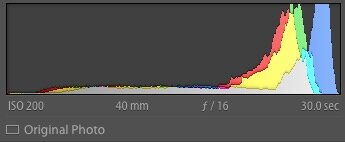
The following image shows what I got straight out of camera and I have included the Exif data as reported by Lightroom.

The initial RAW conversion was done in Lightroom simply because this is my software choice for cataloging my images. As the image shows, the Lee big stopper does seem to present a blue colour cast to the images which I had to remove by setting the white balance to Daylight.
I adjusted the exposure, black and white point to make sure I had a full expanded histogram with no clipping at either end.
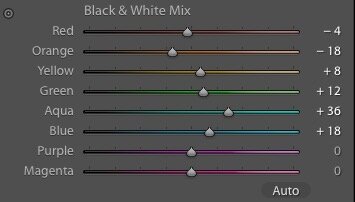
The image was then converted to Black and White in Lightroom by adjusting the colour sliders. During this conversion, my usual approach is to produce an image which has little contrast because I much prefer to add contrast later on in Photoshop with levels or curves.

The image was then cropped to square and handed over to Photoshop for the master edit.
In Photoshop, several layers were made with adjustments and masks.

The Master latey at the bottom contains the imported file from Lightroom along with a final white balance adjustment and colour cast removal. It was then placed into a group. I leave the Master group intact as this gives me an exit strategy should anything go wrong later on.
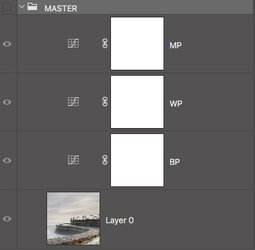
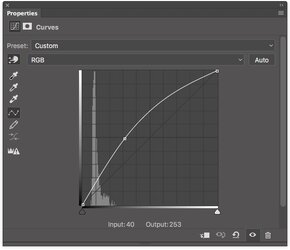
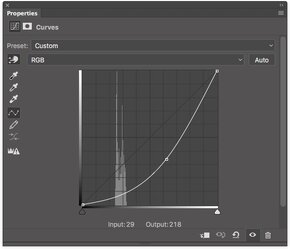
Using a combination of levels and curves, I gradually built up the image by painting in the adjustments with a white brush onto the adjustment layer mask, concentrating on small tonal ranges at a time.
This was a gradual process, I carried on doing this until the image looked how I had visualised it at the time of capture.
I have to stress the word gradual, you need to take your time, its not a race, and a little in this case can, and does go a long way.
One change I have made to my workflow is to adapt better naming for the layers, Curves 2 doesn't really mean much when you return to an image years later.
Curves 2
Curves 3
Final Result

2010 was the year I was introduced to 10 stop ND filters and in this case the Lee 10 stop ND filter commonly known as the Big Stopper.
Not quite understanding then, the best methods to calculate the correct exposure times, I did eventually manage to arrive at an exposure time of 30 seconds with the ND filter attached.
At the point of composition, I did have an idea that the final result was going to be square format, so with this in mind, I knew part of the wall and sea would be cropped out during post production.
The following image shows what I got straight out of camera and I have included the Exif data as reported by Lightroom.
The initial RAW conversion was done in Lightroom simply because this is my software choice for cataloging my images. As the image shows, the Lee big stopper does seem to present a blue colour cast to the images which I had to remove by setting the white balance to Daylight.
I adjusted the exposure, black and white point to make sure I had a full expanded histogram with no clipping at either end.
The image was then converted to Black and White in Lightroom by adjusting the colour sliders. During this conversion, my usual approach is to produce an image which has little contrast because I much prefer to add contrast later on in Photoshop with levels or curves.
The image was then cropped to square and handed over to Photoshop for the master edit.
In Photoshop, several layers were made with adjustments and masks.
The Master latey at the bottom contains the imported file from Lightroom along with a final white balance adjustment and colour cast removal. It was then placed into a group. I leave the Master group intact as this gives me an exit strategy should anything go wrong later on.
Using a combination of levels and curves, I gradually built up the image by painting in the adjustments with a white brush onto the adjustment layer mask, concentrating on small tonal ranges at a time.
This was a gradual process, I carried on doing this until the image looked how I had visualised it at the time of capture.
I have to stress the word gradual, you need to take your time, its not a race, and a little in this case can, and does go a long way.
One change I have made to my workflow is to adapt better naming for the layers, Curves 2 doesn't really mean much when you return to an image years later.
Curves 2
Curves 3
Final Result

 but it certainly gives something to aim for in terms of getting from an adequate image to a superb one.


