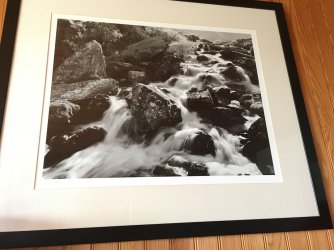
From Riqueval Bridge

Sorry Joanna but you are wrong, people are incorrectly informed that raw files are untouched...this is inaccurate. They have to be processed to a certain degree or otherwise how can you view them even as a JPEG on the back of your camera. The raw files have there data processed and prepared for your editing suite of choice. People talk about colour science and the Leica look etc, lenses aside, the reason for this is that the manufacturer has arranged for the raw file to have a certain amount of processing in- camera via S&R firmware blah blah... believe me it's true
Sorry Alan but RAW files are not processed at all ever. The image you see on the back of the camera is a jpeg, embedded in the RAW file, in addition to the RAW data, constructed according to the settings you make for jpeg files - the RAW data is never processed and is the digital equivalent of a film negative.

How the image turns out is down to how your processing software creates a bitmap version from the RAW data, either by creating a bitmap file on import (Photoshop), or creating one on export after processing (DxO PhotoLab). Either way, the original RAW data is never touched.
I believe that should the digital sensor have sufficient dynamic range its possible to interpret the data as if it was developed film. Film is non-linear in a different way to digital sensors.

Digital technology should evolve to have a significantly larger dynamic range than film

Native RAW data doesn't exist in a physical way which film does. Digital technology interprets RAW data and creates an emissive (emits light) interpretation of it. Film reflects or allows some light to be transmitted due to physical particles or dyes.

The only true way to compare is to 'print' the digital data and then compare
Indeed. My Nikon D810 gives me around 14 stops of dynamic range, which is fairly much what I get out of a B&W negative using the Zone System. I use Fast Raw Viewer to see the full range of detail possible and then work in DxO PhotoLab to extract that detail.

You are so right about the difference between viewing images on a screen and the final print. I am not sure how anyone can do a comparison between digital and analogue, when they are either scanning or photographing a print or negative to compare with a pure digital image.

Then there's the choice of printing techniques, which greatly affects the resulting appearance. Normally, I just use an Epson SC-P600 inkjet for "everyday" prints but, for those special exhibition prints, or those I hang on my walls, I send a digitally processed file to Ilford for their Lambda printing service, on silver halide paper. I defy anyone, looking at such a print, to tell whether the original file was digital or analogue.
 
Sorry Joanna but you are wrong, people are incorrectly informed that raw files are untouched...this is inaccurate. They have to be processed to a certain degree or otherwise how can you view them even as a JPEG on the back of your camera. The raw files have there data processed and prepared for your editing suite of choice. People talk about colour science and the Leica look etc, lenses aside, the reason for this is that the manufacturer has arranged for the raw file to have a certain amount of processing in- camera via S&R firmware blah blah... believe me it's true
Im looking forward to seeing results from this challenge!
:D
 
Sorry Alan but RAW files are not processed at all ever. The image you see on the back of the camera is a jpeg, embedded in the RAW file, in addition to the RAW data, constructed according to the settings you make for jpeg files - the RAW data is never processed and is the digital equivalent of a film negative.

How the image turns out is down to how your processing software creates a bitmap version from the RAW data, either by creating a bitmap file on import (Photoshop), or creating one on export after processing (DxO PhotoLab). Either way, the original RAW data is never touched.

Indeed. My Nikon D810 gives me around 14 stops of dynamic range, which is fairly much what I get out of a B&W negative using the Zone System. I use Fast Raw Viewer to see the full range of detail possible and then work in DxO PhotoLab to extract that detail.

You are so right about the difference between viewing images on a screen and the final print. I am not sure how anyone can do a comparison between digital and analogue, when they are either scanning or photographing a print or negative to compare with a pure digital image.

Then there's the choice of printing techniques, which greatly affects the resulting appearance. Normally, I just use an Epson SC-P600 inkjet for "everyday" prints but, for those special exhibition prints, or those I hang on my walls, I send a digitally processed file to Ilford for their Lambda printing service, on silver halide paper. I defy anyone, looking at such a print, to tell whether the original file was digital or analogue.

Joanna, I have often wondered about the quality of Harman's silver print service vs top-end Giclée printers such as the P600, as I have seen both stunning giclée and C-type prints at any number of exhibitions, including the Taylor-Wessing show at the National Portrait Gallery. It is certainly a comparison that I would like to see, quite as much as that between digital and film.
 
Sorry Alan but RAW files are not processed at all ever. The image you see on the back of the camera is a jpeg, embedded in the RAW file, in addition to the RAW data, constructed according to the settings you make for jpeg files - the RAW data is never processed and is the digital equivalent of a film negative.

How the image turns out is down to how your processing software creates a bitmap version from the RAW data, either by creating a bitmap file on import (Photoshop), or creating one on export after processing (DxO PhotoLab). Either way, the original RAW data is never touched.

Indeed. My Nikon D810 gives me around 14 stops of dynamic range, which is fairly much what I get out of a B&W negative using the Zone System. I use Fast Raw Viewer to see the full range of detail possible and then work in DxO PhotoLab to extract that detail.

You are so right about the difference between viewing images on a screen and the final print. I am not sure how anyone can do a comparison between digital and analogue, when they are either scanning or photographing a print or negative to compare with a pure digital image.

Then there's the choice of printing techniques, which greatly affects the resulting appearance. Normally, I just use an Epson SC-P600 inkjet for "everyday" prints but, for those special exhibition prints, or those I hang on my walls, I send a digitally processed file to Ilford for their Lambda printing service, on silver halide paper. I defy anyone, looking at such a print, to tell whether the original file was digital or analogue.
I believe that if you compare a print from a completely analog workflow with one from a digital workflow then you will notice a difference with the comparison involving handling the actual print (rather than framed behind glass)

If you are talking about scanning in the analog negative then processing, sharpening and printing digitally then it going to be hard to separate them. It's true you can try and make your digital image 'look more analog'

I suspect feel its a largely pointless task to half process an analog image digitally and then compare it to a digital image that you've made to look analog; then to say they look the same !
 
Sorry Alan but RAW files are not processed at all ever
That is a sweeping statement

All files that you get from a memory card are processed to some extent. They originated as three separate matrices of red, green and blue filtered luminances captured in a CMOS sensor. They are then amplified and digitised in complex electronics before being interlaced into a file. The amplification is related to the ISO setting of the camera. The camera then adds EXIF data to the file (along with a JPG thumbnail). Cameras are all calibrated to some extent when they are manufactured and RAW data is adjusted with this calibration to varying extents (including colour accuracy).
Different RAW viewers and converters then provide you with an interpretation of the 1's and 0's in the file. i.e. they process the data and send it to your monitor that adds its own interpretation before displaying it on the screen. Your eyes and brain then take over .......

I think there's a huge amount of 'processing' going on.

RAW files give you the opportunity to re-process part of this chain while minimising the destructive impact on the image to your liking
 
I know not a jot about science, but I do know that RAW files from different cameras - even with similar or identical megapixel densities - processed on the same software and hardware can render quite differently.
 
I know not a jot about science, but I do know that RAW files from different cameras - even with similar or identical megapixel densities - processed on the same software and hardware can render quite differently.
Apart from anything else the colour is different camera to camera. Eg I used To shoot Nikon and know that canon renders colour very differently at the raw level

I assumed though that Joanna meant after loading from the card to computer
 
I have often wondered about the quality of Harman's silver print service vs top-end Giclée printers such as the P600, as I have seen both stunning giclée and C-type prints at any number of exhibitions, including the Taylor-Wessing show at the National Portrait Gallery. It is certainly a comparison that I would like to see, quite as much as that between digital and film.
Certainly, if handling the actual print, there is a marked difference between the feel of silver and inkjet papers but, from normal viewing distance, without touching the paper, most people would be hard pressed to tell you which was which.

Don't forget, most people buying prints are not in the habit of taking a 10x loupe and examining whether they can see ink dots or grain. Even the Ansel Adams gallery site sells both and plenty of people seem willing to pay $279 for a 20 x 16 inkjet print, especially when it is marketed as a "Digitally mastered print from Ansel's Original Photograph"

As soon as you put the print behind glass in a frame, it then becomes very difficult to tell, even from closer (unaided) inspection.
All files that you get from a memory card are processed to some extent. They originated as three separate matrices of red, green and blue filtered luminances captured in a CMOS sensor. They are then amplified and digitised in complex electronics before being interlaced into a file. The amplification is related to the ISO setting of the camera. The camera then adds EXIF data to the file (along with a JPG thumbnail). Cameras are all calibrated to some extent when they are manufactured and RAW data is adjusted with this calibration to varying extents (including colour accuracy).
Indeed. But I was talking about the actual pixel data which is recorded fairly much as is. Of course there may be differences between how manufacturers write that data, but then there are differences between how film emulsions react to the light falling on it.
Different RAW viewers and converters then provide you with an interpretation of the 1's and 0's in the file. i.e. they process the data and send it to your monitor that adds its own interpretation before displaying it on the screen. Your eyes and brain then take over .......

I think there's a huge amount of 'processing' going on.

RAW files give you the opportunity to re-process part of this chain while minimising the destructive impact on the image to your liking
I was talking more about the additional processing that jpeg files undergo to apply the appearance changes selected by the user in the menus, over and above getting the pixel data into the file - the RAW data - before a user ever gets to open it in their preferred RAW developing tool.

Once the file is created in the camera, then it is up to the user to decide how they process it, just the same as choosing which developer to use with a particular film.
I know not a jot about science, but I do know that RAW files from different cameras - even with similar or identical megapixel densities - processed on the same software and hardware can render quite differently.
Just as different films, from different manufacturers, render differently. I think of a particular sensor in the same way as a particular brand of film. After all, they are doing the same job, it's just that the sensor requires help from in-camera software to actually compose and write the file to a memory card.

I could say that I am currently using Nikon D810 film ;)
 
Last edited:
Fair enough on the distinctions between different sensors as being the digital equivalent of different films. The thought had indeed occured.

I mentioned elsewhere that I use a 24mp Nikon D7200, but a have a catalogue of images taken on a 10mp Nikon D80 that I often like more, particularly in the way the files render in B&W conversions. I recognised the same rendering on a post on here recently, and it turned out to have been taken on a contemporary D200.

Regarding B&W digital Giclée prints and wet darkroom prints, the sense that silver halide prints might (possibly) be inherently better is nothing to do with loupes and pixels, but the way they appear to handle light, luminosity and tone. This is not something that is easy to quantify, but it becomes more so with blacks. Looking at McCullen's, Godwin's and Hart's darkroom prints there is a density and saturation in the blacks that I'm not at all convinced that Giclée can match. I've actually got some portraits that I took years ago on my Nikon F3, printed on my Epson Photo 3800, mounted and framed on the wall behind me, and the blacks are superb, dense and dark, but when they catch the reflection of the light coming through the window particularly, there is a last element of richness and saturation and 'blackness' that is still lacking by comparison.

Anyway, whatever else I do, I'm certainly not going to relaunch myself into darkroom printing. I certainly haven't got the time, and anyway, I was always hopeless at it!

fawbd7.jpg
 
And here's the picture behind me. Taken with an Ebony 5 x 4 on Fuji Acros 100 film, processed in DDX, scanned at 2400 ppi, contrast graded in PS and the resulting 240 ppi TIFF file sent to Ilford for silver printing, framed by us on its return.

IMG_1099.JPG

Anyway, whatever else I do, I'm certainly not going to relaunch myself into darkroom printing. I certainly haven't got the time, and anyway, I was always hopeless at it!
And a big fat ditto to that ! :D
 
Last edited:
The print looks lovely Joanna. How does it compare with the same print done on the inkjet with the Canson baryta?
 
The print looks lovely Joanna. How does it compare with the same print done on the inkjet with the Canson baryta?
I've not tried it yet, mainly due to the fact that the external drive the scanned file was on corrupted, including the mirrored copy, so I need to get around to doing it all again :(
 
Most paper for digital printers has a layer that the pigment from ink sits in or on. This is different from analog prints and is often a differentiating factor particularly when you inspect at an angle.
 
Most paper for digital printers has a layer that the pigment from ink sits in or on. This is different from analog prints and is often a differentiating factor particularly when you inspect at an angle.
That's one reason why I never leave either 100% white or black, to avoid changes in reflectivity from an angle.
 
I do think that cameras like the Nikon D810 have incredible ability to pull detail back especially in the shadows, however, no better than film that's been correctly developed to match the scenes DR, and keep in mind the film process goes back over 100 years, yes its that good.

I think the question of which looks best in print Digital or Film has a big question mark, firstly, if you use film to capture images then scan them on to a computer, that file is now digital, the output to the printer is digital, it's all dots of ink, unlike the Silver Halide print which is continuous tone, the nearest prints I have seen to compare with the darkroom are indeed the laser Lambda printers, which transfer the image onto Silver Halide papers and thereafter is a chemical process, expensive if you do a lot of printing, great for the one off large print.

Can I tell a difference between and digital print or a scanned print, yes I can, they have a more textural quality, a more "film look", they don't look falsely sharp, but it's not chalked and cheese unless you comparing either to a Darkroom print.

Film was designed to be used in a darkroom, and if you do the whole film process, from capture to Silver halide print there is not a shadow of a doubt that a good darkroom print blows any digital print out of the water, I have compared one of my D/R print to a digital print, compared the blacks and the digital representation of black is so way off pure black as to make it look like a very very dark gray, in skilled hands a D/R print seems to emit light and are wonderful to view, this might change in the future as printing technology gets more advanced.

I don't use digital cameras at the moment, although the way film prices are going this might change :eek: , I use film not because I think its better than digital, I just love the process of film capture and development, I like old cameras, they all seem to give a different look, I like the mechanical feel and pleasure derived from using them, I also feel at the end of the process I have a tangible real thing to see from my efforts and that's the negative, not just binary code on a computer, I find using digital cameras a little boring and all much the same, what is missing from my workflow is the darkroom were film was supposed to end up in.

I spent years in the D/R and as I have got older I like the clean scanning process, and I suppose I get the best of both worlds, however, I do miss the quality of the darkroom print, but for me, I will put up with the lack of that quality in digital printing, for one thing, convenience, sad to say that really but it is true, and maybe one day I might turn my digital darkroom into a place were film works at its best, the darkroom, one day one day

"Certainly, if handling the actual print, there is a marked difference between the feel of silver and inkjet papers but, from normal viewing distance, without touching the paper, most people would be hard pressed to tell you which was which"

Never a more untrue statement, you must live on a different planet Joanna :)
 
Last edited:
If the mood, soul and story of an image hits you then I don't think it matters which medium captured it in the first place. I have yet to see an image where someone comments "if only that had been captured with a digital camera or if only that had been Ilford HP5 film the image would have been much better" never had and probably never will. Personally, I do not like the debate between digital and film. They are both excellent ways of taking photographs providing that both mediums are handled to their full potential.

I started to use film cameras again a couple of years ago and enjoy the process of using film more so than digital and to a certain extent the much slower process of taking the photo has resulted in me having a much higher success rate of taking photos that pleases me. I much prefer the images taken with my older digital cameras for black and white work compared to the much higher resolution of more recent models. I also find that images taken with film are much more easily edited than a digital image for some reason.
 
I do think that cameras like the Nikon D810 have incredible ability to pull detail back especially in the shadows, however, no better than film that's been correctly developed to match the scenes DR, and keep in mind the film process goes back over 100 years, yes its that good.
Just as film has to be carefully exposed and developed to optimise its DR, so does a digital camera image. Both Helen and I have found it is only too easy to slip into "snapping" mode with a DSLR. However, with a DSLR, when you take the time to evaluate the scene in front of you, spot measure the highlights and shadows, calculate the DR and position the exposure correctly within the DR, you will get every bit as good results as with film.

However, if you "snap" the picture, with the intention of "fixing" it later in post processing software, then you are unlikely to get the same quality of results. As far as I can remember, Ansel Adams said something along the lines of "garbage in - garbage out" when it comes to printing a negative.
I think the question of which looks best in print Digital or Film has a big question mark, firstly, if you use film to capture images then scan them on to a computer, that file is now digital, the output to the printer is digital, it's all dots of ink, unlike the Silver Halide print which is continuous tone, the nearest prints I have seen to compare with the darkroom are indeed the laser Lambda printers, which transfer the image onto Silver Halide papers and thereafter is a chemical process, expensive if you do a lot of printing, great for the one off large print.
And there is the key to the whole argument. It's not just about comparing a silver halide print to a digital print. As I've said before, I very much doubt if you could tell the difference between a well processed digital image, output to silver halide paper via a lambda printer, and a "traditional" darkroom print.
Can I tell a difference between and digital print or a scanned print, yes I can, they have a more textural quality, a more "film look", they don't look falsely sharp, but it's not chalked and cheese unless you comparing either to a Darkroom print.
Digital images only look falsely sharp if they are badly processed, just as darkroom prints can look horrendous if the person creating them doesn't know how to work with their darkroom equipment. Especially if you use the unsharp masking provided by Photoshop. DxO PhotoLab provides multiple and far superior ways of sharpening.
Film was designed to be used in a darkroom,…
I'm sorry to be blunt but… that is pure and utter rubbish. Darkrooms were necessary because we never had scanners and the only way, back then, to get a positive print from a negative was to use light sensitive paper, thus the need for a darkroom.

A scanner shines light through a negative, onto a sensor instead of paper. In the same way that you can choose which paper/developer combination you want to use in the darkroom, so you can alter the response curve in scanning software to give you a different rendition as a basis to start digital processing.

With film, you need to start by printing a test strip to get the best starting exposure, then a test print on which you can assess what subsequent dodge & burn exposures and filters you are going to require to arrive at the final image.

With digital, you scan to give you the flattest possible initial image, to which you then proceed to add masked contrast grading layers, simulating analogue dodge and burn techniques. The difference is, with digital, you waste a lot less paper and chemistry getting it right before committing to a final print.
… and if you do the whole film process, from capture to Silver halide print there is not a shadow of a doubt that a good darkroom print blows any digital print out of the water, I have compared one of my D/R print to a digital print, compared the blacks and the digital representation of black is so way off pure black as to make it look like a very very dark gray, in skilled hands a D/R print seems to emit light and are wonderful to view, this might change in the future as printing technology gets more advanced.
Of course there is an underlying difference between a silver print and a digital print, especially if you are as much of a "pixel-peeper" as I can be. But the truth is, from a normal viewing difference, there are very few that could still make the distinction. But, with a Lambda print, the chances of determining whether the original image was digital or film are vanishingly small, especially if a darkroom worker applies their years of accumulated wisdom to processing the digital image with the same care that they would apply to preparing a wet print.
I don't use digital cameras at the moment, although the way film prices are going this might change :eek: , I use film not because I think its better than digital, I just love the process of film capture and development
Certainly cost of film and chemistry has to play a big part in whether we use film or digital.

I too love the craft of photography, so much so that most other members of our club photo just can't understand why I would plan a photograph, take time setting up to take it (including often using a tripod), then only use software to translate the image I had originally conceived onto a print. Heck, some people in our club don't even take their images of the memory card, let alone print them!
I like old cameras, they all seem to give a different look, I like the mechanical feel and pleasure derived from using them, I also feel at the end of the process I have a tangible real thing to see from my efforts and that's the negative, not just binary code on a computer, I find using digital cameras a little boring and all much the same, what is missing from my workflow is the darkroom were film was supposed to end up in.
You know what is my biggest bugbear with digital cameras? All those infernal menus that they seem to think you need to take a simple photograph!

You know what I love about LF and MF work? Three adjustments: aperture, shutter speed and focus - all manual. But, in the end, if you turn off all the automation of a digital camera and use manual mode, you get exactly the same thing. All it takes is to keep telling yourself not to rely on the preview on the back of the camera - it's only a jpeg that has already been processed by the camera. Instead, use your craft skills to reassure yourself that the exposure you calculated manually is correct and, when you get to process the RAW file, the shadows can be recovered, the sharpness can be refined (either up or down) and, even on the digital equivalent of a roll-film camera, you can apply dodge & burn and a "zone system" to each and every image without compromise.
"Certainly, if handling the actual print, there is a marked difference between the feel of silver and inkjet papers but, from normal viewing distance, without touching the paper, most people would be hard pressed to tell you which was which"

Never a more untrue statement, you must live on a different planet Joanna :)
Maybe. But you are always welcome to visit my planet and find out what a good lambda print looks like. It's just a bit to the east of Roscoff ;)
 
Last edited:
Back
Top