


AS Toby was kind enough to say this image worked I thought perhaps in the spirit of the new emphasis on learning forum it would be of interest to someone how it was done
Original:
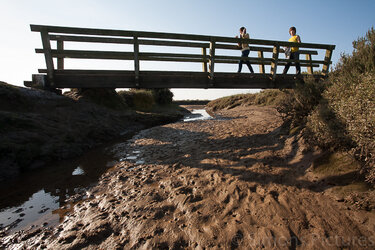
desaturated with no adjustments
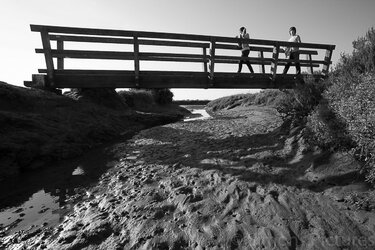
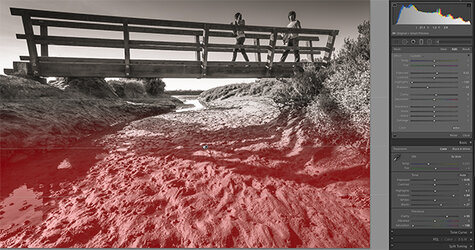
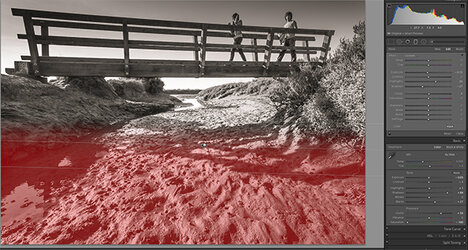
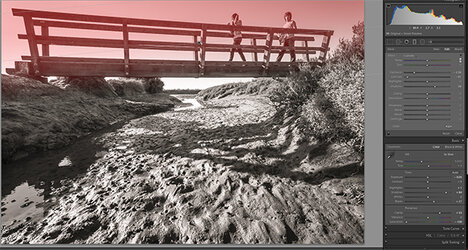
balanced in Lightroom (also added some sharpening and a tone which really should have been a later step). I tried exposure and contrast to try to get the feel of light but wasn't happy and in the end decided the clarity filter did a better job for what I was trying to achieve (but used a tiny bit of exposure and contrast to taste)
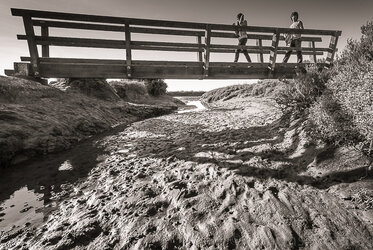
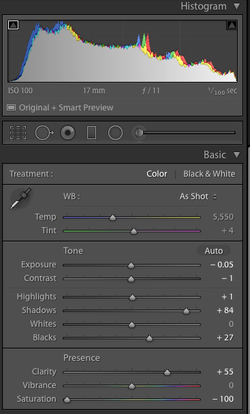
It also had some light graduated masks added - as you can see there's two almost identical at the bottom
========
I had intended to do it all in Lightroom because original I wasn't convinced the image was worth spending too much time on (I'm very quickly get bored and frustrated with editing) but having got it this far decided that it could do with some midtown tweets and masked brushing in of contrast which I find Lightroom too awkward for so I exported it to Photoshop. Also I noticed the shadow shapes were becoming more interesting so I wanted to get those exact too, I hadn't been able to get them as I wanted in LR, I wanted a little more contrast in the shadows without making the highlights more contrasty
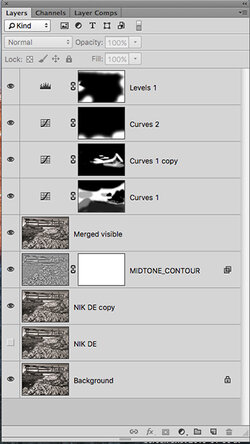
I used the plug-in Nik detail enhancer - I used a very light setting (which actually also has the side effect of lifting the shadows a bit) and I also tried Nik's 'tonal contrast' but in the end decided I preferred Ian Barber's (one of this forum's authors) 'Midtone contrast' action
then as you can see I added some light curves adjustments masked and brushed in and finally used levels for a small selective vignette
I also used Alex Nail's sharpen for web action to finish off
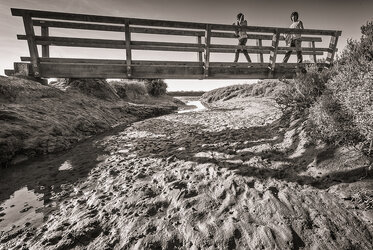
the unedited mono conversion again for easy comparison:

Original:
desaturated with no adjustments
balanced in Lightroom (also added some sharpening and a tone which really should have been a later step). I tried exposure and contrast to try to get the feel of light but wasn't happy and in the end decided the clarity filter did a better job for what I was trying to achieve (but used a tiny bit of exposure and contrast to taste)
It also had some light graduated masks added - as you can see there's two almost identical at the bottom
========
I had intended to do it all in Lightroom because original I wasn't convinced the image was worth spending too much time on (I'm very quickly get bored and frustrated with editing) but having got it this far decided that it could do with some midtown tweets and masked brushing in of contrast which I find Lightroom too awkward for so I exported it to Photoshop. Also I noticed the shadow shapes were becoming more interesting so I wanted to get those exact too, I hadn't been able to get them as I wanted in LR, I wanted a little more contrast in the shadows without making the highlights more contrasty
I used the plug-in Nik detail enhancer - I used a very light setting (which actually also has the side effect of lifting the shadows a bit) and I also tried Nik's 'tonal contrast' but in the end decided I preferred Ian Barber's (one of this forum's authors) 'Midtone contrast' action
then as you can see I added some light curves adjustments masked and brushed in and finally used levels for a small selective vignette
I also used Alex Nail's sharpen for web action to finish off
the unedited mono conversion again for easy comparison:

