
Oh yes I didn't think about that, I only have one lens on my iPhone SE. Does it default to a particular lens?Thanks Steve
Yes - agree with all your comments.
I’d add something about accessing the different lenses. This varies depending on the particular iPhone version, eg mine has x0.5, x1 and x3.

-
Thank You For Visiting... Please Click Here and sign up to contribute
You are using an out of date browser. It may not display this or other websites correctly.
You should upgrade or use an alternative browser.
You should upgrade or use an alternative browser.
Tanzaku format - local park
- Thread starter Elines
- Start date

Seems to be x1Oh yes I didn't think about that, I only have one lens on my iPhone SE. Does it default to a particular lens?
Reading the App blurb it refers to possible use of the wide angle lens by using the ‘settings’ app- don’t know what that means**

**you go to list of apps, select XP4N and the options for 48 mb picture and using wide angle are there
Btw …. Another bug is that you have to exit the xp4n app to see your image - there is a tiny preview but doesn’t last long and seems only to confirm that you have taken an image
When i skimmed the app blurb last evening I recall it referred to ‘for those who have got this far ‘ and then something about a setting but can’t remember what that was
Last edited:
I don't think not seeing the photo taken in the app is a bug I think it is done to keep the app light and simple I just quickly look in the photos app if I want to see it.Seems to be x1
Reading the App blurb it refers to possible use of the wide angle lens by using the ‘settings’ app- don’t know what that means**
**you go to list of apps, select XP4N and the options for 48 mb picture and using wide angle are there
Btw …. Another bug is that you have to exit the xp4n app to see your image - there is a tiny preview but doesn’t last long and seems only to confirm that you have taken an image
When i skimmed the app blurb last evening I recall it referred to ‘for those who have got this far ‘ and then something about a setting but can’t remember what that was
To change the settings is quite simple like all things once you know how! When you have changed them you probably won't change them again. I did this to have a copy of the original image (as your phone would have taken it) plus the BW image the App would have taken.
The Settings app on your device is where you can configure the settings for apps and the system itself. Here's how to access and configure specific apps through the Settings app on your iPhone
- Open the Settings app (it's a gray icon with gears).
- Scroll down to see a list of installed apps.
- Tap on the specific app you want to configure. You’ll see options related to permissions (like camera access, notifications, etc.) and settings specific to that app.
Last edited:

Sorry chaps but not really my cup of tea. I liken these images to writing that is in vertical lines, whereas, because I read horizontally it just doesn't really cut it for me. We all look at scenes more often than not left to right or right to left, and only occasionally up and down.
I Having said that I do have one print hanging in my house of the Reichenbach Falls overlooking the village of Meiringen in Switzerland, made famous in the crime novels depicting Sherlock Holmes where he had the fictional fight to the death with his arch nemesis Count Moriarty. I printed it that way, because to get the true grandeur of the slim fall of water descending close on 300 feet without a break. Also there was nothing worth looking at on either side because it was too dark at the time. Having said that, I would never go out to print a whole series of pictures in the same format unless it was for the same or similar reason I have just given.
I Having said that I do have one print hanging in my house of the Reichenbach Falls overlooking the village of Meiringen in Switzerland, made famous in the crime novels depicting Sherlock Holmes where he had the fictional fight to the death with his arch nemesis Count Moriarty. I printed it that way, because to get the true grandeur of the slim fall of water descending close on 300 feet without a break. Also there was nothing worth looking at on either side because it was too dark at the time. Having said that, I would never go out to print a whole series of pictures in the same format unless it was for the same or similar reason I have just given.
Seems to be x1
**you go to list of apps, select XP4N and the options for 48 mb picture and using wide angle are there
(Still not taken any ‘proper’ pictures with the app.)
My iPhone (13 pro) has an option for 25 mb, not 48 - but the 48 mb option doesn’t seem to pick up on it ie images on that setting aren’t any bigger than without the setting.
Sorry chaps but not really my cup of tea. I liken these images to writing that is in vertical lines, whereas, because I read horizontally it just doesn't really cut it for me. We all look at scenes more often than not left to right or right to left, and only occasionally up and down.
….
Perversely, I think the fact that you look at it vertically makes it more interesting (for me, and when I like it anyway)
Putting it another way, why are house windows usually oblong or square, and not like arrow slits in medieval castles which this style replicates.Perversely, I think the fact that you look at it vertically makes it more interesting (for me, and when I like it anyway)
Because they are the norm as a consequence they will be easier and more cost effective to manufacture. The slits will be bespoke you might not want them everywhere but when you do they stand out as they have a more unique footprint. You don't have to have this format everywhere but it is nice to have a open mind to other possibilities after all variety is the spice of life..Putting it another way, why are house windows usually oblong or square, and not like arrow slits in medieval castles which this style replicates.
You answer does not hold water. If slit windows were prefered then the builders would make them and pass any cost onto the buyer. Your reply is made up to suit your point of view no one else's -it is a natural reaction to look side ways and not up and down. Don't even try to kid a kidder!Because they are the norm as a consequence they will be easier and more cost effective to manufacture. The slits will be bespoke you might not want them everywhere but when you do they stand out as they have a more unique footprint. You don't have to have this format everywhere but it is nice to have a open mind to other possibilities after all variety is the spice of life..
You answer does not hold water. If slit windows were prefered then the builders would make them and pass any cost onto the buyer. Your reply is made up to suit your point of view no one else's -it is a natural reaction to look side ways and not up and down. Don't even try to kid a kidder!
Sometimes it is nice to view things in a different way, we cannot all like the same things, the world would be a very boring place if we did.
I’m not quite sure what the difference of opinion is (or if there is one at all.)
Commonly accepted formats for photographs and paintings etc include:
1:1 Square
16:9 Landscape
Oval - think portraits with white vignette
So the Tanzaku-type happens to be another one that some people like sometimes for some images
Commonly accepted formats for photographs and paintings etc include:
1:1 Square
16:9 Landscape
Oval - think portraits with white vignette
So the Tanzaku-type happens to be another one that some people like sometimes for some images

Or perhaps new territory to explore?I’m not quite sure what the difference of opinion is (or if there is one at all.)
Commonly accepted formats for photographs and paintings etc include:
1:1 Square
16:9 Landscape
Oval - think portraits with white vignette
So the Tanzaku-type happens to be another one that some people like sometimes for some images
Or perhaps new territory to explore?
Or perhaps new territory to explore?
Agreed
I’ve often thought that with digital cameras it ought to be possible to specify your own bespoke aspect ratio/shape, including circles, ovals etc
The app has been updated so it should allow you to choose which lens you want by double tapping - I can't check as I only have 1 lens - It's a bit user friendlier as well....Thanks Steve
Yes - agree with all your comments.
I’d add something about accessing the different lenses. This varies depending on the particular iPhone version, eg mine has x0.5, x1 and x3.
Hmmm pressing volume button doesn’t operate shutter (for me)
How do you contact them Steve?
The shutter via the volume press works for me. I left a message at the end of the article xp4n-every-shot-a-movie-still-ae62a04583e8
You can probably leave a message via feedback on the App Store as well. I think the developer is a one man show and this is a sideline for him.
Hey guys, developer of XP4N here. The new version (1.0.9) supports Ko-Tanzaku format. I've "hidden" the feature away in the Settings page, because it will likely confuse the hell out of many mainstream users. But once you enable it, it will give you a Ko-Tanzaku sized viewfinder to help frame your shots.
I realize this is a B&W forum, but this was the test image I shot to try out the format (I've put it side-by-side with traditional classic Japanese Ko-Tanzaku art to explain to people what the concept is and how to use format). I can make it monochrome if you're really offended by color
I hear your other comments about seeing the chosen film style in realtime (WYSIWYG), I'd love that too. Unfortunately it's technically not possible. The app does so many manipulations to the photo that doing that in realtime to the viewfinder video stream is not feasible. It would turn the viewfinder into a slideshow instead. And previewing the image before you shoot is not possible with iOS. It either takes a picture or it doesn't. Perhaps the iPhone 16 with its shutter button will add a method to get a quicker low-res preview when you half-press. I'll check with Apple.
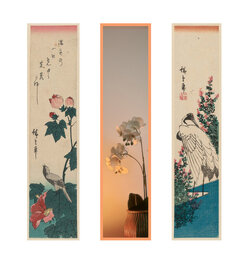
I realize this is a B&W forum, but this was the test image I shot to try out the format (I've put it side-by-side with traditional classic Japanese Ko-Tanzaku art to explain to people what the concept is and how to use format). I can make it monochrome if you're really offended by color
I hear your other comments about seeing the chosen film style in realtime (WYSIWYG), I'd love that too. Unfortunately it's technically not possible. The app does so many manipulations to the photo that doing that in realtime to the viewfinder video stream is not feasible. It would turn the viewfinder into a slideshow instead. And previewing the image before you shoot is not possible with iOS. It either takes a picture or it doesn't. Perhaps the iPhone 16 with its shutter button will add a method to get a quicker low-res preview when you half-press. I'll check with Apple.
Yes it derives the frame tint from the dominant colors in the image. So a B&W image will get a contrasting light gray frame instead.Nice. Is the frame part of the image generated by the app? Can I download it from somewhere?
You can find the app here: https://apps.apple.com/nl/app/xp4n/id6670213512?l=en-GB
I don’t want to come across as someone spamming his app here, but since the app was brought up before I joined I’m assuming that will be ok.