Rattray head lighthouse.

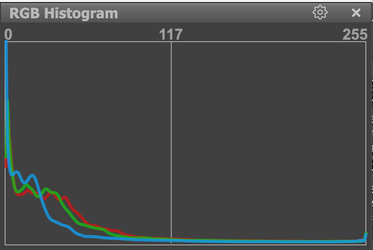
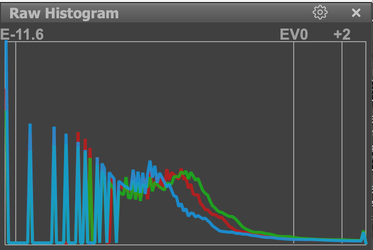
Another reason for not relying on the histogram is that it only reflects the contents of the JPEG, which is embedded in the RAW file. It is only really in the RAW file that you find the full dynamic range and, thus, much more detail in the shadows.

Just as with film, I never get to see the final result of my digital images, which are RAW, until they have been processed. And I rarely, if ever, check the rear screen because I have learnt, just as I had to with film, to get it right at the time of shooting. It can be a challenge to start with but, in the end, I have found it to be worth the effort.

Just found this article on ETTR, which might explain our reticence to use it.
 
Last edited:
@Helen Summers

Thank you Helen.

It clearly works for you and that's all that's needed.

Just as a sidenote, my digital camera (Nikon Z7) allows me to check the histogram in the viewfinder before I release the shutter. I use the exposure compensation buttons to bring the highlights into the histogram. I firstly reduce the exposure until I can see the brightest highlight with a gap between it and the extreme right hand side of the graph. I overdo this compensation so the gap is quite large in case there are hidden highlights I have missed. I then carefully increase it a quarter stop at a time until that brightest highlight has the smallest gap between it and the right hand edge of the graph. It is more difficult to explain than to do but only takes a few seconds. As such, I take just the one shot with no blown highlights and good dynamic range.
 
Last edited:
@Steve

Thanks for your comment Steve.

As I understand it, ETTR aims to expose for the highlights and is commonly used for digital photography. I haven't come across ETTL but I assume this is simple extrapolation meaning to expose for the shadows, as you would for film.
 
Last edited:
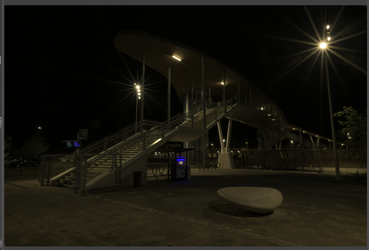
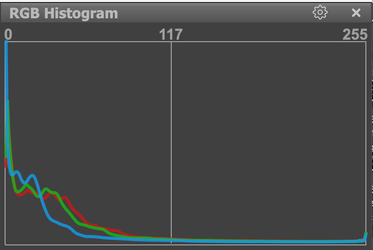
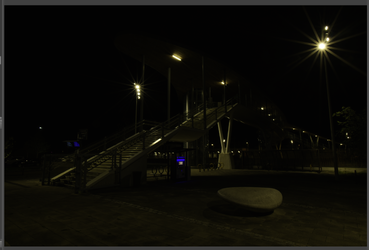
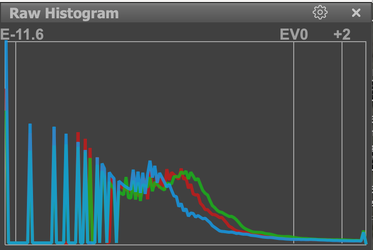
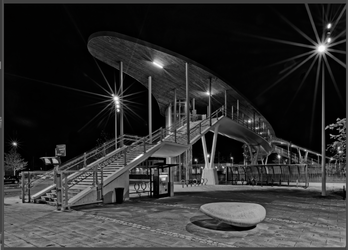
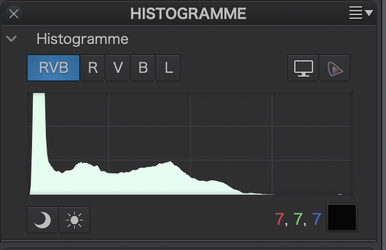
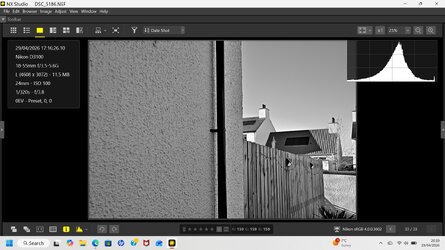
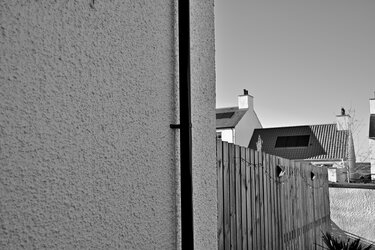
Just as an example of the differences between a JPEG file, as shown on the rear screen of a camera, and the full range RAW file.

Exposed for the brightest highlights at +2EV, here is the untreated JPEG…

Capture d’écran 2026-04-28 à 16.03.47.png

… and its histogram…

Capture d’écran 2026-04-28 à 16.18.03.png

… and here is the untreated RAW…

Capture d’écran 2026-04-28 à 16.03.34.png

… and its histogram…

Capture d’écran 2026-04-28 à 16.17.51.png.

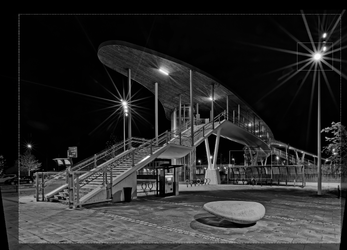
Now, the unprocessed RAW may look a lot darker but, once it has been processed to reveal the shadows, things change rather drastically…

Capture d’écran 2026-04-28 à 16.06.54.png
 
Last edited:
What an amazing response from all of you concerned, I have today started experimenting with ETTR, and I am in the process of reading the article posted by Joanna Carter have been a massive help for me. Blinkies are in fact a common sight on my camera screen after I take a pic.
I have been practicing in the house with my camera, setting it up with a grey board to begin with and going from there.
Its indoors but I can see it now, how to adjust to get the histogram to travel to the right, and make a dull white in camera object (tea cup) to actually look white.
I would expect things to go better when outside in natural light, I will learn as I go along.
Bit I do think that this could defiantly be a turning point in my photography.
I will finish reading the article.
PS. I have taken the ISO from auto to manual to try and learn, if only to see what a difference it makes to exposure.
I may soon post some photographs for discussion on this matter.
 
Would you share the histogram of the final image please Joanna?

Is the processing simply a matter of monochrome conversion and level shifting or something more sophisticated?
 
@Glenn OMG I looked up ETTR and ETTL I think the terminology is a bit confusing to how my mind works!

It seems to contradict my thoughts - it also seems to contradict (but this is not my intention) the main observation of the thread about increasing the exposure for white (which I know is correct but can lead to blowing the highlights if you are not careful) so for clarity this is what I do - I am a simple soul, it is not technical or perfect but works well most of the time for how I shoot:

For film I normally over expose about 2/3 of a stop and develop accordingly.
For digital I normally under expose about 2/3 to 1 stop.
For digital I always shoot in RAW (if it's available)

Although I have shot large and medium format I have settled with 35mm and much smaller sizes as they suit the way I work. If you are developing just one large negative it is a different ball game and mindset so the above is for 35mm and smaller sizes.


@Oldbones Even using RAW (which I always do if I can) unlike modern cameras my Nikon D70s does not have a great dynamic range (D70s only shoots a reduced size RAW file called compressed RAW)- it will blow highlights very easily if you are not careful - when I now rarely use it I set the exposure compensation from -0.7 to -1.0 of a stop and shoot aperture priority.

I shot many weddings (hence my paranoia about blowing highlights), proms, portraits on a D70 and D70s, they have nice sharp sensors and can use old screw AF lenses.

If you want to get the best out of your D70s shoot RAW and run it through DXO PureRAW it will amaze you how good your old digital camera and lenses are - in my mind probably the best upgrade to processing RAW files you can make (especially if you use old kit like me!). Best to check if your camera and lens combination is covered there is a list on their website and you can normally get a free trial to see you what you think first.

As a general rule if lighting is a bit tricky I point my camera at some well lit grass/leaves - these are roughly around 18% grey (the same as your camera meter) press AEL button (Auto Exposure Lock), focus on the subject and Bobs (hopefully) your uncle.....
 
I will finish reading the article

Not forgetting that, even this article doesn't get everything right, but one very important topic is the paragraph marked "5. ETTR Method Two"

I can't emphasise enough that, if you can get your head around it, you are far better off using your camera in all-manual mode, with spot metering, not forgetting that you don't have to measure the exposure at the very moment you press the shutter button. Once you have set things up for the scene, you can quite happily change the framing, as long as the measured area is still in the frame.

Oh, how I wish I could show you, on your cameras just how simple manual operation can be. All this ETTR stuff gets in the way and confuses much more. I will repeat something I said earlier - do not rely on, or even look at, the histogram. It was never necessary with film cameras and, once you learn, what I will call, "the digital zone system", you just flat out don't need it for digital.

Would you share the histogram of the final image please Joanna?

Capture d’écran 2026-04-29 à 09.55.07.png

But you do need to bear in mind some of the adjustments I made in PhotoLab (the full blown editor, which contains PureRAW), like selecting the black and white points with the Smart Lighting tool…

Capture d’écran 2026-04-29 à 09.57.20.png

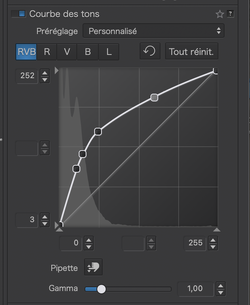
… and a very particular Tone Curve…

Capture d’écran 2026-04-29 à 09.54.31.png

Is the processing simply a matter of monochrome conversion and level shifting or something more sophisticated?

Just as you need to use dodging, burning and grading under an enlarger, you need to learn the digital equivalents.

Personally, I use DxO PhotoLab with their FilmPack add-in. I usually choose the Fuji Acros 100 film emulation.

Why do I use PhotoLab? simply because I can shoot at anything up to 25K ISO if necessary and the DeepPRIME noise reduction will take care of any noise without any loss of detail. Although, I always try to use the lowest practical ISO.
 
I just want to drop a foot note about which metering mode to use.

The examples we have been discussing require spot metering to cope with possible blown highlights but, if the lighting is more general then I tend to use centre-weighted, metering on the brighter areas.
 
Thanks Joanna. Just want to acknowledge your post and the effort you put into it. I'll aim to give a more considered response later.
 
Last edited:
Back
Top