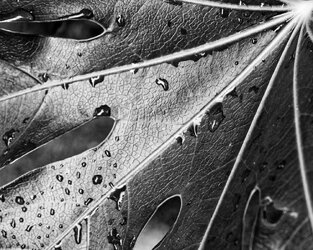
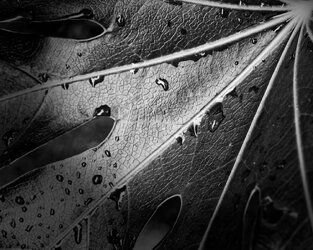
Leaf experimental (v2)

Elines

Well-Known Member
Registered
As posted elsewhere:


I am having a go at using Lightroom to process images instead of Photoshop - just for a change and to see how it goes. I am basing the LR approach on :


This time I made sure that I saved a copy of the original colour image:).

BEFORE

9110

AFTER

9111

I think that there is a lot going for this approach. The main difficulty I have is my lack of experience and knowledge in how to use the radial filter, adjustment brush and spot removal (etc) in LR.

I know that this 'AFTER' has dense blacks:eek: but I need to work out how to avoid/adjust them, so I can't adjust them in LR (yet:))

As before .… this is an image that I took some two/three years ago and haven't processed before.

91109111
 
share the original so we can have a crack?

Before converting to B&W I LR I suggest getting the global changes set roughly first. (So use the blacks slider for clipping, shadows as needed, highlights for light clipping and avoid the whites slider as it kills luminance if possible, clarity slider and contrast keep til after mono conversion}

Rather than desaturate ( as Martin prefers) I prefer to use the B&W conversion panel next. Press the option/alt ket and click to reset the sliders. ( I find for foliage the auto mono does not improve.)

Use the target adjustment tool (top left of the B&W box) to adjust tones to liking. or wiggle the sliders to see which effect you prefer


use 'snapshot' (on left side sets of panels to record any version you like so you can revert to them easily after

stay away fro the adjustment tools (graduated/radial etc above basic panel) until the very end and only if needed.

Once you have a mono you like then sparingly use the clarity slider in basic panel, finally use the contrast in basic panel
The vignetting and sharpness at very end
 
THanbks Simon.

I have managed to get the original into OneDrive but I can't work out how to copy its 'link'o_Oo_Oo_Oo_O:eek:

EDIT is it the address at the top of the page???????
 
Yes, my pleasure.

Personally I am interested in understanding the methods shown in the video, so that I can get an effect similar to the one demonstrated.

At the moment my main issue with my efforts is that the blacks are too dense and solid.


As regards method I need to watch a few videos on use of the LR tools he refers to.

When I've done that I can start developing my own variations. (A bit like my approach to cooking: follow the recipe, and then change to suit. :))

In this case I'd probably move it to PS to fine tune the tones using luminosity masks.
 
Yes, my pleasure.

Personally I am interested in understanding the methods shown in the video, so that I can get an effect similar to the one demonstrated.

At the moment my main issue with my efforts is that the blacks are too dense and solid.


As regards method I need to watch a few videos on use of the LR tools he refers to.

When I've done that I can start developing my own variations. (A bit like my approach to cooking: follow the recipe, and then change to suit. :))

In this case I'd probably move it to PS to fine tune the tones using luminosity masks.
I didn't watch the video

no reason for the blacks to be that dark though considering the starting point

I have down a. darkish version bearing your liking for a dark interpretation

you could then very easily add the radial filters to get the effect you're after.

having checked out that video It seems to me that your first version has either got the exposure too low or the blacks too low or contrast too high and or you over did the radial filter...?

keep trying - that's a great subject to try this out on
did you mean more like this?

9123
 
Last edited:
Thanks Simon.

Good to get some confirmation that this is a suitable case for treatment :)
 
Wow, you fellows deserve some kind of a medal.
What on earth will you come up with next?
The Mind Boggles.!
 
Thanks Joe, why not have a go?

Simon only just seen your version.

Yes, on my phone, it does look like where I want to get to as the blacks don't look solid

Thanks, as if so, that confirms it is indeed a suitable case for treatment:)

Could you post a thumbnail so that it is easier to compare mine with yours (ooh errr missis)
 
Thanks Joe, why not have a go?

Simon only just seen your version.

Yes, on my phone, it does look like where I want to get to as the blacks don't look solid

Thanks, as if so, that confirms it is indeed a suitable case for treatment:)

Could you post a thumbnail so that it is easier to compare mine with yours (ooh errr missis)
9124
 
Thanks Joanna.

(Just because i provided the image, and link to the video I don't see my comments as carrying more weight than anyone else's.)

Is this processed using your normal methods or as per video?

The tones are good but personally I prefer the darker outer edges of the 'original' in the video.
 
Is this processed using your normal methods or as per video?
I use DxO PhotoLab, which I find really easy to use. I can create multiple virtual copies and make all sorts of different versions without touching the original.

Essentially, a contrast curve plus enhanced shadow and highlight contrast sliders and a touch of ClearView Plus
The tones are good but personally I prefer the darker outer edges of the 'original' in the video.
So, here's the same edits but with a slightly off-centre vignette added.

9126
 
When working in LR I always edit using a 'Virtual Copy' frequently creating additional 'Virtual Copies' for comparative purposes as my editing progresses rather than using snapshots. The additional file size is minimal.
 
Back
Top