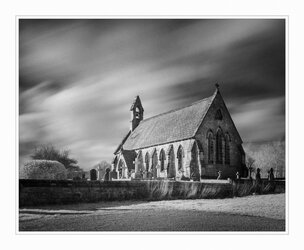
I think the thread has run its course and I was delighted to see how well you all done with that horrible file you had to work with lol, anyway here's the version I did a while back
Edit - didn't get to the end of the tread so didn't see Martin's until I had posted mine
Thanks again for this opportunity Martin
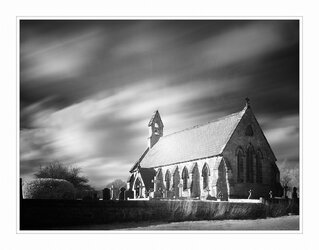
Higher Management was delayed so I started to have a go and have just finished. Here we are:
I went for:
cropping to focus more attention on the church (I read somewhere that the cropping tool is arguably the most creative tool in Photoshop, and I think that there is a lot in that)
made verticals vertical
darkening the bright bits of the sky and areas surrounding the church - again to help focus attention on it
darken end wall of church, to help sense of 3D
kept a frequent eye on histogram to help ensure full range of tones
concentrated sharpening on the light area of foreground and the grass
darkened all four sides, plus brightened the centre, again to focus attention on the church
I started off with the intention to make it all look very misty and mysterious but couldn't get that to work.
This site uses cookies to help personalise content, tailor your experience and to keep you logged in if you register.
By continuing to use this site, you are consenting to our use of cookies.