Fuji Neopan Acros II

OK, back on topic, I need a bit more help here.

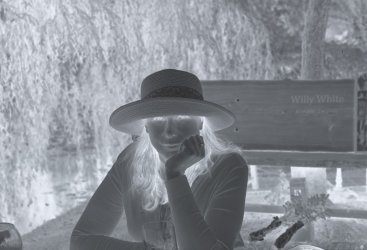
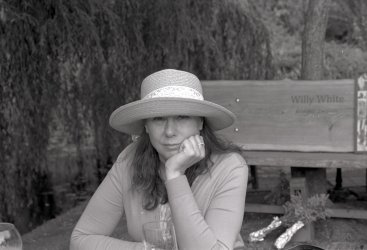
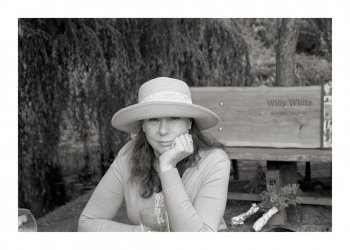
On Saturday I took some photos at a gathering with the second OM2n. I developed the film in ID-11 at 1+1 for 9 minutes at 21 degrees, with 30 seconds of inversion followed by 4 inversions over 10 seconds for each minute, so by the book. The negatives looked fine, but they scanned terribly flat, and appeared underexposed (which is perfectly possible, as the camera might not be good), but with the light areas quickly blowing out when I lifted the images in post.
0024raw.jpg

20220723_0024_1080.jpg
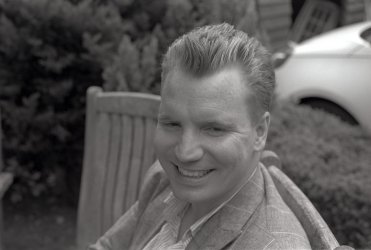
A straight JPEG of the inverted scan, and my processed version. The scan is flat, but the headband on the lady's hat is starting to blow. I couldn't hold detail there in post.

0019raw.jpg


20220723_0019_1080.jpg


0022raw.jpg

20220723_0022_1080.jpg
The fact that there's a split tone notwithstanding, that shirt was white.
0006raw.jpg

20220723_0006_1080.jpg

The scans are all linear raw, with inversion at default in ColorPerfect.

Apart from the likelihood of the camera being out of kilter, any other thoughts? Metering was TTL. The developer could have been tired as it's the tail end of a batch mixed a few weeks ago, but I ran a roll of 120 HP5 through the same mix only last Friday, and it was fine.
 
I am just wondering if your using it correctly, would be interesting to give a brief run down as to how you make adjustments in CP, I can honestly say hand on heart that I have never had a negative in which I cannot control the high values in it.

The problem like this is hard to nail down as there are so many variables at play
 
raw0024_1080.jpg

Martin, here's the scanned negative of the lady with the hat. I'm sure there's detail in the hat band, and the neg doesn't look too bad to me. The inversion is rather flat though, much more so than I get in my workflow with HP5.raw0024_1080.jpg
 
I am just wondering if your using it correctly, would be interesting to give a brief run down as to how you make adjustments in CP, I can honestly say hand on heart that I have never had a negative in which I cannot control the high values in it.

The problem like this is hard to nail down as there are so many variables at play

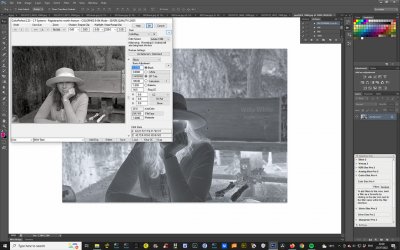
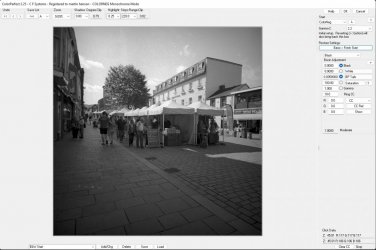
So neg and screen grab of my CP settings - they are just the default, I've always run into trouble when I have started to change the values, and to be honest, prior to using this film, I've never needed to.
 
Flat negatives are a good starting point, however , you do need all the detail present, open blacks and highlights in check, then work with contrast in PS.

First thing I am seeing in your screen grab of coloorperfect is you have set colour space as Adobe 1998, set it to gamma 2.2, and use fresh start as against Optimized
I can see in the shadow degree clip its at naught which is good showing no blocked blacks, the box next to it for highlights is showing clipping by 0.30 and needs to be adjusted to 0 value, with that done and you open in PS you should have all detail there and just contrast grade or however you work from there.

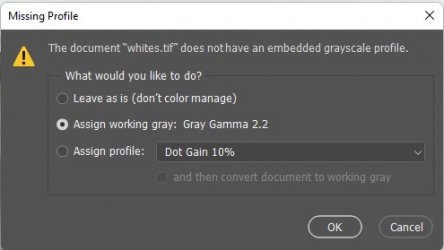
Just one other question, when you open the Raw scan into PS does is warn you that no profile is attached and asking you what to do, like this, if it does set it to Gray Gamma 2.2

profile.jpg

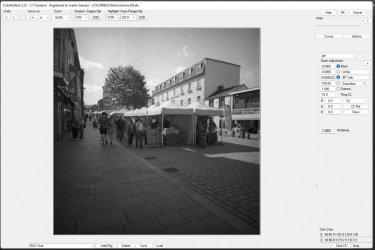
Here's my Colorperfect and settings before adjustment, you can see the shadows and highlights are clipping

intial.jpg

After adjustment
grab.jpg

Notice the file has 0 in both shadow and highlight clip boxes

I think this is were your problem could be
 
OK, Martin, that's great, thank you so much.

A couple of questions;

1. How to I force PS to default my negs to 16 bits/Channel - it seems to be defaulting to 8 bits, which actually appears to be my biggest issue with these negs?

2. How do I set the defaults in CP to Gamma 2.2 and Basic/Fresh Start? At the moment it is set to default to Adobe 1998 and Optimised, which you picked up on. I'm not getting that grey pop-up for the Profile settings.

3. One more - in Vuescan, what are the correct settings for Inputs and Output 'Bits per Pixel'?

Thanks again for going to so much trouble.
 
Last edited:
I use Nikon Coolscans, Joanna.

Oddly, checking back on older scans, they all load onto PS at 16bits/pixel. It seems to just be this batch which went to 8 bits, I have no idea why.

I cleaned my PC, including the registry, and rebooted it. PS didn't initially work properly, and I had to reboot it a couple of times more. I had noticed that it had started to drop into sleep mode occasionally, even when I was working on it, so something was amiss. Everything seems to be back to normal now. Fingers crossed.
 
This video I did should help


I actually set my preferences in vuescan up using your video some while back. However, I do seem to have or two settings that are distinct from yours; my input and outputs are set to 24 bit colour (I scan colour negs too), and 'Media' is set to 'Image' rather than 'B&W negative', as I find that if it is set to the latter it scans as an inverted positive rather than a negative?

Will these variations affect image quality?
 
Scanning and using colorperfect to convert negative to positive, yes you will in my experience get better scans working in the way I have outlined above in the video
 
Scanning and using colorperfect to convert negative to positive, yes you will in my experience get better scans working in the way I have outlined above in the video

I agree. I've run through several very slight variations in the settings this evening, and your method provides better shadow control than the others.

I'm sure, of course, that you did all of this yourself before you settled on what works best, but you know how it is...:rolleyes:
 
Hi Ian, I originally set up using Martin's video above, which I assume is derived from the work that you did.

However I had got into the habit of setting the 'Media' to 'Image' rather than 'B&W Negative' as the scan actually shows in negative rather than that oddly washed out positive whilst it is actually scanning (or whatever it is that it does), and had been setting the output to 48 bit colour rather 16 bit B&W, as it removed the need to convert the image to RGB in PS. Whilst the differences aren't actually huge, I experimented with one of my slightly awkward Acros 2 negs, and found (as you and Martin already have) that doing the scan in B&W Neg and 16 bit B&W input & output gives a more delicate shadow rendition, and a truly 'flat' scan.
 
I know exactly what you mean about the 'look'. It's very smooth and grain-free, almost 'digital'. It reminds be a bit of XP2 in that regard.

talking of smooth film have you tried T-max 100? It makes large areas of skin ( like legs) look almost look like polished silver. Not a at all ‘digital’ look but very different to most other films.

Back to Neopan: I used to love the old Neopan 400 for just amazing silver mid tones. (Quite grainy though). If I was going to use film again that’s a film I’d be after as well as the much faster T-max 3200 for darkish forest scenes, an extraordinary film for that sort of subject
 
Last edited:
Back
Top