Challenge

Norman 1928 - 2018

Well-Known Member
Registered
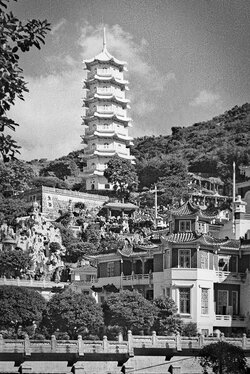
On another well known forum challenges of one sort or another seem to be quite popular and I wondered whether such a genre would be popular here. So, for a bit of fun, I give you a copy of an old commercial 35mm colour slide and my suggestion of what it could look like in B&W after some PP. The challenge is to see what you think it might look like. A copy of the original 'Raw' file is available if you want it.

Norman

As scanned
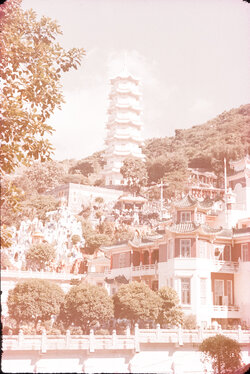
pagodaasscan.jpg


As processed
pagoda.jpg
 
Yes, would like to give it a go.

I think something like this challenge very much fits in with this being a learning forum.

And this is a particularly good one because it fits in with developing skills to 'improve' old photos, something that often arises from family ancestry research.
 
You are quite right Chris, in fact there is a fairly old book, Photoshop, Restoration & Retouching by Katrin Eismann that I have had for many years and used to use as a guide even before I had Photoshop. I had a lot of fun helping a relative of mine who was compiling a family history based on old photographs and repaired many damaged and faded photographs some of which were very old. The same sort of thing was done to help the local Girl Guides by preparing copies of old photographs for an exhibition.

I introduced the topic here because I thought it might inject a bit of life into our forum and interest others who are, like me, unable to get out and about with a camera but still have a great interest in photography. However, so far, the suggestion seems to have gone down like a lead balloon.

Norman
 
Norman

I unexpectedly have some spare time (waiting fo ra delivery) so can you give me a link etc to the raw file - I will also PM my e-mail address.
 
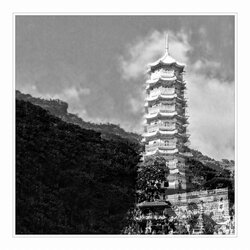
Thanks for this Norman - made a nice change to processing my own stuff and was good practice at renovation.

I decided that the main point of interest was the tower and so homed in on that in terms of cropping, flipping and cloning stuff out.

In terms of actual processing to remove faults, I used Gaussian blur to 'remove' the crazing and then painted the blurring in to the area worse affected (sky fortunately). My painting in was a bit crude - I didn't make a selection and as a result you can see some crazing in the sky adjacent to the tower.

Flipping and removal of the buildings to the (now) left are probably steps too far but it was done to help focus attention on the tower.

If anybody has any queries, then please fire away:)
scan-150807-0019 CWL version mounted.jpg


More widely ........... I hope others will also provide a challenge of some sort. Maybe images that have some kinds of faults would be best as people can maybe then learn alternative ways of dealing with them eg by asking how it was done if not already explained:)
 
Taking into account the condition of the original slide I think you have been a little over ambitious, Chris, nevertheless, one has to start somewhere. I like the idea of making the pagoda the point of interest but wonder if there might not be other ways to achieve this without using such a big enlargement, I will have a play.

Did your work flow include the removal of the colour cast and, if so, how did you do it?

Norman
 
Re colour cast .....

I didn't do anything particular.

In Light room I moved sliders like this

LR processing.JPG

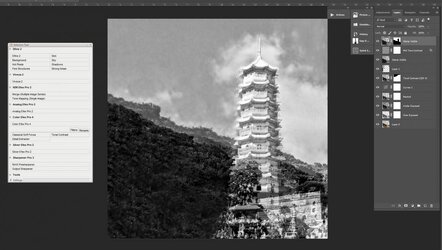
and then in Photoshkop I did this:

In Photoshop.JPG

In PS, the first three layers above layer 0 are produced by Ian's 'triple action'.

Hope this helps:)
 
I use a method to remove colour cast which was recommended to me by Martin which is quite effective and quick. In Photoshop make a copy layer, go to filter, blur and select average. Invert layer, change normal to colour and reduce opacity to around 50% and flatten image.

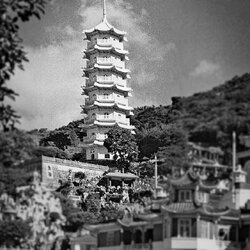
Here is another idea to bring the focus more on to the pagoda without a big enlargement, what do you think?

Norman

pagoda_focus.jpg
 
Hmmm........ maybe a combination of our different approaches would work

  • the blurring works in terms of focussing attention on the pagoda, but is obviously designed to do that , as not very subtle. Maybe if the blur was only in front of or behind the pagoda it would work better (looking more natural?), coupled maybe with slight darkening of the area around the edges of the frame plus lightening of the space around the pagoda
  • the crazing of the sky is very noticeable
Re colour cast ... is it necessary to remove it when you are converting to B&W anyway? I had assumed that it wasn't:)
 
I raised this question some time ago and I think the consensus was that the colour cast should be removed as far as possible. Perhaps Martin or Ian or some other knowledgeable photographer would help.

Norman
 
The colours are representations of the shades of gray, they have an RGB value.

If your image has a colour cast then the cast also has a value of gray, this might not give you an accurate image in terms of tonality when the image becomes gray scale therefore it would be better to remove a cast before starting your edit.
 
Thanks Martin, I haven't come across this before.

So - for me - this thread has served it's purpose of improving knowledge:).
 
Back
Top