Basic Workflow Test: (help Being Request)

José Angel Santana

Well-Known Member
Registered
These are two versions of the same picture take with "the worst lens in the world." I did this deliberately to see if I could improve on a picture taken both in a style that is out of my comfort zone, and with a terrible lens. (Difficult for me in a couple of ways.)

Both have been optimized to the best of my ability in ACR, before converting to B&W in Photoshop. Neither picture has been adjusted globally or locally in any way. Just the color raw file opened up with highlights all the way down, and shadows all the way up, in ACR basic panel.

I've only applied my basic B&W workflow in Photoshop, using the identical action sequences on both versions. However there is one difference: that I'll withhold, for the moment, so as to not bias any feedback.

My question: What differences do you see between A & B? Not that any of these two pictures would appeal to anyone, but which is less distasteful (An homage to our present presidential election situation here at the moment.) And, why? What other difference do you notice?

Thanks in advance,
Jose
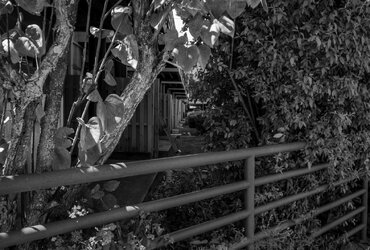
8270451-WIP-NR-SR-A.jpg
Version A

8270451-WIP-NR-SR-B.jpg
Version B

F 8.0, 1/320, ISO 1600,
Olympus OMD E-M10 II, Olympus 15mm mft (30mm FF).

Once again, thank you!
Jose
 
Upon viewing these uploaded version, on my system at least, I realize what I'm asking for my not be possible. I'm not sure the difference can be seen. Let's see what happens?
 
I see changes to some of the highlights but what is more intriguing is the apparent change in position of some of the foliage and the plant 1/4 way in from the right. If both of these are from the same shot that is weird!
 
I'm struggling too José, put us out of our misery....:(
 
Click on Image A to open it in lightbox then rapidly click the right hand arrow to flick between the two images - it's weird to see some of the leaves and the plant stalks just off bottom apparently move position!!!!!!
 
Click on Image A to open it in lightbox then rapidly click the right hand arrow to flick between the two images - it's weird to see some of the leaves and the plant stalks just off bottom apparently move position!!!!!!
Keith,
Yes i see now, the pictures look like they were taken moments after one another. I prefer the version with the specular highlights, the tonal range is extended for me,
Regards,
Alan
 
Greetings and thanks loads fellas!

What this is, is a test with using "Superressolution". Having come to this party latter than most here, it would not surprise me if many here have already visited this outpost of post processing pictures. For those who've not come across this approach, here is one of the many links you'll fine if you google "super resolution photoshop" or "superresolution photoshop" : http://petapixel.com/2015/02/21/a-practical-guide-to-creating-superresolution-photos-with-photoshop/ from my day or so of research into how to do it, I've found just slight variations between different approaches, that all lead to what so far seem like remarkable results for increasing resolution and more. Here is another excellent converesation about it on DPREVIEW: https://www.dpreview.com/forums/thread/4019834

it's weird to see some of the leaves and the plant stalks just off bottom apparently move position!!!!!!

Yes, that's a result of the "MEDIAN" Smart Object Blend Mode step of the process.

So, please forgive if this is repetitive to anyone whose already explored this.

What I did was go back to this picture that I took with "the worst lens in the world" (I've since returned it to B&H photo and got my $46 back) and saw that I'd taken it in burst mode, and so I had 8 shots/versions of it. After going through the "superresolution" steps, placing the pictures side by side in Photoshop at any magnification:100, 200, 400 per cents and higher, one can see a distinct increase in clarity, sharpness, noise reduction, better tonal rage, simply a much more pleasing image than my original.

I prefer the version with the specular highlights, the tonal range is extended for me,
Yes, "Bingo".

When I showed them side-by-side to an objective observer, knowing only what I asked of you, she said that the "A" picture the same one Alan prefers, had all of these other pleasing qualities, most notably that in "A" the "tree bark" did not look like aluminum foil, but in the "B" version (the single frame 'original' version) it still looked like aluminum foil. She thought "A" had my "blood tone" applied as it was slightly more "brown", better contrast, clarity, etc. I'd done nothing to "A" but the "superresolution" for the color similar picture, then after that, applied the same B&W action sequence I'd applied to "B".

So, yes, Alan has noticed this, you must have a tremendous monitor. Because without the benefit of resizing in Photoshop, all I could notice on mine were the change in highlights and the shift of leaves in the foreground and a shift of a highlight in the background.

There we have it, lads!

What do you think of all this nonsense? :) I hope it's not too boring.
 
Last edited:
No not boring Jose, its what we learn as a member of the forum and small things add up to quite a lot,
Regards,
Alan
 
Not watched the video's yet Jose but thanks for bringing this to the forum. It's been an interesting read. I understand that the Olympus EM5 mk2 has a facility to provide a super resolution shot of 40mp out of a 16mp sensor. Seems to use the same principle you mention?
 
You're welcome, Steve. It's my pleasure. I've been doing various tests and there is no question that it does work, in all those ways that the articles mention. Both videos are quite good. I'll keep posting my findings. Yes, EM5 II does have it and I too read about how the approaches are very similar. Olympus will be releasing a new camera soon that will be able to do it as well and more, which is why I didn't get the EM5 II. But, yes it does have that. Glad you find the information useful. I look forward to doing and posting some more of my tests when I resolve some system problems I'm having with my computer.
Thanks for letting me know, Steve!
 

You're welcome Keith. Thank you for letting me know. I've ordered a book on the subject: Photographic Multishot Techniques: High Dynamic Range, Super-Resolution, Extended Depth of Field, Stitching from Amazon. When it arrives I'll report my findings. As well, here is an interesting link that introduces another angle, "single frame" superresolution. It has interactive examples: http://www.wisdom.weizmann.ac.il/~vision/SingleImageSR.html there is also a link to a white paper on the site, that I've downloaded and can't make heads of tails of. :) Here is also another good overview link about "Staking for Image Quality" : http://www.shinyphoto.co.uk/photo-essays/stacking-for-image-quality.

Thanks again, Keith for letting me know.

Over the next couple of weeks I'm having to gear up for my teaching responsibilities and, at the same time, attend to a few computer issues that are getting in the way of my experiments. But after that I'll be posting my experiments here and we'll, "see what happens . . ."

It's a pleasure being here.
Jose
 
Last edited:
Jose,
Have viewed the videos you posted and must give this a go, look forward to seeing your experiments to see "what happens"
 
experiments to see "what happens"
Thanks for letting me know Kev! Yes, I'll looking forward to them too. My main computer is on the blink at the moment. So, it's slowing me down a bit. I may have to see yours while I get my computer glitches fixed. Yes, let's see what happens! :) Thanks again, for letting me know.
 
Back
Top