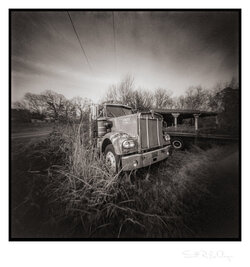
You are getting some nice results with that pinhole camera. I'd be interested to know how much post processing you need to do to get it into this state. Is it simply contrast, sharpness and toning or more complicated?
You are getting some nice results with that pinhole camera. I'd be interested to know how much post processing you need to do to get it into this state. Is it simply contrast, sharpness and toning or more complicated?
Hello, Glenn. Thanks for your comment and question. The answer: very little post processing. The workflow: I develop almost everything using Pyrocat-HD, digitised with a Nikon D850. I then use Lightroom to get the negative to a point of contrast that "looks" good to me. I am mostly setting the white and black points. I then copy it to Photoshop, flip the image with a curves layer, and turn it to black and white with a B&W layer. Then, tone (colourise) it with Ian Barber's plugin. I send it back to Lightroom, where I now have the original RAW neg and the new positive .tif. I may work on the contrast and clarity more at this point. Also, in this image of the truck, I boosted the vignette. Export the final. JPG. That's it. No sharpening. No filters. No presets—3 to 5 min max.
This site uses cookies to help personalise content, tailor your experience and to keep you logged in if you register.
By continuing to use this site, you are consenting to our use of cookies.