DxO PL6

Joanna, I originally forked out for the original Nik software, though I seem to have the google free edition as well. The current one I have dates to when DxO were still offering it to existing users without another charge. I'm happy to stay there if I can.
 
Joanna, I originally forked out for the original Nik software, though I seem to have the google free edition as well. The current one I have dates to when DxO were still offering it to existing users without another charge. I'm happy to stay there if I can.
Sounds good to me. :D
 
Joanna, anything new in NIK 6 worth spending $$$$ to get the upgrade?

I couldn't say since, even though I've got an old licence, I never use it, since it entails converting RAW files to TIFF or JPG before they can be used. I prefer to stay with RAW files all the way in DxO PhotoLab, FilmPack and ViewPoint all integrated.
 
What happens when you want to print or move the photograph to an online viewing platform
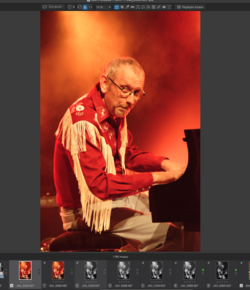
I simply export to an appropriate format, post that exported file and then delete it. All changes to the original are stored in a DOP sidecar file, for several versions of necessary, and I can create a new export at any time.

Capture d’écran 2023-05-17 à 10.40.32.png

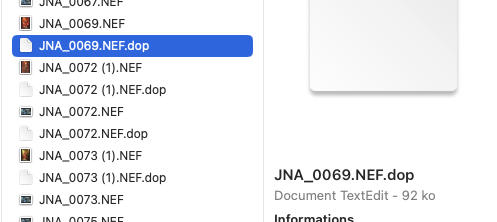
Here is a screenshot of the DOP file next to the RAW file, as displayed in Finder. As you can see, even though it contains all the edits for seven different versions, it is still only 92KB on disk.

Capture d’écran 2023-05-17 à 10.43.23.png

I can transfer the original RAW file plus the DOP to any other computer running DxO PhotoLab and it will pick up all the edits just as if I had started editing it on the other computer.
 
Here is a screenshot of the DOP file next to the RAW file
So they have gone the same way as Adobe by using sidecar files for storing the edits.
I am not a fan of these sidecar files, I prefer to have the edits inside a single file (DNG), less room for error when moving files around.

What colour space does DxO PhotoLab use?
 
So they have gone the same way as Adobe by using sidecar files for storing the edits

Except they use their own proprietary format rather than loading up the XMP file, which they use for metadata.

I am not a fan of these sidecar files

I know what you mean but, unless folks are prepared to allow editing of RAW files, it's always going to be a choice between sidecars of some flavour, or having to create a DNG (or other) copy of the RAW file (which can be even larger than the original) and increasing disk storage necessary for the two files. Then you may need to maintain a connection between the RAW and edited files.

Working on non-RAW files also precludes being able to go back and make RAW adjustments, should you discover you need to change something after you have created the non-RAW file.

One of the greatest benefits of DxO PhotoLab is the DeepPRIME noise reduction, which might only give a preview quality (plus a small high quality loupe) whilst editing, but this avoids having to wait for the full reduction to be applied whilst editing. Then you can batch export and NR gets applied whilst you go for a cup of tea before using/printing the resulting files.

Don't try to find direct equivalents for all PS tools, PL can achieve the same end with their own "interesting" alternative tools.

PhotoLab doesn't strictly use the concept of layers that can be ordered but local adjustments are kept in a list but just cannot be ordered - so far, I haven't really missed ordering.

What colour space does DxO PhotoLab use?

Up to PL5, it used to be AdobeRGB but from PL6, it is now their own wide gamut space which is similar to ProPhotoRGB. It makes a noticeable and welcome difference but, if you want, you can still revert to AdobeRGB. You can export to whatever profile you wish for printing or screen and you can soft proof if you don't trust your profiles.

For B&W, I use the FilmPack emulations, which are superb but, for colour work, I can also use the DCP profiles that come with Adobe DNG Converter to emulate the manufacturer provided in-camera "look and feel"

There is a 30 day free trial download of the Elite version, as well as of the FilmPack Elite and ViewPoint add-ons. It certainly is different in how it works when compared with Adobe but, six years after switching from Photoshop CS3, I could never go back, although I do use Affinity Photo 2 from stitching and stacking.
 
It all sounds exhausting, or at least I feel exhausted having read it all.

I gave DxO a shot a few years ago, but I really didn't care for the interface. I should give it another go really. Given the amount of energy you apply to promoting it, Joanna, I'm surprised we haven't all long-since succumbed :)

My workflow for DSLR digital files takes me through ACR, PS & Nik, with a couple of other plugins here and there. I always retain the RAW (NEF) files, so the option remains to go back.
 
I couldn't say since, even though I've got an old licence, I never use it, since it entails converting RAW files to TIFF or JPG before they can be used. I prefer to stay with RAW files all the way in DxO PhotoLab, FilmPack and ViewPoint all integrated.
Also be careful what doesn't work any longer. They made it very difficult to back out to the previous version when they broke version 4. Subsequently they claimed to have fixed the issue, but wouldn't make that fix available on the version it had been broken on. They wanted you to pay for a subsequent 'upgrade' to v5 fix a v4 problem. At the moment they seem to be dribbling out UI updates (aka v6) incrementally across each of the plugins in the collection in in a slightly cynical approach to charge you more than once for the same updates across the collection.

They need 'redeploy' some of their commercial / marketing spin numpties to engineering more reliable solutions.

Each update costs you approx £70 and arrives at least every year. Its spun as buy once but when you have the pay for essential bug fixes it ends up as costing 60% of the subscription for PS & LR together (which is in a totally different ballgame)

I've ended up a grumpy old git, and I blame companies like DxO :mad:
 
It all sounds exhausting, or at least I feel exhausted having read it all.

My apologies for having tired you out.

I gave DxO a shot a few years ago, but I really didn't care for the interface. I should give it another go really

A few years ago is a long time in software development. Things change and, with the next version, will be changing for the ver better if the beta is anything to go by.

Given the amount of energy you apply to promoting it, Joanna, I'm surprised we haven't all long-since succumbed :)

Yes, I do wonder why I do so much unpaid promotion, but then I see so many people struggling with the Adobe ecosystem, multiple apps and plug-ins, multiple files, etc, all I know is that I can work on images a darned sight quicker than I ever used to in PS and am just offering them a lesser known but excellent tool.

My workflow for DSLR digital files takes me through ACR, PS & Nik, with a couple of other plugins here and there

Wow! And all I need is just the full version of PhotoLab.

I always retain the RAW (NEF) files, so the option remains to go back

But how do you change RAW settings without having to undo everything that came after you saved the non-RAW file?
 
Oh, you can't, but I've never felt the need to. Were I to go all the way back to the Raw file, it would be because I wanted to completely reprocess the photo from the beginning. Ive probably done it a couple of times.

And there you have the difference. With PhotoLab I can change any of the RAW settings, at any time, right up to exporting. And the DeepPRIME NR actually gets executed at the same time as the demosaicing, during the export. This also includes the application of automatic optical corrections, like distortion, vignetting, lens sharpening and chromatic aberration, for an enormous number of lens and body combinations
 
And there you have the difference. With PhotoLab I can change any of the RAW settings, at any time, right up to exporting. And the DeepPRIME NR actually gets executed at the same time as the demosaicing, during the export. This also includes the application of automatic optical corrections, like distortion, vignetting, lens sharpening and chromatic aberration, for an enormous number of lens and body combinations
You can also do all that in LR if you use profiles or presets (rather than Nik plugins 'uck put ping' :mad:) to implement your film characteristics. There are some profiles (RNI films) that accurately simulate the highlight roll of of film. They compress the highlights but prevent burn out.

There is also 'community' out there that is furiously working out how to add noise back in to digital images ;)
 
There is also 'community' out there that is furiously working out how to add noise back in to digital images

Ah! you need PhotoLab where you can substitute the grain of one film for another, modify the grain size, or you can push the ClearView Plus tool to silly limits to really spoil an image :rolleyes:
 
I had a few hours trying out the new PL6 version but personally was not keen on it although it did seem to offer a variety of options.

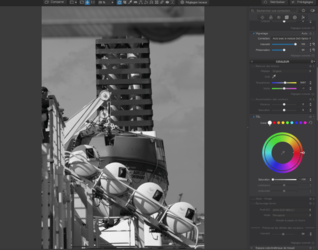
I couldn't find a way to convert to black and white without using a preset.
I am also a little confused at their new Wide Colour Space setting, they don't seem to mention how wide it is compared to ProPhoto nor could I find out what Gamma value it used.
 
although it did seem to offer a variety of options

Therein lies the trick. PL is different in how it approaches editing and can take a little while to get used to if all you've known previously is the Adobe way, although I have a friend who has Lightroom, who says it is more similar.

I couldn't find a way to convert to black and white without using a preset.
There are a few.

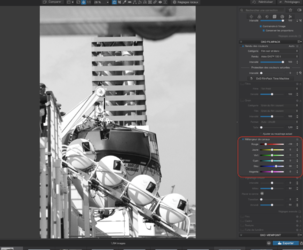
There's the Saturation/Vibrance tool or you can also simply desaturate the master channel on the HSL wheel…

Capture d’écran 2023-05-17 à 23.44.15.png

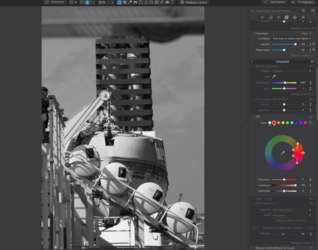
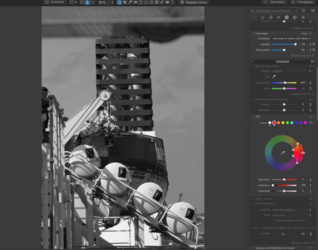
You can then choose one or more of the other colour "channels" (which are only suggestions and can be changed) and adjust the Luminance just as you would work with filters or a channel mixer.

Here are two screenshots, where I have lowered, then raised, the red luminance and you can see the change to the red part of the lifeboat…

Capture d’écran 2023-05-17 à 23.47.54.png

Capture d’écran 2023-05-17 à 23.48.00.png

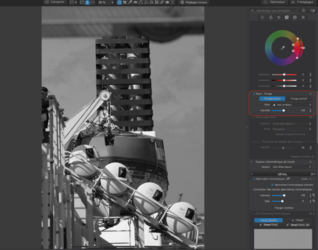
Then there's the "Style - Toning" tool, which allows for a simple monochrome conversion…

Capture d’écran 2023-05-17 à 23.54.16.png

But the key to the very best B&W conversions is to use the FilmPack module, which is incorporated in PhotoLab. The same 30 day free trial is available.

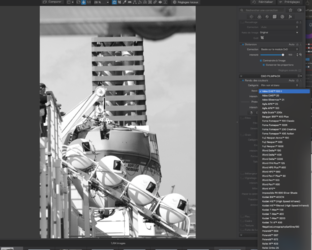
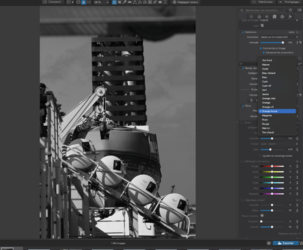
FilmPack Elite appears to be a standalone app but you don't have to install the download; simply register the trial licence and a whole bunch of renderings will be added to the Colour Rendering tool, along with other useful tools, one of which is an extension to the Contrast palette, which adds separate Fine Contrast sliders for highlights, mid-tones and shadows.

Capture d’écran 2023-05-17 à 23.59.59.png

I cannot emphasise enough just how amazing these renderings are and, what is more, you can tune them to better suit your needs.

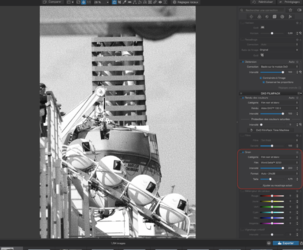
FilmPack also includes a Channel Mixer…

Capture d’écran 2023-05-18 à 00.02.59.png

You can customise the grain, either from the same film or others…

Capture d’écran 2023-05-18 à 00.07.12.png

You can also do the equivalent of placing a colour filter in from of the lens. Here's what happens if you choose the Deep Orange filter.

Capture d’écran 2023-05-18 à 00.10.48.png

… and, of course, you can adjust the density as well.

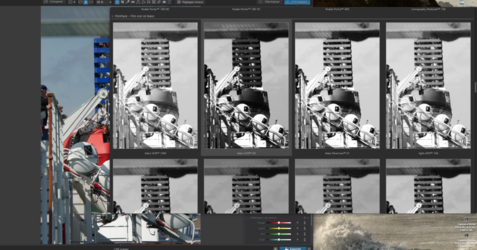
One of the other guys on the DxO forums and I have created a series of presets to allow you to preview all these film renderings, so you can do this…

Capture d’écran 2023-05-18 à 00.16.49.png

… and choose visually.

If you have any further questions, don't hesitate to ask.
 
Last edited:
Back
Top