Saving images to 'Pictures' rather than 'Documents'

John King

Well-Known Member
Registered
When I save images either scanned from Negatives or from a memory card when I go to save them unless I do them singly and they are in a folder they automatically get sent by default to Documents. What is the procedure to get them to be sent to 'Pictures'. I know there is one but I cannot find how to change it on Windows 11 or with photoshop
 
If you’re using a Mac with the Image Capture app the choice of where to save is at the lower left when you open it. Otherwise I don’t know.
 
Macs don't need to be expensive, and they last a long time. I bought my current 2018 Mac Mini when it was 6 years old for about £300, and I expect it to last much longer. I sometimes use my 2010 Mac Mini for Photoshop CS6 and other old software. And I kept the same 16-years old monitor screen and keyboard, so that saves a lot as well.
 
No I don't thinks so, it diverts the images to the cloud system and non of my images are ever going there. Basically I don't trust Microsoft when they say they cannot access them or even just shut it down without warning. No-way Hosea
 
When I save images either scanned from Negatives or from a memory card when I go to save them unless I do them singly and they are in a folder they automatically get sent by default to Documents. What is the procedure to get them to be sent to 'Pictures'. I know there is one but I cannot find how to change it on Windows 11 or with photoshop

When I save images either scanned from Negatives or from a memory card when I go to save them
Which program are you in when you go to save them?
 
I will be using PS. My usual way is to insert the SD card and open it up in PS and work from there. I believe there may be a way by changing 'preferences' Do you know anything about that? I have looked and cannot find 'preferences' in Windows 11
 
I will be using PS. My usual way is to insert the SD card and open it up in PS and work from there

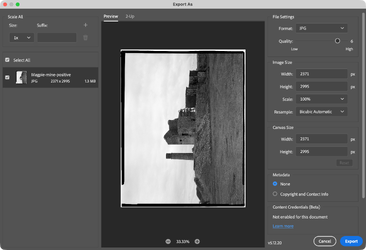
In Photoshop when you choose to export them using the Export dialog, when you press the Export button, you choose a location. The location you choose is persitant until you choose a different one

Screenshot 2026-09-17 at 19.18.20.png
 
I have never seen a page like that one. It is completely new to me. Is it part of the Lightroom section, then if so that is the reason I don't use Lightroom
 
Back
Top