Razorbill

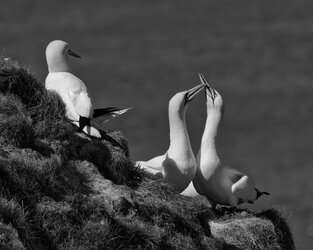
Thanks for taking the time to do this Joanna. The image was deliberately under exposed in order to retain the highlight detail in the birds (not by enough as it happens) and shadows are too blocked to my taste in your final but I suspect that was something you didn't address given that what we were examining was noise reduction. There is no doubt that DXO deep Prime has produced an excellent result and I would be very happy to use it if I had access. So, using it as the standard if you like, I followed your advice and noise reduced the original Raw file in Adobe RAW then exported it as a TIFF (first image below). Better than I had previously been used to but not as good as DXO. However, I then ran the TIFF through Topaz Photo AI noised reduction and was gratified to find that the end result was at least as good as DXO and even dare I say, very slightly better (second image below). Gratifying not because it was better, the difference is at best minimal, but because as a result of this conversation I have found a workflow using my existing software set that really produces a very good result. I'm grateful for that. Let me know what you think - and anyone else for that matter.

Gannets copy.jpg

Gannets mono B copy.jpg
 
Hmmm. Now, to my eyes, that seems to be where it starts to get "plasticky" and over emphasised.
The image was deliberately under exposed in order to retain the highlight detail in the birds (not by enough as it happens) and shadows are too blocked to my taste in your final but I suspect that was something you didn't address given that what we were examining was noise reduction
In fact, the image was perfectly exposed for the highlights, placing them at around +2EV.

What I didn't do is to adjust the levels to recover the shadow detail that is definitely there…

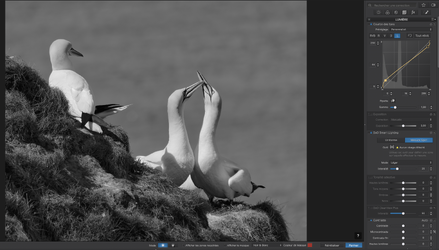
Capture d’écran 2025-10-13 à 11.25.22.png

PhotoLab has a tool called Smart Lighting, which effectively sets the black and white points to the darkest and lightest parts of the image. As you can see from the histogram, I had to slightly raise the black point and lower the white point, but then the algorithm looks after the intermediate tones. Then I used the Tone Curve to slightly increase the contrast at both ends and the Shadow Fine Contrast slider to increase the shadow detail even further.
I followed your advice and noise reduced the original Raw file in Adobe RAW then exported it as a TIFF (first image below)
However, I then ran the TIFF through Topaz Photo AI noised reduction
As an American friend would say, "thars yer prawblem".

Noise reduction is intended for use with RAW files only and, although Topaz might provide it for TIFF files, I believe it is that usage that is creating the "plastic" effect and losing detail which is being mistaken for noise.

BTW, nice shot.


I couldn't help playing a bit more. I just added a red filter to darken the sea…

20170510_0205_3_DxO.jpg
 
Last edited:
I agree, nice shot.

An interesting use of curves that I haven't seen before. Effectively, it appears to me to achieve shadow recovery by compressing the tonal range of the mid-tones but increasing contrast in the deep shadows and highlights. That is something I need to try.

That red filter makes all the difference doesn't it?

Regarding noise reduction, I would question whether or not it is really needed. The image is taken in bright sunlight and we know that the signal to noise ratio of sensors improves dramatically with increasing light levels and lower ISO values. Maybe I have been looking at too many 35 mm. shots using Tri-X but I don't find noise objectionable. Your thoughts?
 
Enough already. I think we have hijacked the forum. Every one else has gone to sleep.

Glenn, it almost certainly wasn't needed. The image was just to explore the conversation Joanna and I were about whether DXO could be matched for performance using Topaz etc. The main gain is that with Joanna's input and a bit more care, my own workflow can get close or at least for me, close enough.
 
Glad to hear it. I am learning from it too and I would actually prefer if there was more of this kind of discussion on the forum. For the record, I am happy if my own photos are workshopped in this way..
 
An interesting use of curves that I haven't seen before
The principle is that a steep part of the curve increases contrast and a flatter part reduces it.

In fact, before messing around too much with the Tone Curve to increase shadow detail, my goto tool in PL is the four Fine Contrast sliders. They can be far more effective than tweaking the curve. e.g.

Before anything else…

Capture d’écran 2025-10-13 à 17.07.17.png

After applying Mid-tone and Shadow Fine contrast…

Capture d’écran 2025-10-13 à 17.07.44.png

Notice how much more shadow detail is revealed. And it looks even better at larger magnification if you add a judicious amount of contrast in the shadow part of the Tone Curve…

Capture d’écran 2025-10-13 à 17.15.29.png


That red filter makes all the difference doesn't it?
In this case, yes.
Regarding noise reduction, I would question whether or not it is really needed.
In fact, from my long experience with PhotoLab's DeepPRIME, which is adaptive and where we are encouraged to just "set it and forget it", it has astounding effects, especially in shadows of low ISO shots.

Because DxO creates camera and lens profiles from actual cameras and lenses, the NR adapts far more accurately than the "calculated" profiles from other software.
Maybe I have been looking at too many 35 mm. shots using Tri-X but I don't find noise objectionable. Your thoughts?
In this shot, not excessively but, since my favourite emulsion is Fuji Acros 100, which has virtually no visible grain, that is my personal preference - no noise. But PhotoLab also allows me to specify grain from a wide variety of films so, instead of leaving noise, I get "real" grain.

Enough already. I think we have hijacked the forum
If we can't discuss this kind of subject, what is the point of the forum?
 
Last edited:
Thanks Joanna. That's a fine explanation of the action of curves and I can see how it makes a difference. I have a background in engineering so I tend to think graphically rather than slider tweaks. It is the steepness of the curve needed to recover the shadows which surprised me. I'll be sure to try it.

Regarding grain versus noise, yes, I understand the difference. Generally speaking, I leave grain structure alone in scanned film shots and only add noise (or digital grain) sparingly to digital shots as the image demands. I rarely denoise unless an image is taken in low light and even then it will only be the colour noise I reduce. I realise this is a personal preference.
 
Last edited:
Back
Top