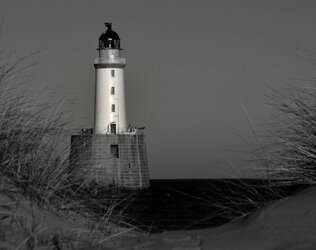
Rattray head lighthouse.

Oldbones

Member
Registered
Took this a few weeks ago.
The last mile or so to the lighthouse was a very rough road, that did put me off going back again.
The lighthouse is 112 feet tall but in doesn't look like that here.
It famous for photographers from near and far, so its common place in club comps etc.
To the point of, of no not another one, but I think for personal reasons its worthwhile to make the effort if even just to see and capture it for your own portfolio.
2 Ratrayhead.JPG
 
Last edited:
I don't know how familiar you are with your processing software, but this looks as though you need to pull the sliders in on your levels, particularly the right hand side, as this will lift the whites and bring the picture to life.

I'm personally not keen on the out-of-focus foreground.
 
Thank you for the input, at the moment I am learning how to edit, I use Nikon NX studio.
I keep a lot of my work and will go back and give it a bit more of some edits and perhaps come up with a better image.
 
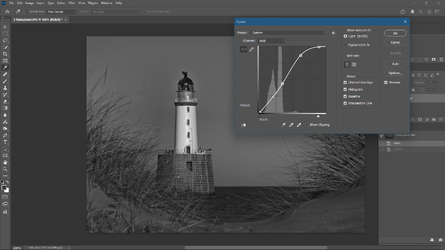
It's a long time since I used Nikon NX Studio so I can't remember if it has a "Levels" slider but what Toby is suggesting is effectively to selectively increase the contrast. If you don't have a "Levels" slider but have a "Curves" control (might be called something else), you can get somewhere near by dragging the highlight end of the curve up to lift the highlights. Something like the example below. Have a play.


1776956010718.png
 
Thank you for the advise, I do have levels and curves withing the NX Studio so I will give it a try.
It was a very bright sunny day, the light was coming from my right, which did make to lighthouse very bright.
I have so much to learn, which I am going to work on as time permits.
Or I might go back and redo it from scratch.
 
I use NX studio, but mostly for tethering my camera to the computer (so I can control my camera and view the image on the large computer screen almost instantly) and for curating my photographs (looking at my images and deciding which ones to edit). I don't use it for editing because there are too few adjustment options. You might consider changing to one of the free editors. I use affinity photo which is quite similar to photoshop, useful if you want to migrate to PS in the future. Other options include Snapseed (mobile phone or tablet based) and Darktable (computer based) etc. Most will have a slider based level control.
 
The comments above are referring to post processing. Now I don’t know how you exposed for this image, so I have had to make an assumption that you aren’t certain on how to expose for a subject that has a very bright component in it and that you were also using a digital camera.

If I am wrong then please forgive my mistake.

If my assumptions are correct then In this case you should have metered for the white of the lighthouse and opened up 1.5 to 2 stops. The white would then be captured as almost white while the other darker shades can be recovered by your processing software.

I hope this is of help.
 
I use NX studio, but mostly for tethering my camera to the computer (so I can control my camera and view the image on the large computer screen almost instantly) and for curating my photographs (looking at my images and deciding which ones to edit). I don't use it for editing because there are too few adjustment options. You might consider changing to one of the free editors. I use affinity photo which is quite similar to photoshop, useful if you want to migrate to PS in the future. Other options include Snapseed (mobile phone or tablet based) and Darktable (computer based) etc. Most will have a slider based level control.
I am going to have a wee investigation into that, thank you.
 
The comments above are referring to post processing. Now I don’t know how you exposed for this image, so I have had to make an assumption that you aren’t certain on how to expose for a subject that has a very bright component in it and that you were also using a digital camera.

If I am wrong then please forgive my mistake.

If my assumptions are correct then In this case you should have metered for the white of the lighthouse and opened up 1.5 to 2 stops. The white would then be captured as almost white while the other darker shades can be recovered by your processing software.

I hope this is of help.
What a good post and so very helpful, thank you so much.
No I am not certain about exposure and I was using a digital camera which is a Nikon D70s.
So you are very correct with your thoughts.
When I use my camera, I always try to set it so the light meter is spot on the middle peg, so you telling me to open 1.5 to 2 stops is a new thing for me, but I am now going to try that.
I am far better pleased with what my work looks like compared to even six months ago.
Starting photography has been really good for me, used to be that I would point and shoot at every thing now I try to pick a subject and work on that.
 
Second attempt.

Not really much of an improvement, because you have used software instead of getting the exposure right in camera.

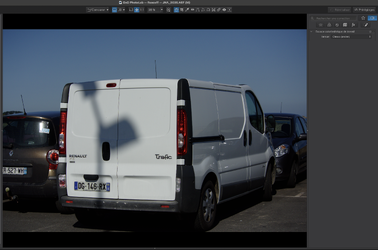
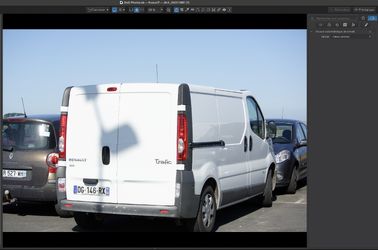
Here is a pair of images, with one metered for a white van, with no compensation…

Capture d’écran 2026-04-26 à 13.23.01.png

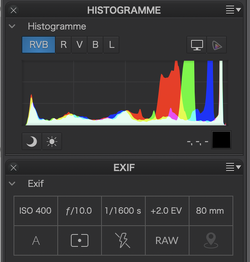
As you can see, the "white" van ends up being 18% gray, which is what you get from any exposure meter.

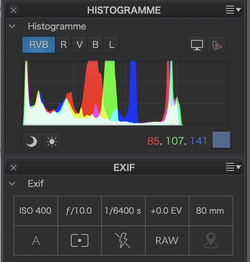
Here is the resulting histogram and EXIF data, which shows that things are fairly murky - as was your first attempt.

Capture d’écran 2026-04-26 à 13.23.38.png

However, if, as Helen suggested, you over-expose by 2 stops, with no other adjustments in software, you end up with a much more balanced rendering, with the white van exposed at the limit of the sensor's range…

Capture d’écran 2026-04-26 à 13.22.45.png

And here is the histogram and EXIF data…

Capture d’écran 2026-04-26 à 13.23.56.png

Of course, if the "white" surface is textured, or off-white, +2EV could be too much. You need to test your camera's limits

If this is too much like gobbledygook, don't hesitate to ask for further clarification

The main point is that you are better off learning how to expose correctly in camera than relying on software.

Sorry about the colour but I wanted to show that there were absolutely zero adjustments in software.
 
Back
Top