

-
Thank You For Visiting... Please Click Here and sign up to contribute
You are using an out of date browser. It may not display this or other websites correctly.
You should upgrade or use an alternative browser.
Norfolk Windmill
- Thread starter Nokin
- Start date
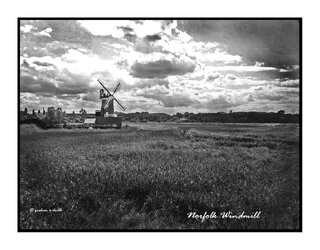

Cley. The clouds are a bit of a mess, Graham, and there's some terrible JPEG compression artefacting.
How do you resize for the web? I keep seeing this with your uploads, whatever you are doing, there are better ways!
Are you using photoshop to process?

Graham _ use this -alex nail save for web
https://www.alexnail.com/blog/tutorials/resize-and-sharpen-for-web-v5/
Make sure that you are editing in in Prophoto RGB, (before you resize)
Graham, as above, Simon beat me to it.
When you have resized using the AN actions - choose '1000px Screen' for this forum - you will see that you have three layers, Unsharpened, Soft Sharpen and Strong Sharpen. Mess about with the opacities until you find the best result. I actually delete the Strong Sharpen layer altogether, and reduce the Soft Sharpen layer to around 50%.
Any problems, come back.
yes I too usually delete or greatly reduce the strong sharpen layer
I also 're'-recorded the action to include 'save as JPG' at end and RGB to make life even easier

Hi Toby..…. I managed to download and install the An.Actions .I selected the 1000pxs screen . How ever I could not locate the 3 layers regarding the Strong Sharpen and soft sharpen . These don't automatically appear on my screen, where are they located.? I seem to have clicked everything.Graham, as above, Simon beat me to it.
When you have resized using the AN actions - choose '1000px Screen' for this forum - you will see that you have three layers, Unsharpened, Soft Sharpen and Strong Sharpen. Mess about with the opacities until you find the best result. I actually delete the Strong Sharpen layer altogether, and reduce the Soft Sharpen layer to around 50%.
Any problems, come back.
Many thanks
Nokin
If you have windows press F7 and they will appear RHS. Or click on 'Window' (top bar) and tick 'Layers'
I already have the photoshop Layers pallet showing , having done adjustments to the file . Have carried out the resizing to 1000pxs .. Cannot see anywhere 3 layers marked Sharpen soft sharpen etc.If you have windows press F7 and they will appear RHS. Or click on 'Window' (top bar) and tick 'Layers'
I thought that the 3 layers you mention were contained in the Actions panel .?
What does the image resolution want to be . I am still doing it at 72pxs.
Thank you
Nokin