Malham Bridge

Keith Haithwaite

Well-Known Member
Registered
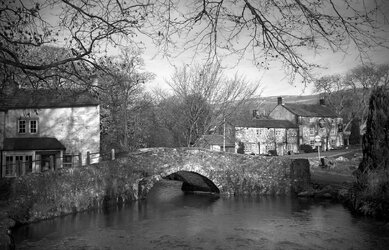
Of the many many shots I have taken of this lovely little bridge this is the only one without branches and leaves obscuring the bridge or tourists cluttering it up - or both!
Malham_Bridge-3_B&W-800.jpg

Malham_Bridge-3_B&W-800.jpg
 
Very nice, the dabbled light on the leftmost building is lovely. There are some strange compression artefacts running through the background trees I think.
 
Thanks Toby. "There are some strange compression artefacts running through the background trees I think." I can't see anything Toby, can you tell me where you see them please so I can check on my PC version.
 
Two bluury horizontal lines about a cm deep running through the trees above the bridge from the level of the sign on the wall to the roof, and at about chimney height,
 
I think I see what you mean Toby. On the full size file I can just see parts of some structures behind the trees which the filesize reduction algorithm seems to have made a bit of a mess of when squashing it down to 800px height as there is no sign of it on 1200px height images I have posted elsewhere. I've had this sort of thing before on certain images and found that reducing the image height in 10% steps seems to reduce the effect.
 
I thought Toby had been sampling his wine again but I think I see what he has spotted, although I'm not convinced they are necessarily artefacts as such but a combination of background features, wires etc.
I have to say that the more I print the more dissatisfied I become with digital images and those resized for the web in particular. They seldom look as they should.
 
Keith, I use Alex Nail's action to resize, it works well. The download and the explanation are on this page..1:66 is apparently the critical ratio.

http://www.alexnail.com/resize-sharpen-web/

I do find that the action in standard form oversharpens somewhat. I remove the 'Strong Sharpen' layer altogether, and reduce the 'Soft Sharpen' layer down to about 75%. I am sure that if I knew how I could amend the action to my preferences, but it only takes a second. You then flatten the image and save for web.
 
A very pleasant scene with a nice range of tones. I'd prefer it to have a stronger centre of interest, such as a horse and rider crossing the bridge!
 
Keith, I use Alex Nail's action to resize, it works well. The download and the explanation are on this page..1:66 is apparently the critical ratio..

Thanks Toby, I'll have a look when I get time.

A very pleasant scene with a nice range of tones. I'd prefer it to have a stronger centre of interest, such as a horse and rider crossing the bridge!

Thanks Trevor and I agree but ..... :(
 
Keith, I use Alex Nail's action to resize, it works well. The download and the explanation are on this page..1:66 is apparently the critical ratio.

http://www.alexnail.com/resize-sharpen-web/

I do find that the action in standard form oversharpens somewhat. I remove the 'Strong Sharpen' layer altogether, and reduce the 'Soft Sharpen' layer down to about 75%. I am sure that if I knew how I could amend the action to my preferences, but it only takes a second. You then flatten the image and save for web.

I use this too (when I remember) but always lower the opacity a bit and mask out the sky
 
Back
Top