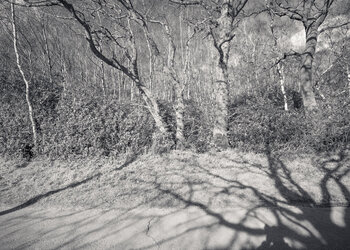
Looks weirdly blurry on my screen_ tried uploading at 1080 px =same-why? Looks fine on FB - what's going on?
Last edited:

same exact image looks nice and sharp on Facebook.....?There is a lot of detail and much of it is just a few pixels across. I think you are just running out of resolving power at 1080 px.


On my screen it looks mushy, as I already saidThey are OK on my laptop. The file size is set by the owners of the forum and I think we should respect that. Is there a particular reason that you have the need for a larger image. We all know that more pixels will allow a larger image to be displayed - but on a laptop? I for one am looking at a picture, not for the technical makeup.
Not quite that bad on my screen
Thanks though I’ve not had this problem before using the same file sizes from the same camera and softwareJust to be clear, I wasn't suggesting we try to bypass the 1080 pixel limit on the forum.
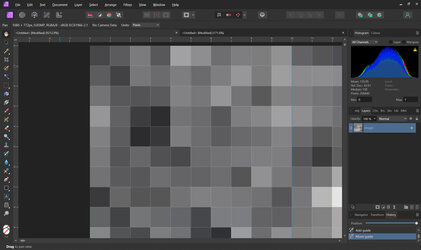
As a sanity check, I turned on the ruler in Affinity Photo with a graduated pixel scale and added a cursor ten pixels from the left hand edge. Your full image showed a width of 1080 pixels (as expected). I zoomed in to see individual pixels and I note their shade of grey changes at every pixel, so the pixel count is correct and every pixel is being utilised to render detail in the image.
As such I still think the 1080 pixel resolution is the limiting factor although you might be able to increase the apparent acuity by playing with contrast, sharpening or micro-contrast.
I am not sure what is happening at Facebook although I guess there may be pre-processing before display.
<smile>Not quite that bad on my screen
I can do that but I have e uploaded pics in the past with same criteria and no issueA little, but I don't think it is anymore than I would have expected from a 1080px image with a large area of fine detail. It is the level of detail which is the salient point. We have become used to higher resolution pictures on our computer monitors and laptops. Our lower resolution images will look soft by comparison.
For reference, common screen resolutions are:
All but the cheapest laptops can achieve Full HD resolution nowadays.
- SD: 720 x 480px
- HD 720: 1280 x 720px
- HD 1080 (full HD) 1920 x 1080px
- UHD (4K): 3480 x 2160px
So 1080 is somewhere between SD (think old fashioned telly when the box was as deep as it was tall) and HD 720 (which was the next generation).
If you want to check if there is a real difference between the Facebook image and the forum image, download them both back to your computer. <Right click> and <Save image as> on a windows machine. You can then compare images and histograms both with each other and with the original.
You should not look at them in the way they are presented here. If they were a B&W hard print, would they be 'mushy', I doubt it! It should be accepted as they are presented, not assessed on the technicality short-comings afforded by the restraints of how big the picture is in the terms of pixels. If a hard copy were to be viewed and they were 'mushy' then that would be a time to gripe about it.On my screen it looks mushy, as I already said
I totally agree with you. We have to view the images as they are, despite the constraints of the pixel count. It is the image, not technical limitations over which we have no control, which is what actually counts.Point taken, but I don't think the criteria are necessarily the same.
The likely difference between what you have posted before and this particular example is the amount of fine detail in the foliage you are trying to resolve. It is fine detail which is most affected by the pixel count and, I believe, the reason for the apparent 'blurriness'.
Sure, I get that Glen but I have posted fine detail before without problemPoint taken, but I don't think the criteria are necessarily the same.
The likely difference between what you have posted before and this particular example is the amount of fine detail in the foliage you are trying to resolve. It is fine detail which is most affected by the pixel count and, I believe, the reason for the apparent 'blurriness'.

The settings in the forum have been set to max-width: 1080px (longest side) so in theory, if you upload at this size no compression should take place.@ian barber
I assume I am right in saying that 1080 pixel JPEG files are displayed as-is on the forum without further compression. Would you happen to know one way or the other please?