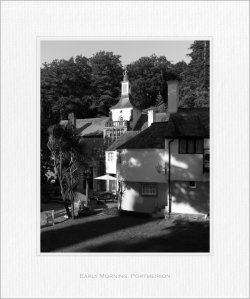
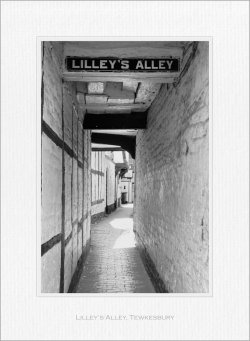
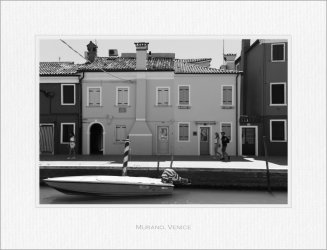
Faux frames

@Joanna Carter

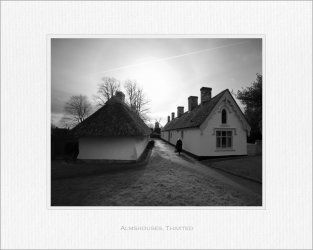
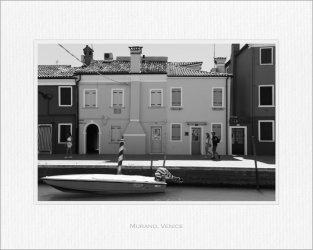
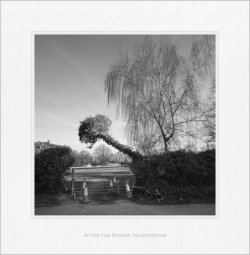
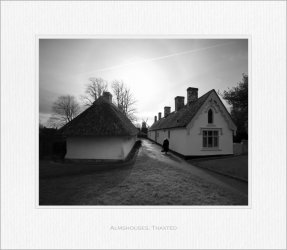
I went for a different dimension for the square format photos as I think 500 x 400mm. format, whilst it works well at hi res or when hung on a wall, loses too much detail in a 1080 pixel format. I stayed true to the concept adding the equivalent of an extra 10 mm. to the bottom. I think it works quite well. For the two landscapes (one 10x8 and one 9x6) I used your suggestion. I am very pleased with the result although I may play with the positioning of the text a little more. Once again Joanna, thanks for your helpful suggestions.
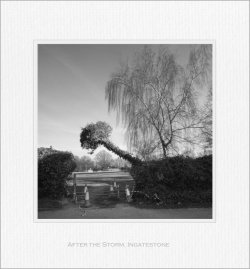
After_the_Storm_Ingatestone.jpg
 
Last edited:
I went for a different dimension for the square format photos as I think 500 x 400mm. format, whilst it works well at hi res or when hung on a wall, loses too much detail in a 1080 pixel format. I stayed true to the concept adding the equivalent of an extra 10 mm. to the bottom. I think it works quite well. For the two landscapes (one 10x8 and one 9x6) I used your suggestion. I am very pleased with the result although I may play with the positioning of the text a little more. Once again Joanna, thanks for your helpful suggestions.
The key is not to slavishly follow any fixed dimensions, more to just add a "bit" more space below the image. With a 50cm x 40cm frame, that turns out to be around 10mm - bigger frames might require more, smaller, less.

I based all my calculations on 50cm x 40cm, because that is the frame size our club photo has a stock of for our exhibitions.

Were I building my own frames, as I have done for our own work, everything is based on the image size, plus the same margin top and sides, with proportionally more space on the bottom.

So, for an uncropped image, taken in 5x4 format, on my Nikon D850, I would get 6140px x 4912px.

This then gives me a print size, at 240ppi, of 65cm x 52cm.

Add a margin of 10cm top and sides and 12cm bottom, to give a finished matt board size of 85cm x 74cm.


Had I taken a square image, I would get 4912 x 4912px.

This then gives me a print size, at 240ppi, of 52cm x 52cm.

Add a margin of 10cm top and sides and 12cm bottom, to give a finished matt board size of 72cm x 74cm.


You see the principal?
 
@Joanna Carter

Very clear and helpful Joanna. Thank you.

My aim was to make something to use for my submissions here so I simply scaled your suggested dimensions to suit a longest edge of 1080 pixels. A typical Engineer, I put together both a spreadsheet and a template version in Affinity Publisher for future use and will, no doubt, be tinkering with it as I go.

It is nice to have a generic method such as the one you gave above and I have updated the spreadsheet to suit. I know it will come in handy when I have to start mounting physical prints to matte board as I will for my LRPS distinction (when I finally get around to it).

Interesting that there seems to be a consensus around the top and side margins being the same width.
 
Last edited:
Just a thought… What do you think about maintaining an equal matt board margin all round but just adding a bit to the margin between the bottom of the image edge and the matt board?
 
I was thinking the same independently but didn't have the energy to start. I think it's just a matter of working out the size of the extra bottom margin:10 mm in 400 or 500 mm is about 2% extra on the bottom. I quite like the consistency the frame size gives to the different portrait and landscape and aspect ratios though, and the unequal margins do give a certain visual tension to the result. All subjective I know.
 
Point taken. It is a scan of a piece of A4 sized matt (the biggest size my scanner will take) so 1080 pixels represents about 8.5 inches. It is about the right scale for a 5" x 4" print but if you are used to much bigger prints then it will feel out of scale. I'll see if I can improve on that. I might also tone it down a bit. Have spent much of the day producing templates with even margins and an 2% extra at the bottom. Think I'll leave the matt for another day.
 
Last edited:
OK so, even margins and big bottoms :) ...

3:2 aspect ratio: margins are 12% of the longest edge with an extra 2% on the bottom
5:4 and 1:1 aspect ratios are 13.5% of the longest edge with an extra 2% on the bottom
 

Attachments

  • After_the_Storm_Ingatestone_5b.jpg
    After_the_Storm_Ingatestone_5b.jpg
    664.6 KB · Views: 5
  • Almshouses_Thaxted_5b.jpg
    Almshouses_Thaxted_5b.jpg
    459.9 KB · Views: 5
  • Early_Morning_Portmeirion_5b.jpg
    Early_Morning_Portmeirion_5b.jpg
    485.3 KB · Views: 3
  • Lilley's_Alley_Tewkesbury_5c.jpg
    Lilley's_Alley_Tewkesbury_5c.jpg
    438.8 KB · Views: 3
  • Murano_Venice_5c.jpg
    Murano_Venice_5c.jpg
    410 KB · Views: 3
Last edited:
Back
Top