Before And After Scanning

Martin Henson

Admin
Staff member
Registered
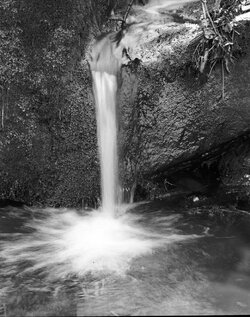
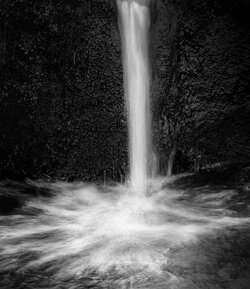
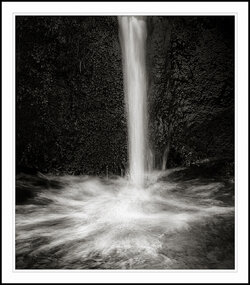
This is an example of a negative scan and the end result, I used Photoshop grad filter to darken down the sides, Ian's Dodge and Burn Panel and a little structure control from unsharpe mask, finished of with Levels end point checks, carefully filling a dark are to the right of the water with the clone tool and cropping to suit. All my main tonal adjustments are always carried out in Camera Raw on a copied Layer so I can paint back where needed. No Plugins used only Ian's D&B panel, (could be done without it but makes life so much easier, thanks Ian)

The Negative
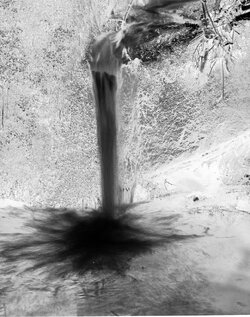
splash-invert-neg.jpg


The Negative inverted to positive
splash-neg-1.jpg


Edit and Crop
splash-edit-tut.jpg

The finished image toned
splash-edit-copy-type-2.jpg

Any questions regarding Scanning or editing ask and I will try to answer

Regards
Martin
 
Well, there's no wonder I was up the creek (no pun intended) with this shot in the other section Martin, I thought the background was trees and/or shrubbery! Personally I prefer the positive image. o_O
 
Soon...Martin when you do an image for the web and tone it like this one, do you do that separately from the one you're going to print from, presumably thats saved without toning and then you tone in IP? DO you ever get in a muddle- I DO - whats'the secret?
 
Lol Simon, the toning is done in camera raw on a copy, when I print with tone i always do it in imageprint (imageprint is a RIP printing software for those that don't know).

I use both, the narrow gamut to add delicate tones and the Wide gamut for heavier tones.

Regards
Martin
 
Lol Simon, the toning is done in camera raw on a copy, when I print with tone i always do it in imageprint (imageprint is a RIP printing software for those that don't know).

I use both, the narrow gamut to add delicate tones and the Wide gamut for heavier tones.

Regards
Martin

there's a wide Gamut toner in IP? - I didn't even realise!
 
Back
Top