

-
Thank You For Visiting... Please Click Here and sign up to contribute
You are using an out of date browser. It may not display this or other websites correctly.
You should upgrade or use an alternative browser.
Hill Farm
- Thread starter John2
- Start date
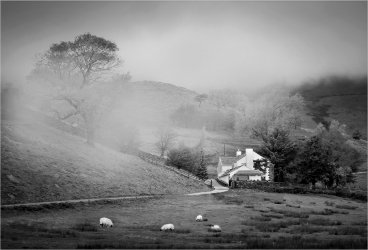
Oh lovely, that's a wish I'd taken it image.

Yes, really lovely.


nicely done
When I look at it on my PC, there's something blurry around the house which isn't mist, and some other odd artefacts which somewhat 'lose it points'. Probably resizing/uploading issues.

Nice image as others have remarked. Well composed, atmospheric and a good tonal range.
I am with Toby on the artefacts - if I look closely there are also some things going on around the sheep. I have to look closely on my laptop screen to see them though. The image is about 17 cm. wide and from normal viewing distance it passes muster.
I would guess sharpening is a more likely culprit rather than resizing though, at least in the case of the sheep. Resizing should just make it block-ier (more pixelated). Uploading shouldn't make a difference providing the site is not re-interpolating the pixels or reconverting into a new format. It should be easy to check for changes if John still has access to the original 1080 image and can compare the two images side by side.
I have often thought it would be a good idea to work out an optimised flow for low-res photos. It is not something I have done in my own practice yet, although I mostly minimise sharpening and local contrast adjustments these days. My images may not be as dramatic as others' but then I am definitely more Pan-F than HP4.
Last edited:

Thanks all for the comments and likes.
Toby/Glen, there may well be some artifacts, possibly resulting from some local sharpening or contrast adjustment (the sheep?) but as I have said before, I offer an image up for what it is as a seen composition. I can't worry about imperfections that only become apparent at a pixel level (although I acknowledge your right to do so and to comment). When all is said and done, if I were viewing say prints in a gallery, I wouldn't take a magnifying glass with me.
Last edited:
Fair enough, John, but I'm not remotely a so-called 'pixel-peeper', I'm merely commenting based on what jumps out at me when I view this at normal size and resolution on my screen. There is a strange blurriness around the farmhouse, an artefaction in the marshy field just below the wall that includes at least one unnatural straight vertical line, and some suggestion of some cloning, and there's something odd going on around the sheep. No microscope is required to notice this.
It is indeed a really pleasing composition. I merely suggest that if the issues, which I think appear to be around the technicalities of resizing - but perhaps more - were to be addressed, then the photograph would succeed on all levels, not merely as a decent composition.
Bozzie was posting some heavily artefacted uploads onto this forum early on, but is now posting some very complete and presentable, artefact-free images. This may be because of helpful suggestions that were made by other forum members, in the spirit of this being a learning forum.
pixel peeping aside there is a very noticeable problem with what looks like banding in the sky ( on my 27"screen)
usually this is caused by the jpg being saved at too low a quality or resized too often etc
You're right and they are devilishly difficult to get rid of. I think the cause though might be that it is an 8 bit image.pixel peeping aside there is a very noticeable problem with what looks like banding in the sky ( on my 27"screen)
usually this is caused by the jpg being saved at too low a quality or resized too often etc
All the comments are good and fair enough, I am sure you all know more than me about analyzing a picture's, but its the for and after process including just getting out and about I like the most.
I am not a professional so if a if picture has faults so be it, its the journey behind it, that I like.
all jpgs are 8 bit so I doubt its that.You're right and they are devilishly difficult to get rid of. I think the cause though might be that it is an 8 bit image.
It's more likely how you're saving it.
Was the original RAW or film and how did you process it?i.e. What's your workflow?
I didn't know that about JPEG, so something learned - thank you.all jpgs are 8 bit so I doubt its that.
I did try to reproduce the banding issue with a home-made 8-bit grey-scale ramp chart today as I have struggled with banding in my own photos. I was unsuccessful, but for what it's worth I posted the images to Forum-chat along with a short explaination.
Last edited:
I work from RAW but when I processed this a few years ago, I didn't know about the benefits of working with 16bit files. I think it was either Ian or Martin (?) that posted an article some time ago showing the difference using a grey scale as the subject that alerted me. Today, 16bit is set as the default for RAW to jpg conversion in my PS workflow. Whatever it is that's caused it, my later images don't seem to have suffered in the same way quite so often.
Good to know. I generally work 16 bit myself but in the old days I didn't realise the program I use (Affinity Photo) needed to be physically set to 16 bit to ensure this happened. Old days. I mean two years ago when I started to learn how to edit in RAW. It would explain why I saw banding in my own edits.
This is such a lovely image that, if you had the opportunity to rework it from the original file with what you know now, I think it would be well worth the effort.
You know to use or lose.