

-
Thank You For Visiting... Please Click Here and sign up to contribute
You are using an out of date browser. It may not display this or other websites correctly.
You should upgrade or use an alternative browser.
Great Hill Scar_Malham Moore
- Thread starter John2
- Start date

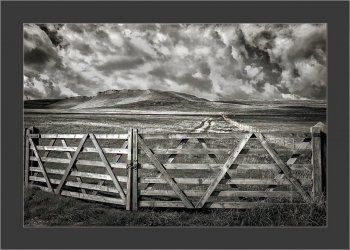

I like it, though The sky’s a bit overcooked

I agree.
Yep, DF is right. If I saw a sky like that I would be retreating very fast.
The thing is the light on the gate is great so redoing the sky could make it a winnerYep, DF is right. If I saw a sky like that I would be retreating very fast.
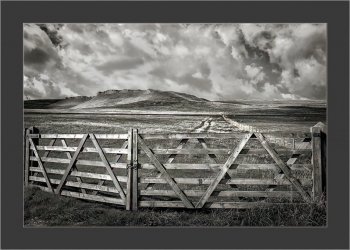
Its still not working for me, John, it looks overworked and feels like mono-converted HDR. The sky and the landscape don't look as though they quite belong to each other. There's something smudgy going on between the bars of the gate.
I would level the same crit on the steam engine and the bridge. The steam almost looks superimposed onto the bridge.
What is you workflow to get here?
Clarity is one of those tools that can sometimes really make and image but it can also destroy an image. With clouds it can really lift them but it can also make them easily look artificial or unreal.The sky is basically as it was but I have probably overdone the Clarity in ACR. Backed it off a bit. Any better?
View attachment 15308
Sometimes I find you can rack clarity right up to 100 but other times just 1 on the scale is too much
Clouds that are already well defined do better with contrast than clailrity adjustments or judicious use of the adjustment brush using exposure or shadow or Highlights adjustment. I avoid the whites adjustment unless essential as it kills luminosity
Here the clouds look wel defined already and the strongest element of interest is the light on the gate, so what you want is clouds that support this. By adding clarity you have drawn the eye away from the gate which is not ideal.
Perhaps try leaving clouds exactly as they are or giving them a graduated filter from top, with the slightest contrast increase or if that doesn’t support the overall visuals and luminance on the gate try exposure lowered very very slightly, or if that doesn’t work try the opposite, lightening it slightly. Use tiny increments. You’re looking to get the clouds to support the overall sense of luminosity without distracting from the main subject (gate)
What the clouds don’t want is definition which is what clarity gives
The thing that’s going for this image is the luminance on the gate
It has great potential as an image but the clouds are killing it at the moment
Last edited: