

-
Thank You For Visiting... Please Click Here and sign up to contribute
You are using an out of date browser. It may not display this or other websites correctly.
You should upgrade or use an alternative browser.
Beach Hut at Dusk, West Mersea
- Thread starter Glenn
- Start date
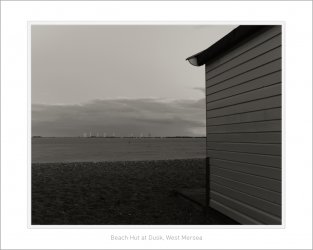

Taken this evening with my Nikon Z7 set to ISO100 8 sec. f/14 29.5 mm
Edited with Affinity Photo:
- Levels adjusted to brighten the image
- White balance adjusted using the wind turbines on the opposite bank as a reference
- Black and white conversion using PAL/JPEG colour weighting
- Overall contrast lifted using curves
- Toned using home-made LUT 'borrowed' from one of Martin's photos
Last edited:

Like this presentation. The reserved frame and lettering in grey fits well to the peaceful morning scenery. As I am still searching for "my" software, I'll check out Affinity, It's said to work well on a MacBook M1. Thanx for the hint, Glenn. Btw, what does LUT mean, please?
Thanks Jay.
LUT is "Look Up Table". It is a way of changing the look of a photograph. Many LUT files can be downloaded from the internet but personally I make my own and use them to copy toning from a donor photograph to apply to my own photographs. They are also often used to simulate different film types.
I find Affinity Photo quite good but I have not used other editing software apart from Picasa. It has a similar User Interface to Photoshop but is available for a one-off payment of £48. Future upgrades are included in that price and a free trial can be downloaded. I just checked the website and it is available at a special price of £24 in the UK at the moment, not sure if the special price is available in Germany.
It does a lot of things and mostly does them well. However, it took me a long time to learn to use and I have found one or two bugs. For example, I would like to use a digital yellow filter before black and white conversion to simulate using a real yellow filter on the camera lens, but for some reason that setting is ignored during the conversion to black and white. The other annoying thing is that the gradient tool is 8-bit with no dithering which can lead to some obvious banding. On the whole though, I have found it does what I want and is a stable platform to use. I was able to follow Martin's contrast grading short course and apply it to Affinity Photo.
Affinity's RAW editor will edit DNG formatted files.
If you want to check it out, I would suggest you download the free trial and follow the first few lessons at the YouTube Inaffinity for Affinity channel's Absolute Beginner's course. Set aside at least a full day (or two or three) to do so though.
As you know, Joanna has suggested DXO software is much more intuitive and she gets good results. Simon (Digital Finger) also said he finds Affinity difficult to use and prefers Lightroom and Photoshop instead. I haven't used any of those apps so I can't comment.
Last edited:
Many thanks Glenn for your detailed answer, much apprechiated! I'll deal with it after work, unfortunately I have to do some office tasks in between ;-)LUT is "Look Up Table". It is a way of changing the look of a photograph. Many LUT files can be downloaded from the internet but personally I use it to copy toning from a donor photograph and apply it to my own photographs.
I find Affinity Photo quite good but I have not used other editing software apart from Picasa. It has a similar User Interface to Photoshop but is available for a one-off payment of £48. Future upgrades are included in that price and a free trial can be downloaded. I just checked the website and it is available at a special price of £24 in the UK at the moment, not sure if the special price is available in Germany.
It does a lot of things and mostly does them well. However, it took me a long time to learn how to use it and I have found one or two bugs. For example, I would like to use a digital yellow filter before black and white conversion to simulate using a real yellow filter on the camera lens, but for some reason that setting is ignored during the conversion to black and white. On the whole though, I have found it does what I want it to and is stable. I was able to follow Martin's contrast grading short course and apply it to Affinity Photo.
Affinity's RAW editor will edit DNG formatted files.
If you want to check it out, I would suggest you download the free trial and follow the first few lessons at the YouTube Inaffinity for Affinity channel's Absolute Beginner's course. Set aside at least a full day to do so though.
As you know, Joanna has suggested DXO software is much more intuitive and she gets good results. Simon (Digital Finger) also said he finds Affinity difficult to use and prefers Lightroom and Photoshop instead. I haven't used either of those apps so I can't comment.