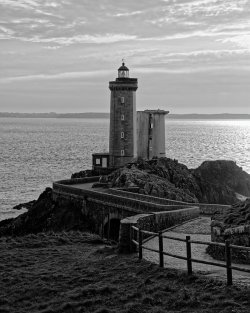
Le Phare du Petit Minou

Joanna Carter

Well-Known Member
Registered
What better way to pass Christmas Day than to take a trip to one of the many lighthouses that surround our coast
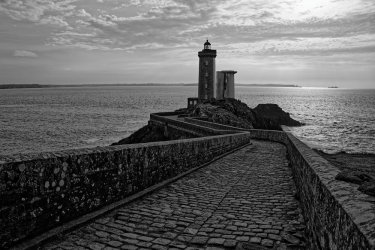
_JNA0002_1_DxO.jpg
 
Last edited:
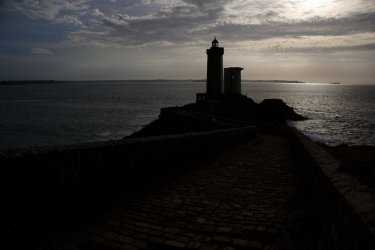
On my screen, it seems a bit underexposed.
If you can't see detail in the rocks to the left of the walkway, then it's your screen.

Otherwise, it's because it was a contre-jour shot, taken with the sun on the edge of the frame, behind the high cloud veil, with very bright specular highlights on the sea. To show more shadow detail than is already visible makes it look very HDRish. I still wonder if it isn't starting to be too HDR as it is.
 
Unless its upload compression, which I doubt, the detail has gone in the deeper shadows, and it's not my screen inability to show it, it looks like it was a single shot that has kept the higher values nearly all there with a very underexposed walkway and lighthouse, I am assuming you have had to open that area up to reveal detail, I think that's why it does look tonally dead in the lower land parts, I would have expected it to have more luminance in this scenario and scene especially with strong frontal lighting.
 
I would have expected it to have more luminance in this scenario and scene especially with strong frontal lighting.
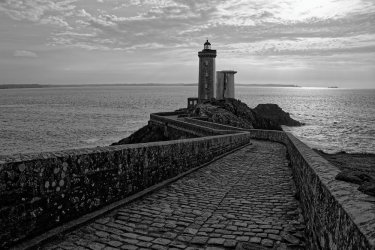
But it wasn't frontal lighting, it was very much backlit.

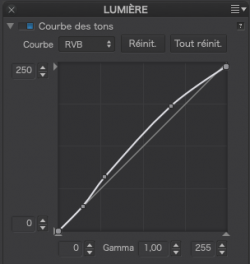
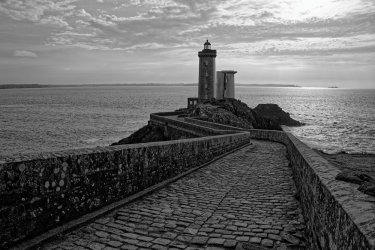
Well anyway, I was playing around with it today and just wondered what would happen if I switched the film from Fuji Acros 100; so I tried Ilford Delta 100, which meant I had to change the tone curve from this…

Capture d’écran 2019-12-26 à 16.41.33.png

… to a straight 45°.

What do you think?

_JNA0002_2_DxO.jpg
 
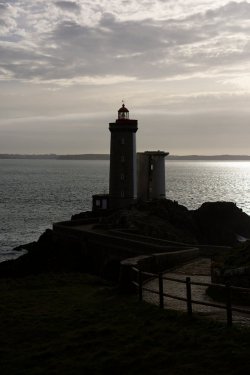
Here's another shot from slightly further left, looking even more towards the sun. Once again using Ilford Delta 100.

_JNA0001_1_DxO.jpg
 
Well all looks same to me Joanna, maybe it was the lack of light on the land, having said that the different angle works a little better.

As regards the curves adjustments, I really don’t see how a new curve shape can replicate the film look and type
 
Well all looks same to me Joanna, maybe it was the lack of light on the land.
With such low winter light, coming towards the camera, through a veiled sky, where the land falls away to the sea, very possibly.
As regards the curves adjustments, I really don’t see how a new curve shape can replicate the film look and type
It's not just the curve, it's also down to DxO's excellent film emulations in their FilmPack module; they change all sorts of things, including the response to different colours. Fuji Acros tends towards orthochromatic, which might account for the lack of contrast given the colour temperature of the light at the time.

Here are the original RAWs before any conversion or adjustments

_JNA0002_M_DxO.jpg

_JNA0001_M_DxO.jpg

Both ETTR metering in manual mode, placing the highlights at EV+2
 
Last edited:
What I thought Joanna, the underexposure even though you can bring it back, which is its self rather impressive, has a negative impact on the tones, at least I think so, the higher values and shadows detail that would have been there had the land been exposed correctly have been killed by lack of exposure. I don't think the ETTR works very well in this situation.

In cases like this would it not be better to expand the tonal range by using separate exposures for land, sea and sky then blend them, your probably going to say you didn't have a tripod, if that's the case then I would say that what could have been a very good BW image has been lost.
I am still not convinced these "film packs" react like the real thing using appropriate development, its a faux effect, I can visualize and I think you possibly can being a LF user how this would have worked with film far better from one exposure than ETTR.
 
What I thought Joanna, the underexposure even though you can bring it back, which is its self rather impressive, has a negative impact on the tones, at least I think so, the higher values and shadows detail that would have been there had the land been exposed correctly have been killed by lack of exposure. I don't think the ETTR works very well in this situation.
I have spent a lot of time working out just how much dynamic range I can get out of my camera (as I discussed with Ian in another thread). The image is not actually under-exposed, it is correctly exposed, using ETTR to give me a file that has fully recoverable shadow detail, within the range of the sensor's capabilities.

With a RAW file, my camera will cope with around 13-14 stops, which is fairly much the equivalent of B&W negative film exposed at N+3. To obtain that, it is necessary to push the highlights as far as possible towards over-exposure without actually blowing them. For me, that means spot-measuring the brightest area and exposing at that reading + 2 stops.

Bear in mind that there was virtually no sunlight on the land in the foreground, thanks to the cloud covering it. The only really sunny area was the sea to the right, thanks to a small hole in the clouds, in the distance to the right.
In cases like this would it not be better to expand the tonal range by using separate exposures for land, sea and sky then blend them, your probably going to say you didn't have a tripod, if that's the case then I would say that what could have been a very good BW image has been lost.
I know, from much experimentation, that creating such a single image will give me a file whose shadow detail can be recovered from as low as the measured EV - 11 stops. With this knowledge, I don't need to go to the trouble of taking multiple shots, as in HDR; my camera already gives me enough range in one image.

The trick is, to work out how to adjust the levels, contrast, curve, etc in order to realise the best mixture of tonalities, without flattening or excessive contrast. DxO has a whole range of tools including, what it calls, local adjustments - this can be built up using masks to apply the adjustments to selective areas, with several overlapping masks if necessary - very much like using layer masks and tone curve adjustments in PS.

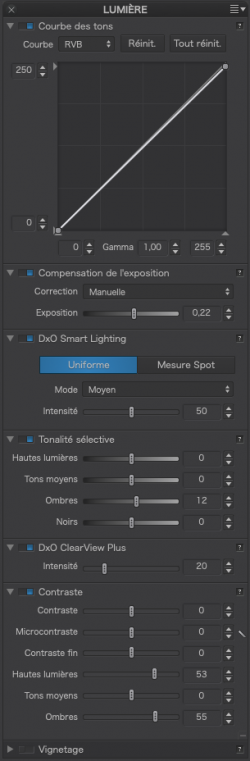
DxO also has some rather magical global adjustments, using tools called Smart Lighting and ClearView Plus, amongst others. Here's a screenshot of the global adjustments I made on the luminosity palette for the second version of the landscape image…

Capture d’écran 2019-12-26 à 23.40.08.png

I also made a local adjustment on the sky to improve the contrast in the highlights/clouds
I am still not convinced these "film packs" react like the real thing using appropriate development, its a faux effect, I can visualize and I think you possibly can being a LF user how this would have worked with film far better from one exposure than ETTR.
Of course film emulations can never be identical to real film, since there are so many different ways you can process the film to change the look and feel.

But, after many years of using the zone system for B&W LF work, carefully exposing and developing to achieve sufficient dynamic range in a negative, followed by scanning and contrast grading in PS, I would be hard pressed to find much difference between a file from a negative so produced and scanned, and a direct, single exposure, RAW image from my D810 (apart from the size and resolution, of course). They both produce a "flat" image that requires careful treatment to extract the best from them. What may be lacking in this instance is that I may have not yet found the ideal settings to achieve the best result. Nonetheless, the image does represent very well the lighting conditions prevailing at the time I took the shot.

I've just tried adding a yellow filter, which seems to make a subtle difference to the detail in the foreground stonework.

_JNA0002_2_DxO.jpg
 
Last edited:
That good eh? :p

HI Joanna. What I meant was that after my first comment about it looking too dark, I've read the other's comments and I'm not sure what to make of the issues related to what seems to be underexposure in the picture. Yes, for me I can see no detail in the darks to the left of the pathway.
 
Would you consider sharing the Actual RAW file for us to download
That really does sound like your screen isn't calibrated.

I see this as a great learning curve for those who wish to get the upmost out of their Digital Sensor but I also feel we are not seeing the entire picture possibly due to compression.

Would you consider allowing the members to download the actual RAW file so they can get an idea of what your doing by looking at the file in their own RAW converter
 
I think we are talking about after you have tried to recover the shadows, they have blocked shadows all over the place.
I can understand DR but I really cannot see how this image can be called correctly exposed ETTR or not, just because you can recover underexposed areas does mean it’s correct, if you have exposed to the right, is the histogram stacked more to the right, which it should be for ETTR how come it’s so dark in the raw state, surely it would have been a little lighter unless of course, it was that dark you needed night vision goggles ;-), I still say rather than DR you have recovered degraded shadow and highlight detail, the only areas that look right are the sky and water, the areas your camera exposed correctly.

It would be helpful to see this Raw file as Ian suggests
 
Last edited:
Back
Top