Opinions on images for teaching B&W

Joanna Carter

Well-Known Member
Registered
I will be teaching a session on B&W photography to our photo club next month.

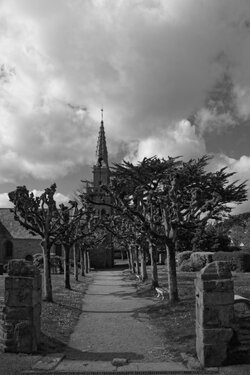
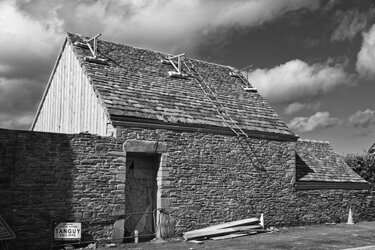
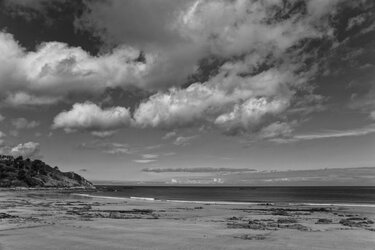
I made three images today; not particularly for what they are an image of, but as a demonstration of the tonal quality that folks should expect when looking to do B&W.

Fortunately, the light around here was superb this morning and, to my mind, was ideal high contrast hard and clear light for demonstrating the use of a "red filter", applied in DxO; I used the Fuji Acros 100 film emulation with blue and cyan cut to nothing and red boosted in the channel mixer.

I know this might not be to everyone's taste but I would be grateful for opinions and ideas of whether the rendition is what you would expect from a "good" B&W image.

After exporting from DxO, the rendition in Safari is a tad duller than in DxO

8002

8003

8004
 
I think it doesn’t really look like a. Red filter as I remember it but I always find red filter emulation software a bit disappointing: not that there’s anything wrong with the images, though the last one is a little flat compared to the other s.
 
My conversion method is pretty much as yours except that I use Affinity Photo. I also tend to darken the skies and lighten the clouds (levels or contrast) a bit more that you.
 
What is a good black & white photograph Joanna? Reviewing any photograph is subjective. On this forum we see a multitude of styles the majority of which are good examples of the genre.
I ran a similar workshop for my club recently and found the easiest way of demonstrating what can be achieved in black & white was to take a well exposed colour photograph into Silver Efex Pro and to show the various effects that can be achieved using the presets. This prompted lively discussion as to which editing worked for different people proving my point regarding subjectivity.
This exercise led on to what editing techniques had been used to achieve the differing results.
 
What is a good black & white photograph Joanna?
An excellent question! As you say, it is very subjective; I was simply trying to provoke discussion here to "preload" some ideas to present.
I ran a similar workshop for my club recently and found the easiest way of demonstrating what can be achieved in black & white was to take a well exposed colour photograph into Silver Efex Pro and to show the various effects that can be achieved using the presets. This prompted lively discussion as to which editing worked for different people proving my point regarding subjectivity.
DxO seems to contain most, if not all, of the Nik collection and, since a lot of people in the club are not yet into doing any post-processing, we have steered them towards DxO as a relatively inexpensive, but still powerful, and easy to use tool that doesn't require a subscription. You have confirmed my idea of using it to demonstrate how to take a colour image from the camera and convert it.

Unfortunately, there are some people who believe that you shouldn't need to do post-processing if you do all the work in the camera ;) That is, until I pointed out that the "picture modes" and various other adjustments are only valid for jpeg images; there were some surprised looks when they discovered that taking a picture in B&W mode, with a RAW file, produced a colour image :)
This exercise led on to what editing techniques had been used to achieve the differing results.
I'm hoping that being forced to use post-processing for B&W will also encourage those who eschew its use to realise that, like a film negative, a RAW file holds so much more information that simply is not visible on the LCD screen on the camera. Then there is the fact that there are very few prints from film that haven't undergone some "customisation" in the printing process; somehow people seem to think that digital means "magic" and that they shouldn't have to put in any effort at all.

As you mention, you need to create the best possible image in the camera and then work on it to extract the detail and feeling that you envisioned when you made the exposure. I have already done a session on "the perfect exposure" and used DxO to demonstrate that, with a RAW file, you need to expose for the highlights and let the shadows fall where they will, recovering them in post-processing. Sort of like a reversed zone system; something that is logical to imagine if you consider the zone system is for negatives and digital images are positive :cool:

Thanks for your input.
 
Personally Joanna I would avoid any plug ins or presets and use PS tools. Otherwise students could just do a basic conversion without understanding what they are doing behind the scenes, as it were. Just my 10 cents though, but it's how I learned... good luck though...
 
Joanna, I agree with Alan. The more techniques you show the more they will forget. I would keep it very simple, PS using levels, curves and dodge and burn. That's all I ever use, as close to the darkroom as you can get it. Good luck, you will be grand.
 
I would say the best starting point of any workshop is to show what elements you need to start making a good image, I always state four

Contrast
Tonal Range
Texture
Mood

Before they are considered, one has to have an idea of what they want from each file, in terms of a finished picture, a plan, then start slowly building the image bit by bit using the four main ingredients.

At first, I would not show the use of plugins to do the work, they must have a basic understanding of working with layers, and selections, plugins come later.

This is a sound start for any workshop IMHO

As for the tonal range, the middle one stands out.
 
I am in complete agreement with that approach Martin and that was the starting point of my workshop. I was not suggesting that one starts by teaching from Silver Efex purely using the presets as an example of the different effects that can be achieved with a black and white image. The discussions that followed were all based around the use of contrast, tonal range and mood and how they were used or could be interpreted from the presets.
Worked examples in Photoshop and Lightroom were the subject of further workshops and the use of Nik Silver Efex is yet to be tackled.
 
I have to clarify something - some people in the club don't really yet know how to get their images from the camera to a computer, let alone process them on it. We are starting with a very low level of assumed knowledge, where many have only just started to realise that P mode is a "bad thing™" and we are coaxing them gently into making pictures rather than just taking snaps.

I have touched on using DxO (Photoshop and plug-ins would be a step too far) and shown how easy it is to make tonal adjustments to compensate for wide dynamic range but we haven't yet done any proper sessions on using software to perfect pictures.

With DxO and its FilmPack, all you need to create a B&W from a file is to select the preferred film type and then refine how strong the effect is with one slider. This is the rough equivalent of buying a roll of film and sending it to a lab for processing. That will be sufficient to start with, then we can move on to discuss more detailed adjustments for those who are minded to take things further.

I doubt if many of the 50 or so members in the club will pursue it seriously; some are already feeling moving out of P mode was a step too far.

I would say the best starting point of any workshop is to show what elements you need to start making a good image, I always state four

Contrast
Tonal Range
Texture
Mood

Before they are considered, one has to have an idea of what they want from each file, in terms of a finished picture, a plan, then start slowly building the image bit by bit using the four main ingredients.

Thanks Martin, that confirms some of the ideas I was formulating. As I said, this is not a course for photographers as you or I would understand in this forum, it is more for folks who have bought a camera and want to know how to make better pictures than the, often failed, attempts that have made so far.

February's course was all about how to avoid white skies and other blown highlights, which is why we touched on the need to place the highlights and then recover the shadows in post-processing. We did a 2 hour teaching session one week, followed by a sortie on a Saturday to get used to using manual mode and the spot metering mode in real life, finally a critique of the images they made on the sortie, using DxO to show just how much detail could be recovered from RAW (and even jpeg) files that look fairly naff on the back of the camera.

One big problem I have always had with teaching at the club is to stop myself assuming the level of knowledge of the members. There is a few of us who can turn out a reasonably competent picture but the majority have been sold compact cameras by our local camera shop, whose idea seems to be to sell them a compact and tell them to leave it in automatic.

The worst cameras we come across are the Panasonic Lumix range, which are either "setup" by the shop or simply left in default mode, with such delights as "Post focus" mode, which takes a short video, altering the focal point for each frame. Then the hapless user has to choose the frame where the focus is how they want it on the small screen on the back of the camera :eek: One of our friends took a whole wedding in that mode and it took both of several hours to get to producing single jpeg files from those "movies".
 
Back
Top