


-
Thank You For Visiting... Please Click Here and sign up to contribute
You are using an out of date browser. It may not display this or other websites correctly.
You should upgrade or use an alternative browser.
Olmstead Point Yosemite Valley Usa
- Thread starter Nokin
- Start date

Just tried to look at the attachment but it is reporting that it could not be found.
Just tried to look at the attachment but it is reporting that it could not be found.
Sorry a problem with the file. had to delete Will resend shortlyJust tried to look at the attachment but it is reporting that it could not be found.
Thanks for the quick response.
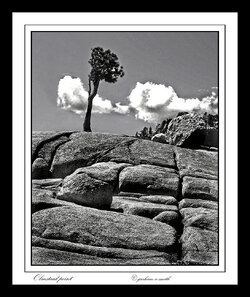

you've got that jpg conversion artefact problem again in the sky: Also the halo around the tree is rather obvious and the contrast on the rocks especially seems a bit high.
Last edited:

What file format are you scanning to? What resolution?
Thanks for your C/C.. I think that the problem with the halo, which I did not see, when processing . Is I have found out it occurs when I change the image from colour to Black and White. I have been using the Saturation method., to desaturate the colour. If I use the Grey Scale method in Photoshop Raw it does not occur . So I shall be using that method in future. Hopefully that will get rid of the Artefacts in the sky also. Which I cannot see!!! Thanks once again .you've got that jpg conversion artefact problem again in the sky: Also the halo around the tree is rather obvious and the contrast on the rocks especially seems a bit high.
Nokin
What file format are you scanning to? What resolution?
Thanks for your interest in my Image. I make the longest side 1000pxls and the resolution 300pixels , that is in Image sizing.What file format are you scanning to? What resolution?
Then I sharpen for web. following John Robinson on You tube , Sharpen for the Web Video.
Thanks.
Nokin
Well, as they say, thar's yer prawblem. For web publishing, you only need 72 ppi and, whatever you are using to resize, you really shouldn't be doing any sharpening when reducing sizeThanks for your interest in my Image. I make the longest side 1000pxls and the resolution 300pixels , that is in Image sizing.
Then I sharpen for web. following John Robinson on You tube , Sharpen for the Web Video.
Thanks.
Nokin

Graham, I thought you'd started to use the Alex Nail process, what happened? The train photo was fine.

I like the composition a lot. The processing not so much.