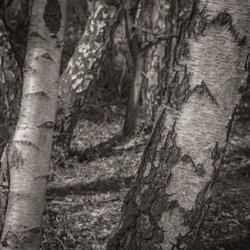
Litcham Common

Digital Finger

Well-Known Member
Registered
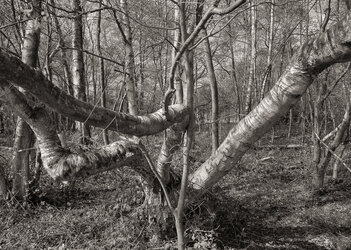
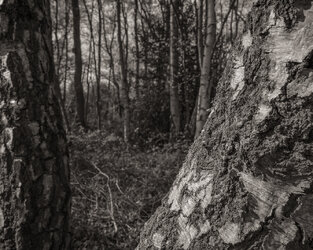
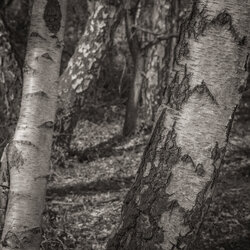
a wander today on Litcham Common-started out bright - then thunder came in-we just hightailed it out of there before the rain hit
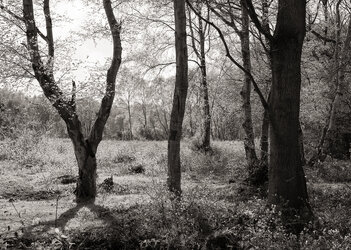
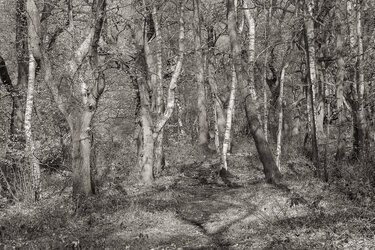
_V8A8633.jpg


_V8A8635-2.jpg


_V8A8641-2.jpg


_V8A8649-2.jpg


_V8A8651-6.jpg
 
Last edited:
OK, got 'em now.

These are really lovely, you have really cornered the light in the first ones, so often really difficult to get much out of densely tangled woodland like this. The last two certainly show off that sensor in your Canon, maybe the birches need to be lifted a bit more out of the background.

thanks Tobythat is good to know- I have lost confidence in editing recently- it seems in retrospect that I have been rather depressed (dealing with parents' demise and sequelae) and it affected my ability to 'see'

I am starting to regain a sense of normality again now but was really wondering whether I had recovered my ability to visualise and edit

Those last two I probably shalln't bother re-editing as the light really was gone by then, I'm not convinced they're worth the effort
thanks for commenting though
:)
 
Last edited:
I enjoyed viewing these as well. Definitely your best work this last while Simon.
 
I enjoyed viewing these as well. Definitely your best work this last while Simon.

Thanks Tommy
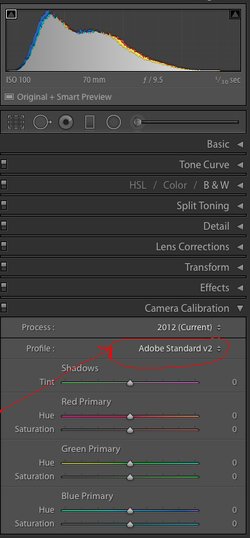
On a technical note I found that by changing the calibration in Lightroom from adobe standard to standardv2 I was better able to control the shadows
 
As, I'm at present, obsessed with learning to contrast grade in LR, these are a feast for the eyes insofar as that. I also like the intimate relationship to the woods.
 
As, I'm at present, obsessed with learning to contrast grade in LR, these are a feast for the eyes insofar as that. I also like the intimate relationship to the woods.


Thanks José.
in case it's of interest my technique is to chimp often (i.e. check the histogram after every shot) , as. a rule of thumb I have exposure compensation set to minus 1 and aim to et the highlights very very slightly clipping in the hit, then With LR I control the highlights with a combo of the highlight and whites sliders. I noticed that a negative in the whites slider tends to kill luminance faster than with the highlights slider so though the far right of the history of 'scrubbed' to the left will move the whites slider, this is not always the best way of controlling clipping. Usually a minimal combination of both is best.
Also as mentioned above , do try the Adobe Standard v2 in calibration. I never find the 'camera' calibration profiles much help.
Also Using the B&W sliders is a great tool for controlling tones
 
With LR I control the highlights with a combo of the highlight and whites sliders. I noticed that a negative in the whites slider tends to kill luminance faster than with the highlights slider so though the far right of the history of 'scrubbed' to the left will move the whites slider, this is not always the best way of controlling clipping. Usually a minimal
I have found something quite similar, Simon. Do you do something like this, to move the HL to the left (negative) until the histogram clears the HL section, and if not then slide the white down to the left? I've found that for printing that works very well? Is this what you're talking about?

Adobe Standard v2 in calibration
I'm not aware of this, what is it?
 
I have found something quite similar, Simon. Do you do something like this, to move the HL to the left (negative) until the histogram clears the HL section, and if not then slide the white down to the left? I've found that for printing that works very well? Is this what you're talking about?


I'm not aware of this, what is it?
re HL/whites: I try one and watch the histo and also the effect on the image, then reset then the other then reset, then based on what I saw there, adjust accordingly. it is often the case that the whites slider will actually better drop the clipping but also uses too much luminance , so often the HL gets used in preference or at a stronger setting than I would like because the strong whites setting is nastier,

I usually balance the two but no rule as to which first
Adobe Standardv2 see attached-try it! (I only very recently noticed it myself)
Screen Shot 2018-04-24 at 22.19.55.png

here's the normal one...
Screen Shot 2018-04-24 at 22.29.33.png


in fact I should have NOT used it for one of my Litcham common pics as replying to you got me to try the other normal adobe standard - see how the contrast pops back in!

However for the other shots it was instrumental in keeping the strong contrast under easy control
--this is the difference it makes without any other adjust menus at all below

with adobe standardv2_V8A8651-7.jpg
with Adobe standard 'normal'_V8A8651-8.jpg
 
Last edited:
re HL/whites: I try one and watch the histo and also the effect on the image, then reset then the other then reset, then based on what I saw there, adjust accordingly. it is often the case that the whites slider will actually better drop the clipping but also uses too much luminance , so often the HL gets used in preference or at a stronger setting than I would like because the strong whites setting is nastier,

I usually balance the two but no rule as to which first
Adobe Standardv2 see attached-try it! (I only very recently noticed it myself)

Thanks for this Simon.

Yes, your HL/whites approach is just about identical to what I'm doing. I just tend to try and get it done with the HL "first" then I adjust the Whites on an "as needed" basis for the same reason, though I didn't realize it was their effect on "luminance" as you point out. It was something I just had picked-up along the way.

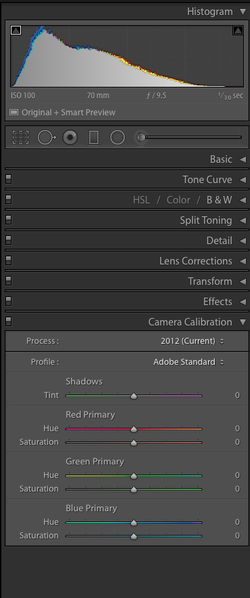
As for the Adobe Standardv2. I don't seem to have that option, perhaps because of my camera(s). I don't know. Here's what my Calibration panel looks like:

CALLIBRATION.jpg

Unlike your's, there's no "Profile" selection option. I wonder why?
I would never have known about this as my Calibration Panel was hidden until you pointed this out to me.

Yes I see the difference and it's "dramatic". Wonders never cease with this stuff. (Which brings up another question that I'm going to explore in the Chat section.) Hmm...
 
Hmmm..not sure where the Adobe standard v2 came from either....either it was already there or I downloaded it and forgot about it....

check this out that I just googled
http://www.fredmiranda.com/forum/topic/1453911

there's more to there....

Yeah, was going to google but you beat me to the punch. Seems like quite the godsend for Canon 5D users. I'm out of that loop. LR & PS has automatic calibration setting for the Olympus M4/3 camera's who knows what they are. I guess I can play with the setting in the Calibration panel myself and see what difference it makes. Thanks, man.
 
Yeah, was going to google but you beat me to the punch. Seems like quite the godsend for Canon 5D users. I'm out of that loop. LR & PS has automatic calibration setting for the Olympus M4/3 camera's who knows what they are. I guess I can play with the setting in the Calibration panel myself and see what difference it makes. Thanks, man.


Ah OK I checked it out and you're right- it's only available for the 5DsR (when I select an image from another camera it disappears ) Sorry 'bout that
 
Back
Top