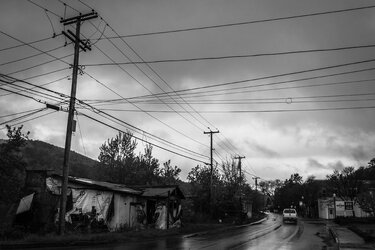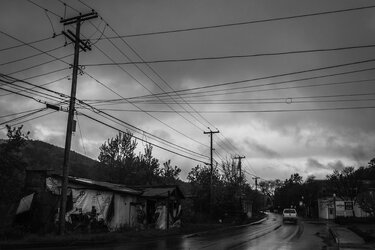
Vermont, Summer 2017

.....and of course, you made the statement with a smile on your face. Undermines everything "Moonlight in Vermont" has made us believe about Vermont. :rolleyes::) Interesting image. The wires are a bit of a pain but at least you have used them to good effect in framing the comp.
 
"Moonlight in Vermont"
Thanks for looking, commenting and the feedback, John. I'm not aware of the "Moonlight in Vermont" reference. I imagine you mean some kind of country scene with snow and moonlight. This was just crossroad I saw while traveling the backroads of Vermont on a rainy day. The dilapidated home in the LL, the pick-up truck, and the sky caught my eye. Thanks, John.
 
It's an age thing José. It's a song. Have a listen, particularly to the second verse:


Second verse;

"Telegraph cables, they sing down the highway and
travel each bend in the road........"

Perhaps not so far out after all. :D
 
Last edited:
Whats wrong with the people who live in this town Jose? Not a single shoe dangling from the overhead wires...:)
 
It's an age thing José. It's a song. Have a listen, particularly to the second verse:


Second verse;

"Telegraph cables, they sing down the highway and
travel each bend in the road........"

Perhaps not so far out after all. :D


Ah, yes. I see. :) "Frank" was born and raised just a couple of miles from here, and less than a mile from where I grew up. I shoulda' known that.

Whats wrong with the people who live in this town Jose? Not a single shoe dangling from the overhead wires...:)
That's right, Alan. I'll have to make a picture down the way, in Hoboken Frank Sinatra's are might still be hanging on those wires. :)
 
This is one of three pictures, I posted a couple of days ago, which represent my first attempts to process my pictures exclusively in the Lightroom Develop module and without even the Adjustment Brush Tool in LR. Since I'd been somewhat familiar with ACR's Basic Panel, I used those adjustments that corresponded to them in LR.

But, I missed some of the controls that I'd enjoyed in Photoshop, that I learned with Martin's contrast grading approaches. So, I brought the original uploaded pictures into Photoshop and adjusted them a bit. What is interesting to me, is that in each instance, the pictures look, to me, much closer to what the scene looked and felt like when I shot them. More so than I was able to accomplish in LR alone. Hmm...
_5141864_01.jpg
_5141864_01.jpg

Thanks, for looking.
 
I too found LR limiting but after much practice find I can get more out of it than before , much more. Some things still need Ps though
 
I too found LR limiting but after much practice find I can get more out of it than before , much more.
Seems like the Adjustment Brush tool in LR, that I know very little about, since I seldom used it in ACR, is a VERY valuable tool in LR to achieve similar results in Photoshop. Have you used the Adjustment Bruch much in LR, Mr. Simon?
 
Seems like the Adjustment Brush tool in LR, that I know very little about, since I seldom used it in ACR, is a VERY valuable tool in LR to achieve similar results in Photoshop. Have you used the Adjustment Bruch much in LR, Mr. Simon?

nope can't stand it- it's slow and clumsy
What I do use though (after the basic/B&W etc) are the other tools, Grad, radial filters, subtly
I get most out of the basic panel, took me a long time to realise what really does what
 
nope can't stand it- it's slow and clumsy
...funny, I'm sitting here reading all of these articles online about the great benefits and flexibility of the LR Adjustment Brush:

https://www.google.com/search?q=lig...ome..69i57.11463j0j7&sourceid=chrome&ie=UTF-8

... I'm just learning. I thought the same as you with it in ACR. but now trying to work in LR . . . I'll look into the Grad, radial as well.

I get most out of the basic panel, took me a long time to realize what really does what
I'm more familiar with the Basic panel, as I've always tried to "optimize" pictures in ACR before bringing them in as Smart Objects into Photoshop for a rather complex method of B&W conversion. While complex it gives me a great deal of control over specific parts of the picture on multiple layers.

I'm trying to achieve that same level of control over specific areas like I can in Photoshop. I imagine, it would be like the same kind of simplicity and control one could achieve in the wet darkroom, that I know nothing about.

But something like adjusting just mid-tone contrast, I have no idea how to do that in LR at the moment.

I think I may be rambling... :)

Thanks for the feedback.
 
nope can't stand it- it's slow and clumsy
:) Simon, please forgive my poking an open wound. :)

In playing around with it local adjustment with that brush,(the Adjustment Brush) I've found that when optimizing a picture before B&W conversion, when converted to B&W in the Develop module, those adjustments from the AB carry over and can be further adjusted. I think that is very cool for local adjustments.

I look forward to trying and finding the same, with the Grad & Radial Filter as well. Very cool.
 
No probs José - I have very short attention spanner and just can't be bothered wit the Adjustment brush

Re:Midtone contrast in LR: I think it requires a VERY fine tuning between contrast/clarity/B&W/ and lowering shadows and lifting highlights separately in the radial and grad filters
 
No probs José - I have very short attention spanner and just can't be bothered wit the Adjustment brush

Re:Midtone contrast in LR: I think it requires a VERY fine tuning between contrast/clarity/B&W/ and lowering shadows and lifting highlights separately in the radial and grad filters

Thanks for that, Simon.

I'm playing with the Grad & Radial filters now. Wow, so powerful. I can see that becoming good with these too, and the others tools in the Tool Strip can give one a great measure of control insofar as contrast grading.
 
Back
Top