

-
Thank You For Visiting... Please Click Here and sign up to contribute
You are using an out of date browser. It may not display this or other websites correctly.
You should upgrade or use an alternative browser.
You should upgrade or use an alternative browser.
River Clough Garsdale.
- Thread starter John2
- Start date
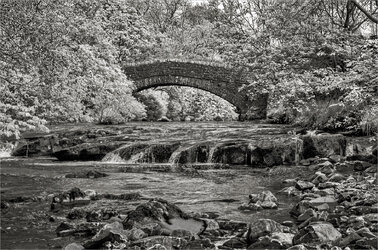
I like the subject and the composition. But I find the textures rather weird and unnatural.

Alan, I can't disagree with you because I'm not entirely happy myself. What is it that bothers you? I ask because I have deliberately added some Gaussian Blur to counter claims that I consistently over sharpen when very often I don't Knowingly do so. The only other processing was to lighten the green foliage to add some subject contrast.
Hi John, It's difficult to say why I think it doesn't look natural. I don't do much digital, being more than happy with film. But I do know that digital opens up a whole range of options, which make it easy for things to go wrong. Perhaps there is too much micro contrast. And I'm not sure what gausian blur is, but it doesn't look sharp.
Apologies if this doesn't help.
Apologies if this doesn't help.
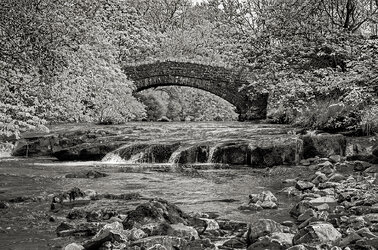

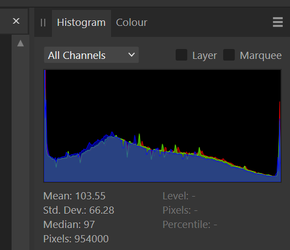
Ok, that is interesting. The image clearly has some toning applied because the red, green and blue channels are not perfectly aligned in the histogram. In other words, the image has not simply been desaturated and cropped but must have had some additional process applied. If you don't recognise this as something you have applied in post then is something going on in the camera? Are you perhaps using one of the camera's internal filters to produce your black and white TIFF?
The other thing I notice is that the pixel size is similar to the foliage size which can affect the ability of the image to convey fine detail. You may wish to try posting a slightly higher resolution version, say 2k pixels on the longest edge. If that is not available from your TIFF file then it would be worth checking your camera settings to make sure you are shooting at full resolution.
The other thing I notice is that the pixel size is similar to the foliage size which can affect the ability of the image to convey fine detail. You may wish to try posting a slightly higher resolution version, say 2k pixels on the longest edge. If that is not available from your TIFF file then it would be worth checking your camera settings to make sure you are shooting at full resolution.
Last edited:
No, you're right Glenn, the image has had a light sepia tone applied and as I said above, I had lightened the green foliage in post to provide some subject contrast. I never just desaturate. For most images, I prefer to use the B/W colour mixer to differentiate similar tones. None of that explains the texture problem that Alan pointed out. I need to find the original raw image and see if the problem was there in the first place.
I agree, the RAW image should tell all. I too use the B/W colour mixer: I only suggested desaturation as a troubleshooting method not as a workflow change. Desaturation doesn't change the luminance but the mixer does and can sometimes cause clipping. Perhaps too the RAW image will have a higher resolution that you can utilise to your advantage.

Nice location and good composition, but the processing is really weird. The second one is better, but it looks incredibly oversharpened.