

-
Thank You For Visiting... Please Click Here and sign up to contribute
You are using an out of date browser. It may not display this or other websites correctly.
You should upgrade or use an alternative browser.
You should upgrade or use an alternative browser.
On The Edge
- Thread starter kev145
- Start date
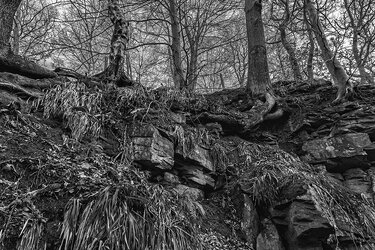

I quite like the image Kev but it is rather too busy and grey for my old eyes so I was wondering if a more interesting picture could be made with a crop from a part of it, say from the bottom RH corner: up 2/3rds and to the left 2/3rds. Those rock and root formations are interesting but might be a tricky bit of editing - perhaps another visit?

There's a good shot in this scene, except you haven't found it. Rather than shoot a wide swath of the trees, rocks and roots, etc. which makes the scene look very cluttered and discombobulated, I would have isolated a smaller section of the scene and made that my image. Remember the adage..."less is more" and it's very applicable in this case.

There are a good number of very dense areas with no detail at all. Was this intentional? Have you tried lifting the deepest shadow areas at all, I feel that the overall image would be lifted and not be so sombre and 'heavy'. I do like images which have a good 'body' but for me this is a tad too far. Sorry.

No need for apologies John, different opinions are what this forum is all about. Left the deep shadows as they are because thats the way they were.
Not sure what you mean about dense areas with no detail but thank for your comment and a belated welcome to the forum.
Not sure what you mean about dense areas with no detail but thank for your comment and a belated welcome to the forum.

this is all about textures but I don't think they are differentiating enough
A
Alan Jones
Guest
Kev,
This is a nightmare image for me to process, i have tried them and i cant do it. They look really strong and imposing at the time of capture however the edit seems to elude me. I have come to the conclusion that when i ask myself can i do it? i answer "Can i eckers like"
Regards,
Alan
This is a nightmare image for me to process, i have tried them and i cant do it. They look really strong and imposing at the time of capture however the edit seems to elude me. I have come to the conclusion that when i ask myself can i do it? i answer "Can i eckers like"
Regards,
Alan
A few posts back I stated that I thought it was a bit 'heavy'. I take that back. I was looking at it on my laptop which was on the wrong angle but not noticed, but on my desktop screen all the detail is there with plentyof detail - It is all there. However I will go along with 'less is more'.
"this is all about textures but I don't think they are differentiating enough"
Well observed and interesting comment, will keep that one in mind for future processing
Sit back and have a strong cuppa Alan, it does help.
Cheers John, " less is more " is a good rule to keep in mind.
Well observed and interesting comment, will keep that one in mind for future processing
Sit back and have a strong cuppa Alan, it does help.
Cheers John, " less is more " is a good rule to keep in mind.
"this is all about textures but I don't think they are differentiating enough"
Well observed and interesting comment, will keep that one in mind for future processing
Sit back and have a strong cuppa Alan, it does help.
Cheers John, " less is more " is a good rule to keep in mind.
What you have here is one of themes challenging sort of images to process well, so I would keep it and try again later so you can see how you'd do it different next time
Did you process it globally or in parts using masks ?
Simon, to answer your question briefly
convert it to B&W in camera raw
open as smart object
use adjustments layers which alters the image globally but brush out on the mask areas which I don't want affected.
dodge and burn on new layers
return to camera raw to make fine adjustments
nik output sharpener using the brush to sharpen selected areas
This is briefly how I do it, would like to know how others do it to try and improve.
I think this image could work. You have to stop the blacks clipping (or quite so near), the trees at top look over sharpened but that was probably just at the last saving for web stage, the long greenery could be made nicely to flow down like a cascade from the sliver birch above, the rocks in between could be more 'metallic' etc
I think overall you have lost the tonal subtlety to make it work well I think a softer more gentle approach could tease out the potential of this image much more
I think overall you have lost the tonal subtlety to make it work well I think a softer more gentle approach could tease out the potential of this image much more

In other words its been edited in Silver efex until its nearly tonally dead, agree entirely with Simons comment above.