Darker Edges on scanned film - Nikon Coolscan V or LS-50

ian_s

Well-Known Member
Registered
Having decided to give a Nikon scanner & Vuescan a go I am still learning !
I have noticed a number of scans give me a darker edge to the results, in this instance more noticeable on the left hand side
Film was freshly developed Ilford XP2 400
The lens (I think was a 21mm)
Any suggestion what may be causing this ?
It does look wider than 3:2, could the scanner be capturing areas where the film coating isn't as good
Alternatively could the film not be sitting flat in the scanner
Or it lens vignetting (I suspect not as the aperture was f8 or so ?
Thanks for any suggestions
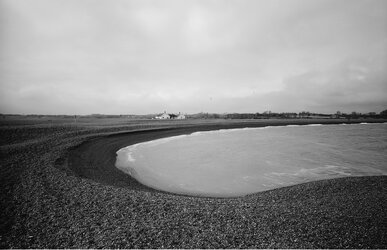
raw0027heavyds-positive.jpg
 
First thing is to find out if it is the film or the scanner. I'd be tempted to photograph the neg with a digital camera, or even a phone, and invert in an editor to check. Alternatively, reverse the film in in the carrier and see if the darker region is on the same part of the negative or not.
 
Last edited:
Is the film home processed? I went through a phase a couple of years ago where the edge (usually the shorted trailing edge) of the film was under developed. It only happened with colour, never B&W. Nor was it every frame and occasionally a film would be perfect. I never did get to the bottom of it because the problem just stopped
The less density on the frame would give rise to a similar problem that you are having.
 
Thanks for the replies.

@Glenn I had tried getting consistent images of negatives on a digital camera but struggled without a dedicated macro lens, stand etc. That's why I decided to go with the scanner as a macro lens plus other bits would cost more and be more liable to dust problems. May be the wrong decision !

@John King The film was developed by Analoguewonderland.co.uk so while they may have had an issue I am not yet confident to suggest they investigate. The XP2 did use a C41 process

Other info I missed from the original post was that I set Vuescan to output a raw file, rather than tiff or jpg. Is there a possibility that some scanner compensation (similar to digital camera compensating for lens fall off) that may have been missed off
 
Was the scanner serviced, Ian? It might just indicate a grubby mirror. I've had something similar with a coolscan IVED, and I've put it aside for a service.
 
Thanks for the replies.

@Glenn I had tried getting consistent images of negatives on a digital camera but struggled without a dedicated macro lens, stand etc. That's why I decided to go with the scanner as a macro lens plus other bits would cost more and be more liable to dust problems. May be the wrong decision !

@John King The film was developed by Analoguewonderland.co.uk so while they may have had an issue I am not yet confident to suggest they investigate. The XP2 did use a C41 process

Other info I missed from the original post was that I set Vuescan to output a raw file, rather than tiff or jpg. Is there a possibility that some scanner compensation (similar to digital camera compensating for lens fall off) that may have been missed off
How did you convert the negative to a positive in photoshop
 
@Martin Henson Thanks for the reply. I did the raw/dng conversion in Lightroom using the curves. Dragging bottom to top and top to bottom etc. Then set white and black points to avoid blocking and clipping. I have subsequently found a plugin called Negative Lab Pro and may try this as a demo.
 
Thanks for the replies.

@Glenn I had tried getting consistent images of negatives on a digital camera but struggled without a dedicated macro lens, stand etc. That's why I decided to go with the scanner as a macro lens plus other bits would cost more and be more liable to dust problems. May be the wrong decision !

@John King The film was developed by Analoguewonderland.co.uk so while they may have had an issue I am not yet confident to suggest they investigate. The XP2 did use a C41 process

Other info I missed from the original post was that I set Vuescan to output a raw file, rather than tiff or jpg. Is there a possibility that some scanner compensation (similar to digital camera compensating for lens fall off) that may have been missed off
If there is a problem with the film the negative will show a lighter band along the offending edges. If there is a band and the camera you used had a focal plain shutter then there could very well be a problem with the shutter blinds. Having said that it would mostly affect shutters with cloth or rubberised blinds, metal shutters such as those used in more modern cameras don't usually have this problem
 
Last edited:
@Glenn I had tried getting consistent images of negatives on a digital camera but struggled without a dedicated macro lens, stand etc. That's why I decided to go with the scanner as a macro lens plus other bits would cost more and be more liable to dust problems. May be the wrong decision !
You've probably got this already but in case not: I only meant to try these things to eliminate the negative as being the source of the issue. I wasn't suggesting you change your workflow.
 
You've probably got this already but in case not: I only meant to try these things to eliminate the negative as being the source of the issue. I wasn't suggesting you change your workflow.
Using my iphone and some patience (a little bit of cursing too ;) ) this is a magnified version of the negative. The white balance is off - blame the iPhone.There is some lightening towards the left hand edge

IMG_7270c.jpg
And here's the crude inversion from the iPhone image

IMG_7270c-positive-2.jpg
 
If there is a problem with the film the negative will show a lighter band along the offending edges. If there is a band and the camera you used had a focal plain shutter then there could very well be a problem with the shutter blinds. Having said that it would mostly affect shutters with cloth or rubberised blinds, meta shutters such as those used in more modern cameras don't usually have this problem
@John King The camera does have a rubberised cloth shutter, but the timing of the curtains was checked at all the speeds (not scientifically but looking at the edges with no lens at a light.) I would expect a more pronounced band if it was a shutter issue - what do you think ?
 
Last edited:
Thanks for the replies.

@Glenn I had tried getting consistent images of negatives on a digital camera but struggled without a dedicated macro lens, stand etc. That's why I decided to go with the scanner as a macro lens plus other bits would cost more and be more liable to dust problems. May be the wrong decision !

@John King The film was developed by Analoguewonderland.co.uk so while they may have had an issue I am not yet confident to suggest they investigate. The XP2 did use a C41 process

Thanks for the replies.

@Glenn I had tried getting consistent images of negatives on a digital camera but struggled without a dedicated macro lens, stand etc. That's why I decided to go with the scanner as a macro lens plus other bits would cost more and be more liable to dust problems. May be the wrong decision !

@John King The film was developed by Analoguewonderland.co.uk so while they may have had an issue I am not yet confident to suggest they investigate. The XP2 did use a C41 process

Other info I missed from the original post was that I set Vuescan to output a raw file, rather than tiff or jpg. Is there a possibility that some scanner compensation (similar to digital camera compensating for lens fall off) that may have been missed off.

That should not make any difference. I have just noticed on the sample you sent through that the banding is darker on on side than the other so I think that rules out the shutter problem. It isn't vignetting either because that would be more apparent in the corners Have a look at the negs and see if you can see any difference in the depth of the image contrast/density. If not then the problem could well be with the scanner.
@John King The camera does have a rubberised cloth shutter, but the timing of the curtains was checked at all the speeds (not scientifically but looking at the edges with no lens at a light.) I would expect a more pronounced band if it was a shutter issue - what do you think ?
 
I retract what I said about a shutter problem. Now I have seen the negatives it gives a better idea of what is going on.

Just checking the blinds visually is not good or accurate enough, it has to be done on a correct device for checking speeds. A human eye is not quick enough to detect problems like these This to me, now I have the information sounds as if it is either the shutter curtain is being a little sluggish at both the end of, and start of the shutter travel. What camera was it?
Elderly Leicas were/are notorious for it, but other cameras are not immune. If it was happening only at the end of the 2nd curtain travel it is known a Shutter Bounce where the shutter arrives at the end of the run but bounces slightly off the stop. When it is at the start it looks as if the 2nd curtain is just that little bit sluggish to initially get moving. It looks as if a shutter service is needed. I am not a camera technician but I have seen this before, (On an elderly, early Leica M3 (double wind) from the mid 1950's) and that was the diagnosis from Leica when I sent it to be serviced. The service was done and the problem went away.
 
Last edited:
I retract what I said about a shutter problem. Now I have seen the negatives it gives a better idea of what is going on.

Just checking the blinds visually is not good or accurate enough, it has to be done on a correct device for checking speeds. A human eye is not quick enough to detect problems like these This to me, now I have the information sounds as if it is either the shutter curtain is being a little sluggish at both the end of, and start of the shutter travel. What camera was it?
Elderly Leicas were/are notorious for it, but other cameras are not immune. If it was happening only at the end of the 2nd curtain travel it is known a Shutter Bounce where the shutter arrives at the end of the run but bounces slightly off the stop. When it is at the start it looks as if the 2nd curtain is just that little bit sluggish to initially get moving. It looks as if a shutter service is needed. I am not a camera technician but I have seen this before, (On an elderly, early Leica M3 (double wind) from the mid 1950's) and that was the diagnosis from Leica when I sent it to be serviced. The service was done and the problem went away.
Thanks for the advice, i‘ll investigate a shutter service. It’s a lot newer than mid 1950’s but out of any warranty, also hear that trips back to ‘home’ in Germany can take many months so will look for a UK based solution.
 
You know it could be uneven development, you could be agitating the film to gently , for moving developer around the tank do you use the swivel stick or inverting the tank
 
Thanks for the advice, i‘ll investigate a shutter service. It’s a lot newer than mid 1950’s but out of any warranty, also hear that trips back to ‘home’ in Germany can take many months so will look for a UK based solution.
There are Leica authorised repairers in this country. My M3 went to their place in MIlton Keynes (I am not sure if they are still open there though) and the full service was not as costly as I was originally estimated and took as far as I recall 10 days or perhaps a fortnight. If you search Google for "Leica repairers UK" there is a list worldwide, but one for UK. Currently there are 7 named and one who will undertake lens recoating.
It appears the Milton Keynes site where I sent min M3 no longer deals with cameras and repairs, although it is still Leica it handles only technical measuring instruments.
 
Last edited:
Back
Top