

-
Thank You For Visiting... Please Click Here and sign up to contribute
You are using an out of date browser. It may not display this or other websites correctly.
You should upgrade or use an alternative browser.
You should upgrade or use an alternative browser.
Chape-le-Dale
- Thread starter K mann
- Start date
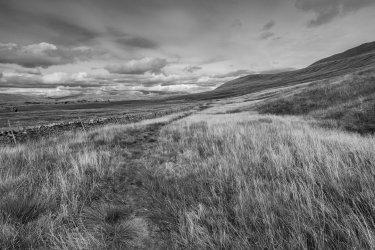
I like this a lot. I used to do a bit of photography in the Inglebrough area, but never went to Twistleton Scar.
The textures in the grass are really good. I wonder if you are able to supply some technical details.
Alan
The textures in the grass are really good. I wonder if you are able to supply some technical details.
Alan

Thank you Alan....i will do for sure.I like this a lot. I used to do a bit of photography in the Inglebrough area, but never went to Twistleton Scar.
The textures in the grass are really good. I wonder if you are able to supply some technical details.
Alan
Naaa the Alan, In answer to your question with some of my ways of editing....Thank you Alan....i will do for sure.
What i no first is use Capture one 21 pro as my RAW edit base tool. I then migrate to photoshop and use the new undated DxO NIK plugin.
I will then colour Efex pro 4 and the first tool i use is the pro contrast option to and use the brush tool to paint in the sky, the reason i use that tool for the sky as a found out a few weeks back is it showed that i could slight push it that bit further without noise introduction. I will then use the same tool for the ground and i believe chose to go upto and 40% with the dynamic contrast and about 8% with the correct contrast slider but will be selective to brush in only sections, (for example, in the grass area of the above image, which has a pale yellow colour).
I use that tool effect again for the rest...
I will then choose layer then flatten.....I opened up NIK plugin again but this time choose to use the tonal contrast colour Efex pro 4 for a global view but use it wisely to not over do the adjustments and again do some selective brushing in.
Many of us have different ways to editing, some may frown upon this but i want for myself an editing routine that suits....
Oh and another good NIK tool is Viveza which allows to do some selective editing.
Wow. Many thanks for your very detailed reply.
I really like the way that you have done nothing "over the top" here and produced something with really nice textures etc.
Alan
I really like the way that you have done nothing "over the top" here and produced something with really nice textures etc.
Alan
Your welcome and appreciate the positive this has given to you.Wow. Many thanks for your very detailed reply.
I really like the way that you have done nothing "over the top" here and produced something with really nice textures etc.
Alan