

-
Thank You For Visiting... Please Click Here and sign up to contribute
You are using an out of date browser. It may not display this or other websites correctly.
You should upgrade or use an alternative browser.
A Quack in the Water
- Thread starter Maharg
- Start date
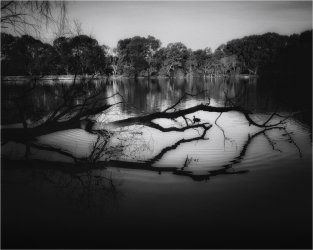
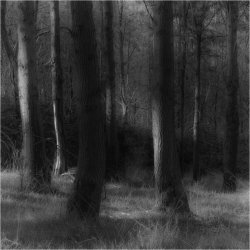

The second one is another beauty.

Thank you Toby.The second one is another beauty.

Like both
There seems to be some sort of diffusion filtering going on here. It doesn't seem to be at the picture taking time but rather in post.
I'm used to using diffusers when taking the picture which 'spread' the highlight details into the mid and lower tones of the image. This diffusion reminds me of a technique I have seen for applying diffusion during BW printing which has the opposite effect of spreading the shadow areas of the image, (lighter areas on neg), into the mid and higher tones on the print.
Maharg, are you doing any unusual post work on these images?
I do some post work on nearly all my images. I try to keep it to a minimum if I can. Also I wouldn't call myself a photographer, just some old fart that likes to walk around with a camera. Therefore I have little to no knowledge of what would be unusual or usual. Having said that I almost always play around with dodging and burning in little areas within the image. From what I have seen on how to edit your images on youtube videos my post work is different in that I am doing very little editing and also doing things in a different order and moving sliders in the opposite direction to what is recommended most of the time.There seems to be some sort of diffusion filtering going on here. It doesn't seem to be at the picture taking time but rather in post.
I'm used to using diffusers when taking the picture which 'spread' the highlight details into the mid and lower tones of the image. This diffusion reminds me of a technique I have seen for applying diffusion during BW printing which has the opposite effect of spreading the shadow areas of the image, (lighter areas on neg), into the mid and higher tones on the print.
Maharg, are you doing any unusual post work on these images?
I should add that I have never made a print. If I had a darkroom I would make prints, but it looks like I will never have a darkroom. My digital camera is an iPhone 8 and my film negatives are scanned on an Epson 600. Post editing is done in Lightroom or Nik. iPhone images are edited in Snapseed on the phone. My background is in Illustration, calligraphy and type design and fine art not photography. I prefer film to digital and I hate photoshop. In retrospect I suppose I could say that I am doing some unusual things in post and perhaps looking and seeing things a little differently to most photographers, possibly.


I agree with what you are seeing, in the second image in particular. I don't seek that effect, but it seems that one way to get it is to decrease clarity in Lightroom.There seems to be some sort of diffusion filtering going on here. It doesn't seem to be at the picture taking time but rather in post.
I'm used to using diffusers when taking the picture which 'spread' the highlight details into the mid and lower tones of the image. This diffusion reminds me of a technique I have seen for applying diffusion during BW printing which has the opposite effect of spreading the shadow areas of the image, (lighter areas on neg), into the mid and higher tones on the print.
Maharg, are you doing any unusual post work on these images?
One photographer who uses diffusion in a traditional darkroom is Brian Kossoff. If you are not familiar with his work, you should check it out: https://www.kosoff.com/Artist.asp?ArtistID=39770&Akey=C782FMS2

When I first look at the pictures, I though you used a filter like this one: https://kenkoglobal.com/product/black_mist_no_05/
Very lovely dreamy look!
I am not familiar with the work of Brian Kossoff. I will check out his work. Thanks for the links!I agree with what you are seeing, in the second image in particular. I don't seek that effect, but it seems that one way to get it is to decrease clarity in Lightroom.
One photographer who uses diffusion in a traditional darkroom is Brian Kossoff. If you are not familiar with his work, you should check it out: https://www.kosoff.com/Artist.asp?ArtistID=39770&Akey=C782FMS2
I use Nic soft ware for post work. I will often use Nic Color Efex Pro 4 Dynamic Skin Softener to create this effect. It works well but you do need to be careful and follow less is more thinking. Although 99% of the work is in b&w I use Color Efex Pro for most of my post processing. Works for me.When I first look at the pictures, I though you used a filter like this one: https://kenkoglobal.com/product/black_mist_no_05/
Very lovely dreamy look!
