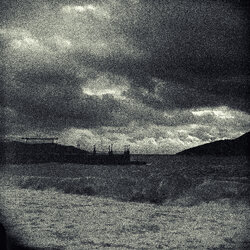
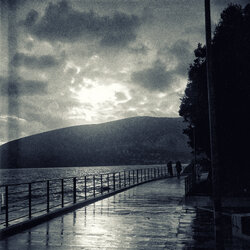
The Adriatic is stormy

Yury Melnikov

Member
Registered
Hi everyone!
I shot a sea storm on Fomapan 100 film. Lubitel 166U.
For some reason, my entire film is covered in little white spots. I don't know why. I processed the film using the tried and true method in the tried and true developer.
Has anyone else encountered this?
 

Attachments

  • _DSC4821-редакт-редакт Aka Leonard Misson.jpg
    _DSC4821-редакт-редакт Aka Leonard Misson.jpg
    10 MB · Views: 39
It may be my screen, but this appears to me to be a long way off the quality of the previous images you have sent in. Yes it is grainy but that can have a an extra impact but I am afraid not in this case.
I see what you mean by the white spots but they are only visible on my screen if I enlarge the image. Do you think if the image was lighter the spots could become less if, not invisible
 
The Lubitel 2 was my first "serious" camera.

I wonder if the issue is reticulation, a phenomenon encountered when there is a sudden change in temperature while developing film.
 
I do not think it is reticulation, The appearance of reticulation when enlarged looks like a lot of tiny caterpillars, and this is grain, pure and simple, which you can see if the image is enlarged on the screen and at the same time show the white spots.

Even brightening my screen to the max does not lighten the image in the deepest shadows in the lower 1/3.
 
Colleagues, thank you for your attention to my problem. I wrote to the manufacturer about these white spots, and here's the response I received:

"Hello Yury,

we are sorry about incurred problems, you described.
On part of the materiál 120 there is a problem with worse washing of the green layer.
At present, the problem is solved by not using this dye.

The spots can be residues of not decolorized anti-halo layer.

We can advise you to remove these spots with this instruction:

1) Prepare a working solution with at least 40% ethanol (optimally 70%).

2) Carefully insert the sheet film foils into a tray or cylinder container with a sufficient amount of ethanol solution using the anti-halogen layer up (emulsion side down) into the tray or into the cylinder.

3) Keep the negatives in this solution for about 45 minutes and make a slight movement every 4-5 minutes.

4) Wash the negative sheets under running tap water for 2-3 minutes. 5) Perform standard drying, including previous application of wetting agent solution (FOTONAL).

Hope you will achieve to save your processed negatives.


Please write me how many of your films this defect concerns

Kind regards,
Jana Müllerová"
 
It may be my screen, but this appears to me to be a long way off the quality of the previous images you have sent in. Yes it is grainy but that can have a an extra impact but I am afraid not in this case.
I see what you mean by the white spots but they are only visible on my screen if I enlarge the image. Do you think if the image was lighter the spots could become less if, not invisible
John, I was fascinated by Leonard Misson's work.
Then, the other day, we had a storm and rain. I grabbed my camera, which is great for heavy rain, and went out to shoot.
I metered the exposure based on the brightest part of the sky.
The graininess of the image adds a certain charm to the image (I think).

Here's another image, where the graininess is minimal. I think the picture is less expressive.
 

Attachments

  • Lubitel 166 aka Misson (1).jpg
    Lubitel 166 aka Misson (1).jpg
    7.8 MB · Views: 24
...

The spots can be residues of not decolorized anti-halo layer.

We can advise you to remove these spots with this instruction:

1) Prepare a working solution with at least 40% ethanol (optimally 70%).

...
Interesting. So do you think you will try it? I think I might be tempted to try it on a small and unimportant part of the film first.
 
John, I was fascinated by Leonard Misson's work.
Then, the other day, we had a storm and rain. I grabbed my camera, which is great for heavy rain, and went out to shoot.
I metered the exposure based on the brightest part of the sky.
The graininess of the image adds a certain charm to the image (I think).

Here's another image, where the graininess is minimal. I think the picture is less expressive.
Hi Yuri

It has still come on my screen as very dark, Even lightening to screen to maximum makes only a slight improvement.

It may be that you are metering it incorrectly and loosing detail in the shadows. When I started using a camera seriously I joined a club where the 'elders' of the club were always ready with helpful and good information. There advice would have been along the lines of 'Expose for the shadows and let the highlights take care of themselves.' This is based upon the reasoning that if you meter for the highlights that will cause loss of detail in the shadows which generally cannot be recovered. But if you meter for the shadows this will cause the highlights to be over exposed. but with a bit of burning in when printing (giving extra exposure to the highlights alone,) then an acceptable print with a good range of tones can be obtained.
 
Hi Yuri

It has still come on my screen as very dark, Even lightening to screen to maximum makes only a slight improvement.

It may be that you are metering it incorrectly and loosing detail in the shadows. When I started using a camera seriously I joined a club where the 'elders' of the club were always ready with helpful and good information. There advice would have been along the lines of 'Expose for the shadows and let the highlights take care of themselves.' This is based upon the reasoning that if you meter for the highlights that will cause loss of detail in the shadows which generally cannot be recovered. But if you meter for the shadows this will cause the highlights to be over exposed. but with a bit of burning in when printing (giving extra exposure to the highlights alone,) then an acceptable print with a good range of tones can be obtained.
Not strictly true. Yes, you meter for the shadows. But you don't let the highlights "take care of themselves". You control the highlights and keep them in check by giving reduced development.
 
Not the way I was guided to use and it has never failed me for the past 62 years. If you reduce the development that will stifle the developments of the shadow detail so you are heading back to square one. This can be mitigated a little by reducing the ISO of the film but unless you have good information or knowledge what would be best it can still be a bit of a risk
 
Last edited:
John, using extra exposure and reduced development to control high contrast lighting is a tried and tested method that has been used for many years. It reduces excessive negative contrast and makes the negative easier to print. It is not difficult to do and I can't think why you seem to be warning against it.
 
Last edited:
Because it is easier and you do not have to change the development time. The burning in, is done in the darkroom and much easier to judge than guesswork involving reduced times. Also if you are using say 35mm or 120, and that may have several changes of ISO in the roll, but not with all the frames, Then the complete film is developed at the standard times then you may/will run in to other problems. It probably will work with sheet film, but on a roll of between 12 and 36 it really is a non starter.

I think I will stick with what I was told in the early 60's by folk who probably had the same or more experience than I do today. It worked then and still works now.
 
I also do it the way John does in a way, I use a pentax spot meter and always meter biased to the shadow's using the PMM method of metering, it seems to keep thing's simple for me. What ever works for you is the correct way.
 
Flack, John and I are in agreement about metering for the shadows, as you describe. What we are disagreeing about is what you do with the negative highlights. John lets them fall where they will. I prefer to give reduced development to film taken in very contrasty light, to to keep the negative highlight density in check, and make the negative easier to print. John says this method is a non starter, despite the fact that it has been in common use for decades.
 
Yes BUT! if you reduce the development time you also loose other details too. It will be a bit of guesswork what degree of reduction with the development will give the best results.
With normal development you keep 100% of the detail.When printing in the darkroom it is far easier to make a test strip for the greater part of the exposure which has normal contrast and a separate test strip for the highlights with the exposure decided for the areas with normal exposure as the base, and add extra exposure for the highlight area, possibly even using a softer filter to aid the result you are after. That way you can have unlimited attempts to get it right, With reduced development get it wrong, and the job is toast.
 
You've got a fertile imagination John but fortunately it doesn't happen in the way you describe. You don't lose shadow detail. The shadows, where very little activity has taken place, develop out fully early in the development process. In any case, the method involves giving an extra stop of exposure. This is to boost the mid-tones. Reducing development brings the highlights down - as you want to happen - but it also brings the mid-tones down a bit, and the extra exposure brings the mid-tones back up to where you want to see them in the finished print. So you certainly don't lose shadow detail.
The main question is, by how much do you reduce development? Ilford give times which are for "Normal" development. These are calculated to work well for film taken in "normal" contrast, i.e. a bright day with no sun. For film taken in strong sun, a reduction of 20% in development time is generally recommended. You could always start with a 10% reduction, if you want to play it safe.
I say "you" but I know you won't bother with any of this John. I only mentioned this in case anyone here is new to film, and wants to give it a try.
 
You've got a fertile imagination John but fortunately it doesn't happen in the way you describe. You don't lose shadow detail. The shadows, where very little activity has taken place, develop out fully early in the development process. In any case, the method involves giving an extra stop of exposure. This is to boost the mid-tones. Reducing development brings the highlights down - as you want to happen - but it also brings the mid-tones down a bit, and the extra exposure brings the mid-tones back up to where you want to see them in the finished print. So you certainly don't lose shadow detail.
The main question is, by how much do you reduce development? Ilford give times which are for "Normal" development. These are calculated to work well for film taken in "normal" contrast, i.e. a bright day with no sun. For film taken in strong sun, a reduction of 20% in development time is generally recommended. You could always start with a 10% reduction, if you want to play it safe.
I say "you" but I know you won't bother with any of this John. I only mentioned this in case anyone here is new to film, and wants to give it a try.
But get it wrong and your work is toast! As I said quite clearly before this will also affect other images on a roll of film unless they ALL need reduction in time. It is/could be OK with sheet film, but not a roll of 120 or 35mm. Doing it the old, tried and tested way from way back, long before your or I were born, if you make a mess of the printing, you still have the negative where you can try again ....and again..... and again.....ad infinitum.
 
John, here's how it works for me. My preferred lighting is hazy sunshine. I use 35mm HP5, rated at 200. If it was exposed in hazy sunshine, I develop it in ID11 at a dilution of 1+2 for 14 minutes at 20 degrees C. This produces negatives of reasonable contrast that generally print on a middle contrast grade - grade 2.5. If the sun came out fully and some frames were taken in this higher contrast light, they will probably need printing on say grade 1.5. If I took a few in the shade or when the sun went in, then these lower contrast frames might need printing on grade 3.5.
Lets say I didn't get my preferred hazy sun, but it was fully out for all or the majority of the shots. Higher contrast. If this happened I would develop the film for less - in ID11 at a dilution of 1+3 for 15 minutes - this will produce negatives that generally print on grade 2.5. Any lower contrast frames will need maybe 3.5.
In short, I like to produce negatives that print on a middle grade, but still have the versatility of the multigrade system to deal with those that don't.
 
Last edited:
I should have added that, even if you don't actually print in the darkroom, it's worth doing what I described above because it produces negatives that are easier to scan.
 
Back
Top