Why Sweep And Stitch?

John Stewart

New Member
Registered
Conventional wisdom seems to be that to do a digital panoramic shot you sweep and stitch. Why? To make it harder to do? So you can't accurately frame what you are shooting? So you can blow it up to mural size? The latter is the only one that makes sense to me.

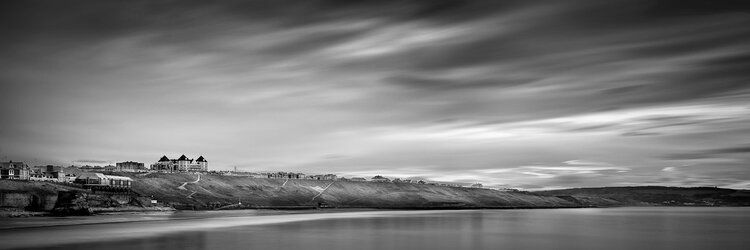
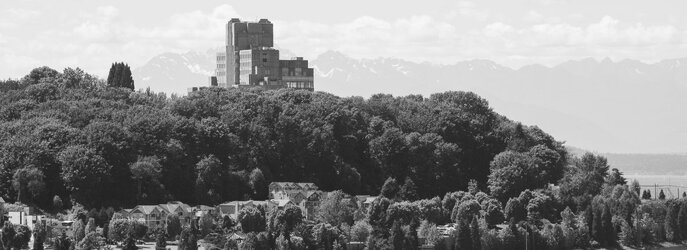
I recently came to digital after using a Hasselblad XPan, a wonderful rangefinder camera that allows you to take moderate panoramas in a single shot, with accurate framing and good resolution. I bought a Nikon D7500 after convincing myself that I could get similar results with it. I put a homemade mask over the viewing screen so I can see the framing for panoramic when I shoot. I then do a custom 1 x 2.74 crop in Lightroom. I maintain that the resolution I get is just fine for prints up to 20+ inches. Most importantly, you can previsualize the shot, which I have long believed is key for "art" photography (see Edward Weston, Minor White, Paul Strand, Ansel Adams, etc.). Accurate framing is admittedly not that important for sweeping vistas of sunsets and mountain ranges, or city skylines, but I think panoramic format is good for many other things.

I look forward to your comments.
example1.jpg

Example2.jpg
 
can you tell me what 'sweeping' is? And how that is different from any other method?
Ie often thought about panos but had little success so Im interested in the best method
 
By "sweeping" I mean turning the camera horizontally to take multiple photos that are then "stitched" together. I'm not sure I'm using the right terminology.
 
Having recently learned to do it, 'sweeping and stitching' seems to be a very quick and straightforward technique in photoshop. I can't see any particular difficulty in getting a good composition with a properly levelled tripod.

I do like 2 or more shot/frame panoramas for landscapes, and must do more.

Your two photos seem fine, though lack ambiance or subjective focus - they seem slighty 'snapshotish', if you'll forgive me, and the light or processing seems flat.
 
?I'm not clear what your alternative approach is - could you clarify please?

Presumably it's not (just) cropping to an extreme letterbox shape?
 
The only thing that i can add to the comments is that these days i tend to do my panoramas in landscape mode rather than the portrait mode that the text books tell us is the way to do these things, with so many pixels these days i wonder if extremely large files are truly necessary
 
Thanks for the explanaton

When I tried panos the main prob I encountered was the big difference in exposure between the area that has sun and that which doesn't- Im not sure how to make this balance out when processing the separate exposures.
i.e. how to do an HDR comp as well as pano comp (at the same time)
 
?I'm not clear what your alternative approach is - could you clarify please?

Presumably it's not (just) cropping to an extreme letterbox shape?

Actually, it is exactly that. Cropping that much may be anathema to some (All that data lost!), but I'm finding that quality is just fine for the print sizes I'm doing (around 20").
 
Having recently learned to do it, 'sweeping and stitching' seems to be a very quick and straightforward technique in photoshop. I can't see any particular difficulty in getting a good composition with a properly levelled tripod.

I do like 2 or more shot/frame panoramas for landscapes, and must do more.

Your two photos seem fine, though lack ambiance or subjective focus - they seem slighty 'snapshotish', if you'll forgive me, and the light or processing seems flat.

Thanks for the feedback. I had not done much postprocessing (especially on the second one) and will look at the "flatness" issue.

Regarding the lack of subjective focus and 'snapshotishness': I think that brings up one of the things the pano format offers. I think pano makes it difficult to do a photo about a particular thing and encourages you to think about the relationships between things. I'm talking about using it for more than sweeping sunsets and city skylines.
 
That seems to be the main reason for stitching, and also wanting to maximize resolution for large prints, with shots from a relatively long les stitched together, rather than one wide-angle shot of the same scene. I may be revealing my ignorance of distortion effects and other things, but I think you can get the same image from a letterboxed wide-angle shot as from stitching images taken with a longer lens, as long as resolution doesn't become an issue. So I think of panoramic as all about the letterbox aspect ratio, rather than whether or not the image was made by stitching--but you and others I've encountered in these forums seem to disagree.
 
I don't think that it is disagreement John but, as in all languages, words alter their meaning. Panoramic, at one time really meant any wide angle view of a scene - and of course, still does. However, in the common currency of "modern" photographic terms, it is generally interpreted as a series of photographs "stitched" together either horizontally or, even, vertically.
Anyway, enjoy your panoramic shooting, by whichever means you choose!
 
Thanks for the explanaton

When I tried panos the main prob I encountered was the big difference in exposure between the area that has sun and that which doesn't- Im not sure how to make this balance out when processing the separate exposures.
i.e. how to do an HDR comp as well as pano comp (at the same time)

The key is to use manual exposure, not automatic. If there is a big difference in exposure between shadows and highlights, you need to expose for the highlights, import the RAW files, stitch them into a 16 bit TIFF or PS file and then play with contrast masking to retrieve the shadows.

Here's an image I made from 22 portrait photos taken with a 10 megapixel D200. Obviously the need to reduce the image size to 1024 pixels loses a bit of detail but, since the original stitched file is 1.3 gigabytes and would print to a length of 2.26 metres, I thought the forum software might well explode if I tried to upload that :rolleyes:

Panorama 300mm copy2_DxO.jpg
 
Last edited:
Actually, it is exactly that. ........

Just to be clear ......

.... I am perfectly fine with that:)

In raising my query I wanted to check if there was a way to produce a panorama that I wasn't aware of.

To me if the end result works then that is the key thing. It doesn't matter (to me) whether it is achieved by (simple) cropping or by a more complicated 'sweep and stitch'.
 
The key is to use manual exposure, not automatic. If there is a big difference in exposure between shadows and highlights, you need to expose for the highlights, import the RAW files, stitch them into a 16 bit TIFF or PS file and then play with contrast masking to retrieve the shadows.

Here's an image I made from 22 portrait photos taken with a 10 megapixel D200. Obviously the need to reduce the image size to 1024 pixels loses a bit of detail but, since the original stitched file is 1.3 gigabytes and would print to a length of 2.26 metres, I thought the forum software might well explode if I tried to upload that :rolleyes:


Thanks Joanna, yes I have used Manual exposure but of the scenes I was trying to capture the DR was too great-that was the problem I couldn't overcome
 
Back
Top